Prop Traders: Multi Account Trade Alerts with JSON & Risk Controls

For identical trades across accounts on different brokers, webhook fan-out beats manual copying every time. Use copier groups only when you need one leader’s live fills mirrored proportionally to followers. Either way, Tradingfloor is built for this exact job. Before scaling anything, test a single TradingView webhook against a paper account first.
TL;DR:
- Webhook fan-out provides faster and more reliable execution across multiple accounts, especially when accounts trade the same instrument in sync.
- Proper payload configuration, including account IDs and tokens, is crucial for accurate multi-account order placement and must be tested thoroughly beforehand.
- Risk-percentage sizing ensures proportional trade sizes based on each account’s equity, with rounding and minimums important for smaller accounts under $25,000.
- Broker-specific rules and account policies must be verified to avoid violations, particularly concerning copying limits and disclosure requirements.
- Expect order fill times to vary between brokers, with a typical delay of one to two seconds, potentially impacting scalping or tight stop strategies.
Table of Contents
- What Are Multi Account Trade Alerts, and Which Approach Fits Your Setup?
- How Do You Set Up TradingView Alerts to Fire Across Multiple Accounts?
- How Do You Size Positions Correctly Across Different Account Balances?
- What Prop-Firm and Broker Rules Should You Check First?
- How Fast Should Multi Account Trade Alerts Actually Execute?
- What Logs and Controls Do You Need to Run This Safely?
- What Usually Goes Wrong, and How Do You Fix It Fast?
- How Tradingfloor Handles Multi Account Trade Alerts in Practice
- When Does It Make Sense to Scale by Copying Instead of Running Separate Strategies?
- Get Real-Time Position Mirroring Without Managing Every Account by Hand
- Where to Go Next for Implementation Details
- Sources
What Are Multi Account Trade Alerts, and Which Approach Fits Your Setup?
Multi account trade alerts are automated messages that trigger the same trade, or a proportionally sized version of it, across several trading accounts at once. Prop traders running two, five, or fifteen funded accounts use them to avoid manually clicking buy on every platform every time a setup fires. There are two distinct ways to build this, and picking the wrong one costs you either flexibility or reliability.
Webhook fan-out sends one alert (usually from TradingView) to a distribution service, which then pushes identical or scaled orders to every connected account simultaneously, regardless of broker. This is the simplest model when your accounts all trade the same instrument the same way.
Copier groups work differently: one designated leader account trades, and follower accounts mirror that leader’s net position in real time. This model tracks partial fills, scale-ins, and exits automatically, which webhook fan-out does not do on its own.
Decide based on:
- Do your accounts span multiple brokers (Tradovate, TopstepX, Rithmic)? Webhook fan-out handles this natively.
- Do you need per-account position sizing that differs from a flat multiplier? Both models support it, but copier groups handle partial fills more gracefully.
- Can you tolerate a few hundred milliseconds of staggered fills between accounts? If not, minimize the account count per alert.
- How much setup complexity can you manage? Webhook fan-out is easier to audit; copier groups require leader account monitoring.
Most prop operators running evaluation accounts start with webhook fan-out, then layer in copier logic once they’re running a leader strategy that needs live position tracking.
How Do You Set Up TradingView Alerts to Fire Across Multiple Accounts?
The architecture is straightforward: TradingView generates an alert, sends it as a webhook to your copier service, and the copier service translates that single payload into individual orders sent to each broker’s API. You need a TradingView plan that supports webhook alerts (the free tier does not), plus API tokens for each connected broker account.
The payload itself is where most setup mistakes happen. A working multi-account JSON structure needs a base order (symbol, side, price) and a nested array listing every account that should receive it.
| Field | Purpose |
|---|---|
symbol |
The instrument being traded (e.g. ES, NQ) |
action |
Buy, sell, or close |
token |
Authentication credential, unique per account |
account_id |
Identifies which broker account receives the order |
risk_percentage |
Sizes the order as a percentage of account equity |
quantity_multiplier |
Sizes the order as a multiple of the base quantity |
A generalized version looks like this:
{
  "symbol": "ES",
  "action": "buy",
  "multiple_accounts": [
    { "account_id": "ACC001", "token": "xxx", "quantity_multiplier": 1 },
    { "account_id": "ACC002", "token": "yyy", "risk_percentage": 0.5 }
  ]
}
A few things matter here beyond syntax:
- Never hardcode tokens in a public script or shared spreadsheet.
- Rotate tokens periodically and immediately if a device is lost.
- Test the payload against one account before adding the array.
Pro Tip: Keep a version-controlled copy of your JSON template outside the alert itself. When TradingView’s alert editor truncates a long payload, you want a backup you can paste back in fast.
How Do You Size Positions Correctly Across Different Account Balances?
Two methods dominate here, and picking the right one per account matters more than most traders assume. Risk-percentage sizing calculates position size from account equity and stop-loss distance, so a $50,000 account and a $150,000 account each risk the same percentage rather than the same dollar amount.
Here’s the math on risk-percentage sizing: if an account has $50,000 equity, you’re risking 1% per trade, and your stop-loss is 10 points away on a contract worth $50 per point, your dollar risk per contract is $500. Divide your risk budget ($500) by that per-contract risk ($500), and you get 1 contract. Scale that same 1% risk rule to a $150,000 account with the identical stop distance, and you get 3 contracts.
Statistic to watch: according to PickMyTrade’s setup documentation, risk-percentage and quantity-multiplier sizing are both standard features across multi-account copier tools, meaning the choice usually comes down to account uniformity, not tool availability.
Rounding matters at small account sizes. If the math produces 1.6 contracts, round down, never up. A few practical rules:
- Set a minimum contract floor per account so the system never sends a zero-size order silently.
- For accounts under $25,000, quantity multipliers are often more predictable than risk-percentage math.
- You can combine both: use risk-percentage as the primary calculation, then cap it with a hard multiplier ceiling.
What Prop-Firm and Broker Rules Should You Check First?
Copying rules are not uniform across firms, and assuming they are is the most expensive mistake you can make before going live. Some prop firms distinguish between copying your own trades across your own funded accounts (usually allowed) and distributing signals to third parties (frequently restricted or banned outright). Vendor documentation on prop-firm copying is explicit that these policies vary firm by firm and should be confirmed before scaling.
Run through this before connecting a second account:
- Read the firm’s current policy page on copy trading or account duplication, not a cached version from months ago.
- Confirm the maximum number of accounts you’re allowed to run simultaneously under one identity.
- Ask whether duplicate trades across your accounts need to be disclosed or logged with the firm.
- Request written confirmation by email or support ticket, not just a verbal answer in chat.
- Stage your rollout on one evaluation account before connecting funded accounts.
Pro Tip: Save the firm’s written confirmation somewhere outside their support portal. Policies get updated, and a screenshot with a date on it is worth more than a memory of what someone told you in March.
Tradingfloor’s guide to prop firms that allow copy trading breaks down policy differences by firm if you want a starting reference before you call support.
How Fast Should Multi Account Trade Alerts Actually Execute?
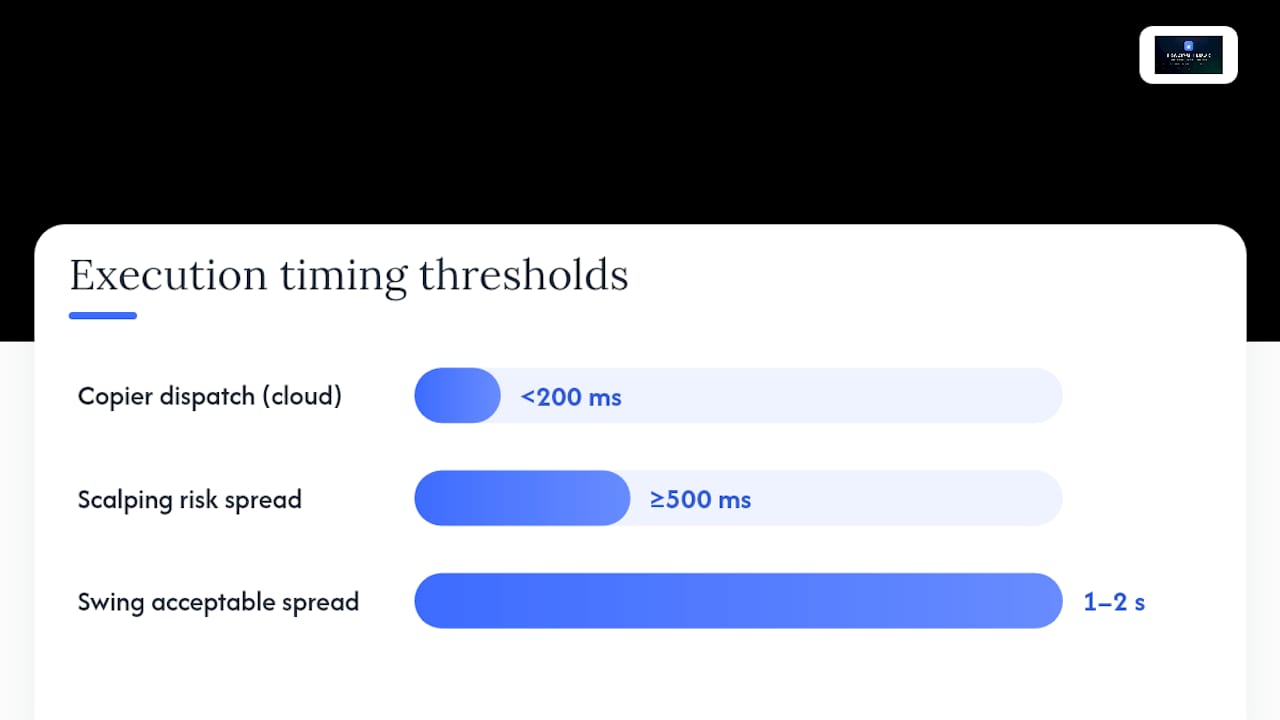
Server-side processing on a well-built copier is fast. A cloud-based system typically dispatches orders to brokers in under 200 milliseconds after receiving the webhook. That number describes only the copier’s internal handoff, not what happens after the order leaves the building.
Total fill time depends on three separate legs: TradingView’s own dispatch speed, the network path to your copier, and each broker’s own order processing. Vendor documentation on trade copiers is direct about this: the copier’s speed is one input among several, not the whole equation.
That means fills across ten connected accounts on three different brokers will not land in the same millisecond. Expect staggering, especially past ten accounts, where independent broker API queues process orders on their own timelines rather than in lockstep.
To measure your actual system, log three timestamps for every trade: webhook receipt, dispatch to each broker, and confirmed fill. Compare the spread across accounts weekly.
- For scalping strategies with tight stops, a spread over 500 milliseconds across accounts may already distort your edge.
- For swing trades held for hours or days, a one or two second spread is usually irrelevant.
- Track the worst-case account, not the average, since one slow broker connection can wreck an otherwise fast setup.
What Logs and Controls Do You Need to Run This Safely?
Every serious multi-account setup needs an audit trail you can check without guessing. Capture the raw webhook payload, the order ID returned by each broker, and the fill timestamp per account. Without those three, you cannot reconcile a mismatch after the fact.
Layer in automated safety controls on top of logging:
- A global stop that halts all copying instantly, not just on the next signal.
- Per-account daily loss limits that disable that account without touching the others.
- Slippage caps that reject a fill if the price moved too far from the alert price.
- A daily reconciliation job comparing intended trades against actual fills.
Cboe’s real-time alerting infrastructure is a useful reference point for what enterprise-grade logging and notification pipelines look like at scale.
Pro Tip: Route your emergency stop to a channel you actually check, like a push notification, not just an email you scan once an hour.
What Usually Goes Wrong, and How Do You Fix It Fast?
Most failures trace back to five causes: expired auth tokens, hitting a broker’s API rate limit, a malformed JSON field, sizing math that rounds to zero, or a broker rejecting an order outside trading hours. Check these in that order before assuming something bigger is broken.
A staged rollout catches almost all of this before it costs money:
- Smoke-test on a single account with tiny size to confirm the payload structure works end to end.
- Fan out to two or three paper accounts to confirm sizing math and timestamps behave as expected.
- Roll out to one small live account before connecting the rest.
- Reconcile every fill against intent for at least a week before trusting the system unsupervised.
After launch, keep validating: check fills against orders daily, watch for latency drift, reconcile P&L weekly, and retune your alert thresholds as account count grows. Tradingfloor’s guide to mirroring trades precisely covers reconciliation workflows in more depth if you’re troubleshooting a persistent mismatch.
How Tradingfloor Handles Multi Account Trade Alerts in Practice
Tradingfloor was built around the exact problem this article covers: mirroring real positions, not just signals, across every funded and evaluation account a trader runs. The platform copies net positions rather than isolated orders, which means partial fills and scale-outs on a leader account get reflected accurately on followers, not approximated.
On its TradingView to Tradovate integration, Tradingfloor reports firing an alert from TradingView and copying it across every connected account very quickly, reflecting publisher testing under specific network and account conditions without a guaranteed timing for every broker pairing or account count. That figure reflects publisher testing under specific network and account conditions, not a guaranteed result for every broker pairing or account count.
Per-account risk controls, including quantity multipliers and risk-percentage sizing, run natively, and the platform works across brokers including Tradovate and TopstepX without requiring a local install. It runs entirely in the cloud, accessible from any device.
Real-world performance will vary with your own broker mix, account count, and network path, which is exactly why the testing checklist earlier in this piece matters regardless of which platform you choose.
When Does It Make Sense to Scale by Copying Instead of Running Separate Strategies?
Copying earns its place when you’ve already proven a strategy on one account and the bottleneck is execution across accounts, not the strategy itself. If you’re still testing an edge, run it on one account before you multiply the risk of a flawed setup by ten.
Start small, trust your logs over your memory of what happened, and automate the stop before you automate the scale. Rotate your tokens, back up your configuration, and write down what you’ll do the moment something breaks, before it does.
— KennyTrades
Get Real-Time Position Mirroring Without Managing Every Account by Hand
Manual copying across accounts means logging into three or four broker platforms every time a signal fires, and hoping you clicked the right size on each one. Tradingfloor removes that step entirely: connect your accounts once, set per-account multipliers or risk percentages, and every trade mirrors automatically with individual loss limits protecting each account independently.

If you’re running Take Profit Trader accounts, Tradingfloor’s dedicated integration mirrors one trade across every connected account without manual re-entry. Start by testing a TradingView webhook against a single account, confirm the fill and timestamp match expectations, then enable your per-account risk multipliers and set daily loss limits before adding the rest of your accounts. A 30-day trial gets you through that entire rollout before you commit to a subscription.
Where to Go Next for Implementation Details
Start with the multi-account JSON documentation if you’re building or debugging a payload structure. For broker-specific behavior, Tradovate’s copy trading overview covers platform-specific quirks worth knowing before you connect an account. Before scaling past one or two accounts, confirm your firm’s actual policy on Tradingfloor’s prop firms that allow copy trading page rather than relying on forum posts. If you’re building your own alert infrastructure from scratch, Assymetrix’s guide to order flow and alert payloads is a useful technical reference for structuring identifiers and parameters cleanly.
Sources
- Place Trades in Multiple Accounts Using PickMyTrade
- Futures trade copier for prop firms & TradingView | PickMyTrade
- Cboe real-time market alerts
Recommended
- Multi-Account Trade Execution Explained for Prop Traders
- Per-Account Risk Controls: The Role They Play for Multi-Broker Traders
- How to Set Risk Controls Across Multiple Accounts
- Cross-Account Trade Management: A 2026 Trader’s Guide
Trading Floor mirrors every trade across your Tradovate, TopstepX & Rithmic accounts in real time, from $25/mo.
Start copying →