How to Set Risk Controls Across Multiple Accounts

The fastest path to consistent risk management across multiple trading accounts is this: build a centralized control profile, enforce it at the platform or broker level, and layer a trade copier on top for cross-account consistency. Before you touch a single setting, audit every account you manage, then pick the three controls that matter most — daily loss limit, max order size, and instrument whitelist. Those three alone will prevent the majority of catastrophic breaches.
Key Takeaways
Setting risk controls across multiple accounts requires centralized profiles, server-side enforcement, and a copier layer that applies per-account limits before any follower order reaches the exchange.
| Point | Details |
|---|---|
| Audit before you configure | List every account ID, broker, and permission level before touching any settings. |
| Server-side enforcement is most reliable | Broker-level RMS controls fire even when the trader’s platform disconnects. |
| Profile + assign + override pattern | Build one canonical profile, assign broadly, and document every override with a reason. |
| Layer enforcement for reliability | Run critical controls at the broker RMS level and repeat them in your trade copier. |
| Tradingfloor automates per-account enforcement | Per-account limits, slippage caps, and real-time notifications across Tradovate, TopstepX, and Rithmic. |
Table of Contents
- Before you apply controls, run this pre-implementation checklist
- Account-level vs admin/global controls: what applies where
- Which risk parameters you actually need to set
- How to apply the same controls to many accounts at once
- Where controls live and when they fire
- How to monitor controls and catch breaches before they escalate
- How to test controls before they go live
- Common problems and how to fix them fast
- Governance, naming conventions, and cost considerations
- When a trade-copier platform makes sense for automated enforcement
- What most traders get wrong about multi-account risk controls
- Tradingfloor gives you per-account controls without the manual overhead
- Sources
Before you apply controls, run this pre-implementation checklist
Getting the setup right before you push any rules live saves you from chasing down half-applied profiles and unexplained rejections at 9:31 AM.
- Inventory every account. List each account ID, the broker or platform it lives on (Tradovate, Rithmic, TopstepX, etc.), and your current permission level. You cannot enforce what you cannot see.
- Decide enforcement scope upfront. Determine which rules are firm-wide (admin/global) and which are account-specific. Mixing these up later creates override conflicts that are painful to untangle.
- Prepare your templates or CSVs. Build your control profiles before rollout day. If you plan to use an API, confirm your API keys, test authentication, and note any rate limits so a bulk operation does not throttle mid-run.
- Set your monitoring channels. Decide who gets notified and through what channel — push notification, email, or a Slack ops channel — before the first rule goes live. An alert that fires with no one watching it is useless.
- Assign a rollout owner and a rollback contact. Per risk ownership best practices, one person should hold final decision authority for the rollout while others share detection and remediation responsibilities. Name both roles before you start.
Pro Tip: Save a snapshot of every account’s current settings before you change anything. If a profile assignment goes wrong, you need a clean restore point, not a memory of what the settings used to be.
Account-level vs admin/global controls: what applies where
Not all risk controls live in the same place, and confusing the two is one of the most common reasons a rule that “should have fired” did not.
Admin/global controls are platform-enforced rules that apply across all accounts under a firm or admin umbrella. Trading Technologies’ Setup application lets admins configure risk limits for accounts and users across the entire company from a single interface. These are the right home for firm-wide drawdown caps, blocked instrument classes, and maximum notional exposure rules. No individual account should be able to override them.
Account-level controls are per-account parameters that handle exceptions: a funded account with a tighter trailing drawdown than the firm default, a demo account with relaxed limits for strategy testing, or a cross-broker account that needs a different notional cap because of contract size differences.
The practical pattern across most platforms — including NT Risk Manager’s profile-based workflow — is: build a canonical profile, assign it broadly, and keep overrides minimal and documented. When an override is applied, log who made it and why.
| Scope | Enforcement point | Who can change it | Rollback |
|---|---|---|---|
| Admin/global | Platform risk engine or broker RMS | Admin or risk officer only | Revert profile at admin level; affects all assigned accounts immediately |
| Account-level | Per-account settings or override layer | Account owner or delegated ops | Clear override and re-inherit from parent profile |
| Trade-copier layer | Copier software (pre-trade gating) | Copier admin | Pause copier, correct settings, resume |
Practical scenarios:
- A funded evaluation account typically carries a stricter trailing drawdown than a personal account. Set the evaluation-specific limit as an account-level override on top of the global profile.
- A demo account used for strategy testing can inherit the global profile but have the daily loss limit relaxed so it does not interrupt testing workflows.
- Cross-broker accounts running the same strategy need aligned notional caps even when contract multipliers differ. That alignment lives at the account level, not the global profile.
For a deeper look at per-account governance, the account-level risk management guide covers the full scope of per-account settings and when to use them.
Which risk parameters you actually need to set
Here is the canonical list. Not every parameter applies to every account type, but you should have a deliberate reason for skipping any of them.
- Max order size. Cap the number of contracts per single order. For evaluation accounts, this is often set at a small number of contracts depending on account size and prop firm rules.
- Position limits. Maximum open contracts at any one time. Set this at the account level for funded accounts; it prevents a single runaway position from breaching drawdown before you can react.
- Max open entries. Limits the number of simultaneous open trades. Useful for strategies that pyramid — keeps the account from stacking exposure beyond what the drawdown math supports.
- Daily loss limit. The single most important parameter for funded and evaluation accounts. Set it at or below the prop firm’s daily loss rule, with a small protective buffer so your system fires before the firm’s system fires.
- Trailing drawdown. A moving floor that rises with your account’s peak equity. NT Risk Manager supports trailing drawdown natively, and most serious prop platforms enforce it server-side.
- Notional limits. Total dollar exposure across open positions. Critical for cross-broker accounts where contract multipliers differ — a ES contract and a MES contract have a 10x notional difference.
- Margin and leverage caps. Set a maximum margin utilization percentage. For evaluation accounts, keeping margin utilization under a moderate threshold is a reasonable conservative default.
- Instrument whitelist/blacklist. Explicitly list which instruments are tradeable. Anything not on the whitelist is blocked. This prevents accidental trades in instruments the prop firm does not allow.
- Order type restrictions. Some prop firms prohibit market orders during news events, or restrict IOC and FOK orders. Enforce this at the copier or platform level, not just as a reminder.
- Slippage caps. Maximum acceptable slippage per fill. Particularly relevant for trade-copier accounts where the follower fills after the leader and market conditions may have moved.
- Consecutive loss cap. After N consecutive losing trades, pause the account or require manual review. This is a behavioral guardrail, not just a financial one.
Pro Tip: Start every new account with the most conservative defaults you can tolerate. It is far easier to relax a limit that is too tight than to recover from a breach caused by a limit that was too loose. For evaluation account management, conservative defaults are especially critical in the first two weeks.
How to apply the same controls to many accounts at once
Scaling controls from one account to fifty is where most ops teams introduce errors. The methods below reduce that risk.
- Build a named, versioned profile. Create one canonical profile with all your standard parameters. Name it with a timestamp and brief description (e.g.,
EVAL_CONSERVATIVE_2026-06so you know exactly what it is and when it was created). Never edit a live profile in place — clone it, edit the clone, test it, then swap. - Assign the profile to an account group. Most platforms support account groups or leader/follower patterns. Tradovate’s Group Trade lets you define groups and assign per-account quantities, so one trade distributes to multiple accounts at the same broker platform. Use the same grouping logic for risk profiles.
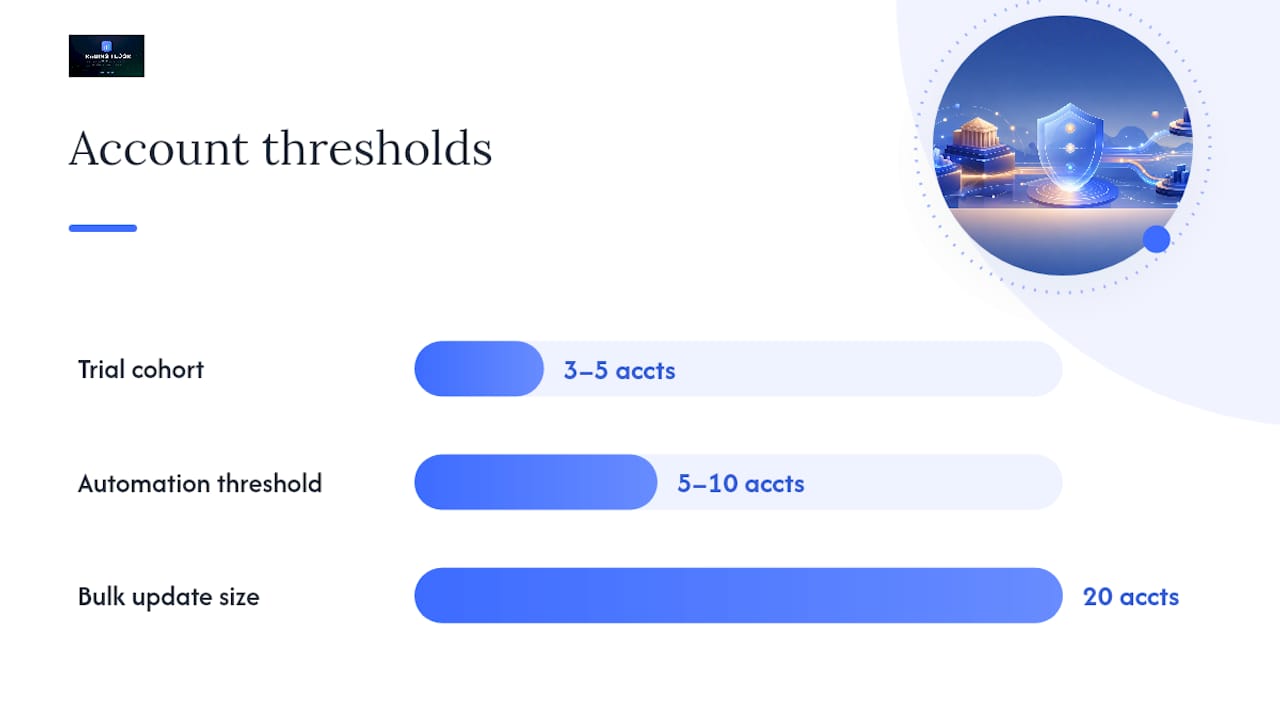
- Bulk apply via dashboard or CSV. For platforms that support CSV import, export your current account list, add the profile assignment column, and re-import. Always run this on a test cohort of 3–5 accounts first. Check the “mode” or “inheritance” column after import to confirm accounts are pulling from the profile and not sitting on stale overrides.
- Use the API for scale. If you manage dozens of accounts, automate profile creation, assignment, and audit log extraction via API. Key operations to automate: create/update profiles, assign accounts to profiles, pull rule-evaluation logs. Watch rate limits — a bulk assignment that hits 200 accounts simultaneously may throttle or partially fail, leaving some accounts unassigned.
- Clear overrides before re-applying. NT Risk Manager’s documentation specifically calls out using “Clear Overrides” before re-assigning a profile, so accounts inherit the fresh profile values rather than keeping stale per-account exceptions.
Safe bulk-change checklist:
- Test on 3–5 accounts before full rollout
- Schedule changes outside peak trading hours
- Notify all stakeholders before the maintenance window
- Confirm inheritance is active on every account after the change
- Keep the previous profile version available for immediate rollback
For cross-broker execution patterns, the cross-account trade management guide covers synchronization techniques in more detail.
Where controls live and when they fire
Understanding the enforcement chain tells you which control will catch a breach and which one will miss it.
- Platform admin UI. The configuration layer. This is where you set parameters, but it is not where enforcement happens. Changes here propagate to the enforcement engine, which may have a sync delay.
- Broker-side risk engine / RMS. The most reliable enforcement point. Rithmic’s Risk Management Hub evaluates orders at the infrastructure level before anything reaches the exchange, and fires server-side auto-liquidation even when the trader’s platform has disconnected. If a control matters, it should live here.
- Server-side pre-trade checks. Run before order submission. A rejected order never reaches the exchange. This is the correct place for max order size, instrument blocks, and daily loss limits.
- Trade-copier gating. The copier checks parameters before replicating a leader’s position to follower accounts. This catches mismatches in contract size, slippage, and per-account limits before the follower order is placed.
- Post-trade reconciliation and auto-liquidation. The last line of defense. Stripe’s Managed Risk model illustrates this pattern well: automated monitoring triggers targeted interventions — pausing payouts, holding reserves, or deactivating accounts — with notifications sent through the dashboard and email. The same logic applies to trading: post-trade reconciliation catches what pre-trade checks missed and triggers liquidation or capability changes.
The order of reliability: broker/server-side > pre-trade check > copier gating > post-trade reconciliation. Client-side checks are the least reliable because they depend on the client being connected and functioning.
Pro Tip: Layer enforcement. Run the critical controls at the broker/RMS level and repeat the same limits in your trade copier. If the broker-side check fails due to a connectivity issue, the copier catches it. Single-point enforcement is a single point of failure.
How to monitor controls and catch breaches before they escalate
Monitoring is not a passive activity. You need specific metrics, specific thresholds, and a clear escalation path.
Metrics to track in real time:
- Intraday P&L vs daily loss limit (alert at 70%, hard stop at 100%)
- Open position count vs position limit
- Order rejection rate (a spike signals a misconfigured limit or a strategy running into a wall)
- Reconciliation mismatches between leader and follower accounts
- Exception counts per account per session
Alert design:
- Primary alerts fire when a threshold is crossed and require immediate action (daily loss at 90%, auto-liquidation triggered, profile assignment failure).
- Secondary alerts are informational (daily loss at 70%, order rejection rate above baseline). These go to a Slack ops channel or email summary, not a pager.
- Suppress repeat alerts for the same condition within a 15-minute window. An alert that fires every 30 seconds for the same breach creates noise that ops teams start ignoring.
Audit and logging:
- Log every rule evaluation, every profile change, and every API call that modifies a risk parameter. Include the timestamp, the actor (user or system), and the before/after values.
- Retain logs for at least 90 days. Compliance reviews and post-incident analysis both require this.
- Run a reconciliation check at end-of-session: confirm every follower account’s position matches the expected state given the leader’s trades and the copier’s execution log.
For multi-platform monitoring practices, the multi-platform trading best practices guide covers continuity and monitoring across different trading environments.
How to test controls before they go live
A control that fires incorrectly during live trading is worse than no control at all. Test before you deploy.
- Sandbox or paper trading first. Run every profile in a simulated environment. Trigger each limit deliberately — place an order above max size, exceed the daily loss threshold, attempt a blocked instrument. Confirm the rejection fires correctly.
- Small cohort rollout. Move to 3–5 live accounts. Run a full session and monitor every rejection, every alert, and every reconciliation result. Do not scale until this cohort shows clean behavior for at least two sessions.
- Test profile inheritance and overrides. Assign a profile, then apply an override on one account, then clear the override. Confirm the account reverts to the profile values and does not retain stale settings.
- API idempotency tests. If you are automating profile assignment via API, send the same assignment request twice and confirm the second call does not create a duplicate or corrupt the existing assignment.
- Cross-broker behavior. For trade-copier accounts spanning multiple brokers, test that contract multiplier differences are handled correctly. A 1-contract ES trade on Rithmic should not copy as a 1-contract MES trade on Tradovate unless that is your explicit intent.
- Rollback drill. Practice the rollback procedure before you need it. Revert a profile assignment, confirm accounts return to the previous state, and time how long it takes. If it takes more than five minutes, your rollback process needs work.
Pro Tip: After any bulk change, run an automated smoke test that queries each account’s active parameters and compares them against the expected profile. A simple script that flags mismatches catches partial failures before the trading session starts.
Common problems and how to fix them fast
Permissions and broker approvals:
- Symptom: Controls are configured in the admin UI but not enforcing. Fix: Confirm the broker has activated the risk module for your account tier. Some broker-side controls require a separate approval or feature flag. Contact broker support with your account ID and the specific control you are trying to enforce.
Away trades and linked accounts:
- Symptom: Reconciliation shows fills that did not come through your copier. Fix: Check for linked accounts or manual trades placed directly at the broker. Away trades are legitimate fills that bypass your copier. Identify them by comparing the copier’s execution log against the broker’s fill report. Exclude confirmed away trades from reconciliation mismatch counts.
Latency and enforcement timing:
- Symptom: Orders are filling before the risk check fires. Fix: Determine whether your controls are client-side or server-side. Client-side checks run after the order is submitted and can miss fast fills. Move critical controls to the broker RMS or a server-side pre-trade check. Rithmic’s infrastructure-level enforcement is specifically designed to solve this problem.
Contract multiplier mismatches:
- Symptom: Notional exposure on follower accounts does not match the leader. Fix: Audit the contract multiplier setting in your copier for each instrument and broker pair. A ES/MES mismatch is a 10x notional difference. Set explicit multipliers per instrument per account rather than relying on a global default.
Quick resolution checklist:
- Pull the rule evaluation log for the affected account and timestamp
- Confirm the profile assignment is active (not overridden or stale)
- Check broker-side logs for the same order — does the rejection appear there?
- Verify API call logs if the profile was set programmatically
- If the issue is unresolved in 10 minutes, pause the affected account and escalate
For recovery steps after a drawdown breach, the drawdown recovery guide covers resync procedures in detail.
Governance, naming conventions, and cost considerations
Good governance is what separates a risk system that holds up under pressure from one that quietly drifts out of alignment.
Naming and versioning:
- Use the format
[SCOPE]_[TYPE]_[YYYY-MM]for profiles. Example:EVAL_CONSERVATIVE_2026-06. Add the owner’s initials if multiple people manage profiles. - Never edit a live profile. Clone it, version the clone, test, then promote.
Change control workflow:
- Propose change → test in sandbox → deploy to small cohort → full rollout. Each stage needs a sign-off from the rollout owner before proceeding.
- Keep a rollback owner named for every change. That person has authority to revert without waiting for approval if something goes wrong.
Audit log practices:
- Export rule-change logs weekly and store them outside the trading platform. If the platform has an outage, you still need the audit trail.
- Log the approver, not just the actor. “Who changed it” and “who approved it” are two different questions.
Cost considerations:
- Direct costs: Subscription fees for risk management software or trade-copier platforms. Engineering time to build and maintain API automation. Broker approval costs for advanced risk modules (some brokers charge for RMS access).
- Indirect costs: Downtime during rollout windows (trading paused = missed opportunities). False positives that block legitimate trades. Ops time spent resolving mismatches and permission issues.
Evaluation criteria for third-party automation:
- Latency of enforcement (sub-second pre-trade checks vs post-trade reconciliation)
- Broker coverage (does it support your specific brokers?)
- Per-account control granularity (can you set different limits per account, not just globally?)
- Audit trail quality (are rule evaluations logged with timestamps and actors?)
- Pricing model (per-account, flat subscription, or usage-based?)
When a trade-copier platform makes sense for automated enforcement
At some point, managing risk controls manually across multiple accounts stops being an ops challenge and becomes a reliability problem. The threshold is roughly 5–10 accounts: below that, manual profile management is workable; above it, the error rate from manual changes starts to cost real money.
A trade-copier or multi-account automation platform should provide:
- Per-account position limits and daily loss limits, not just global settings
- Per-account slippage caps so follower fills do not exceed acceptable deviation from the leader
- Contract multipliers per instrument per account to handle cross-broker notional alignment
- Real-time push notifications when a limit is breached or a trade is blocked
- Auto-reconciliation to catch and flag position mismatches between leader and follower accounts
- Bulk profile assignment so you can update 20 accounts in one operation, not 20 separate ones
- An audit log that captures every rule evaluation and every profile change
When to choose automation:
- You manage multiple accounts across more than one broker
- You update risk profiles frequently
- You need cross-broker notional alignment (different contract multipliers)
- Manual reconciliation is taking more than 30 minutes per session
Capability checklist before buying:
- Does it integrate with your specific brokers (Tradovate, Rithmic, TopstepX)?
- Are controls enforced pre-trade or only post-trade?
- Does it support fail-closed behavior (block the trade if the check cannot complete) vs fail-open (allow the trade if the check times out)?
- What is the support SLA for enforcement failures?
- Can you test it on a sandbox or free trial before committing?
Start with a small batch of 3–5 accounts on a free trial. If the copier handles profile assignment, multiplier alignment, and reconciliation correctly on that cohort, scale up.
What most traders get wrong about multi-account risk controls
The conventional wisdom says “set it and forget it” — build your profiles, assign them, and trust the system. That works until it does not.

The real failure mode is not a missing control. It is a control that was set correctly, then silently drifted out of alignment because someone applied a one-time override that never got cleared. The override is invisible unless you specifically query for it.
The fix is not more controls. It is a weekly audit that queries every account’s active parameters — not the assigned profile, but the actual enforced values — and flags any account where the active value differs from the profile default. That one check catches override drift before it becomes a breach.
The second thing traders underestimate is the value of a mandatory cooldown after a forced liquidation. When an account hits its daily loss limit and gets liquidated, the instinct is to reset and re-enter immediately. That is exactly when judgment is worst. A 24-hour trading pause after any forced liquidation is not a punishment — it is a circuit breaker that prevents the second loss from compounding the first. Build it into your governance rules, not just your personal discipline.
Tradingfloor gives you per-account controls without the manual overhead
Managing risk across multiple funded and evaluation accounts means you need controls that travel with each account, not just a global setting that treats every account the same. Tradingfloor mirrors the leader’s net position in real time across Tradovate, TopstepX, Rithmic, and other supported platforms, with per-account limits, slippage caps, and contract multipliers enforced at the copier layer before any follower order is placed.

Every account gets its own daily loss limit, position cap, and notification threshold. When a limit is breached, you get a push notification immediately — not a reconciliation report the next morning. The platform runs in the cloud, so there is no installation, no local process to babysit, and no single machine whose connectivity determines whether your controls are active.
For traders managing 5 or more accounts across multiple prop firms, the free 30-day trial is the right place to start. Set up a small cohort, confirm the per-account controls behave as expected, then scale. If you run TopstepX accounts specifically, the TopstepX trade copier page covers the integration details.
Sources
- Risk management — Managed risk | Stripe
- NT Risk Manager Documentation | Setup, Drawdown, and Max Open Entries
- Can I trade once and have orders sent to multiple accounts? | Tradovate Support
- Risk Limits Overview
Recommended
- Account-Level Risk Management: A Trader’s Complete Guide — Trading Floor
- Recover From a Drawdown Hit Without Losing Funded Accounts — Trading Floor
- Prop Account Trade Limit Setup: Your 2026 Guide — Trading Floor
- Cross-Account Trade Management: A 2026 Trader’s Guide — Trading Floor
Trading Floor mirrors every trade across your Tradovate, TopstepX & Rithmic accounts in real time, from $25/mo.
Start copying →