Trading Error Logs for Prop Traders: A Complete Guide

A trading error log is a system-level, timestamped audit trail produced by a trade-copier platform. It records every copy failure, sync exception, slippage breach, order rejection, and reconciliation event that occurs when mirroring positions across funded and evaluation accounts. It is not a personal journal of trading mistakes. The four things it does operationally: troubleshoot copy failures in real time, reconcile your fills against broker and prop-firm server records, support compliance and audit requests, and surface performance anomalies across accounts. Platforms like Tradingfloor, integrated with TopstepX, Rithmic, and Tradovate, generate these logs automatically. Prop firms have tightened audit-trail expectations, and a clean timestamped log can determine payout vs. disqualification.
Table of Contents
- What does a trading error log actually record?
- Why these logs matter for prop traders and multi-account managers
- How to read and interpret a copier error-log entry
- Reconciliation workflow: matching copier logs to broker and prop-firm records
- Alerts, retention, security, and operational best practices
- Common error cases mapped to root causes and immediate fixes
- Sample log entries and a reusable post-mortem template
- How trade-copier features reduce errors and where to look in your system
- Key Takeaways
- The part most operators get wrong about log hygiene
- Tradingfloor gives you audit-ready logs from day one
- Useful sources and further reading
What does a trading error log actually record?
Two categories of data live in every copier log: event types and schema fields. Knowing both lets you locate the right entry fast.
Common event types:
- Copy/sync failures (leader order not mirrored to one or more followers)
- Order rejections (broker refused the order)
- Partial fills (executed qty less than intended qty)
- Slippage breaches (executed price outside the configured cap)
- Latency spikes (copy delay exceeds threshold)
- Connection drops (VPS or API disconnect)
- Reconciliation events (auto-match of copier record to broker fill)
- Auto-quarantine actions (follower account suspended by risk rule)
- Manual overrides (operator-initiated position adjustment)
- Notification events (push, email, or webhook alert dispatched)
Typical log schema:
| Field | Description | Data type |
|---|---|---|
| timestamp_utc | Event time in UTC, millisecond precision | timestamp string |
| account_id | Follower account identifier | String |
| leader_id | Leader account identifier | String |
| follower_id | Follower account identifier (copy of account_id for correlation) | String |
| order_id | Platform-assigned order identifier | String |
| correlation_id | Links leader and follower orders for the same signal | UUID |
| intended_qty | Lot/contract size the copier attempted | Decimal |
| executed_qty | Lot/contract size actually filled | Decimal |
| intended_price | Price at signal time | Decimal |
| executed_price | Broker-confirmed fill price | Decimal |
| slippage | Difference between intended and executed price | Decimal |
| broker_response | Broker error code or “FILLED” confirmation | String |
| latency_ms | Time from leader fill to follower order submission | Integer |
| event_type | Enumerated event category (see list above) | Enum |
Millisecond timestamps are non-negotiable. A one-second resolution makes it impossible to correlate copier events with broker execution records. All nodes should sync to a reliable NTP source. Export formats to request from your copier: CSV for spreadsheet reconciliation, JSON for scripted matching, and PDF for formal audit submissions.
Why these logs matter for prop traders and multi-account managers
Prop firms like TopstepX maintain their own server-side fill records. When your copier log and their records diverge, the burden of proof falls on you. A daily reconciliation check across your TopstepX accounts during evaluation phases catches mismatches before they become disqualification events. On the broker side, Rithmic provides execution timestamps and fill confirmations that your copier log should match to the millisecond.
Pedro Penin of JP Trading Capital has stated directly that unreconciled copier logs have led to account closures and withheld funds. The scenario is consistent: a copy fires on the leader, the follower order is rejected silently, the prop firm’s records show a position that does not match the trader’s account, and the evaluation fails. A log that captures the broker rejection code and the exact timestamp gives you the evidence to dispute that outcome.
Pro Tip: During the first two weeks after going live on a new evaluation account, review the copier log daily. Maintain a simple spreadsheet of PnL by account alongside the log so sizing errors and missed copies surface immediately rather than at month-end.
Rules-based automation and reliable logging together reduce both error frequency and time-to-detect, which is why human error in prop trading remains one of the leading causes of avoidable disqualifications.
How to read and interpret a copier error-log entry
Step 1: Filter by timestamp and account ID. Narrow the log to the time window around the suspected event and the specific follower account. A broad search across all accounts and all time produces noise.

Step 2: Correlate leader and follower orders using the correlation ID. Every copy event should carry a shared UUID linking the leader order to the follower order. If the follower entry is missing, that is a silent fail.
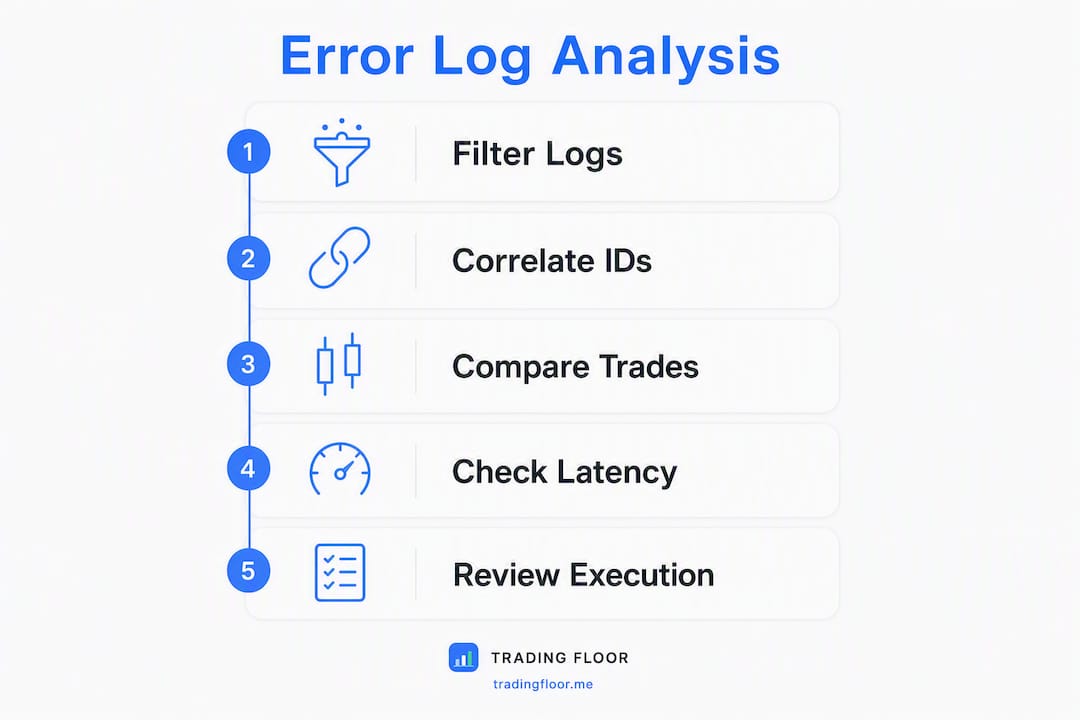
Step 3: Compare intended vs. executed qty/price and the broker response. A filled order with slippage above your cap is a different problem than an outright rejection. The broker_response field tells you which.
Step 4: Check latency and connection-status entries. A latency_ms value above your threshold, combined with a connection-drop event in the same window, points to a VPS or API issue rather than a broker rejection.
Step 5: Escalate or remediate. If the root cause is clear, apply the fix from the error→cause→fix table in Section 7. If broker execution IDs are missing or timestamps conflict, open a formal dispute with the evidence package described in Section 8.
Quick triage flags:
broker_response: REJECTED— check symbol mapping and account permissionsslippage > cap— verify slippage limit configuration on that followerexecuted_qty < intended_qty— partial fill; check available liquidity and position limitscorrelation_id: null— duplicate-order protection may have blocked the copy
Sample CSV row:
2026-03-14T14:32:01.847Z,ACC_042,LDR_001,ACC_042,ORD_8821,CORR_4491,2,0,4285.50,0.00,0.00,REJECTED,38,ORDER_REJECTED
Sample JSON object:
{
  "timestamp_utc": "2026-03-14T14:32:01.847Z",
  "account_id": "ACC_042",
  "leader_id": "LDR_001",
  "order_id": "ORD_8821",
  "correlation_id": "CORR_4491",
  "intended_qty": 2,
  "executed_qty": 0,
  "intended_price": 4285.50,
  "executed_price": null,
  "slippage": null,
  "broker_response": "REJECTED",
  "latency_ms": 38,
  "event_type": "ORDER_REJECTED"
}
Pro Tip: Always pull the broker-side execution log alongside the copier log. The copier records what it attempted; the broker records what it accepted. Gaps between the two are where disputes live.
Reconciliation workflow: matching copier logs to broker and prop-firm records
A structured sequence by timeframe keeps discrepancies from aging into disputes.
- Real-time (within minutes): Confirm push or webhook alerts fire on every rejection and slippage breach. Silent failures are the most dangerous outcome.
- End of day: Export the full session log in CSV or JSON. Match order_id, timestamp_utc, executed_price, executed_qty, and broker_execution_id against the broker’s fill report. Flag any row where the broker execution ID is absent from the copier record.
- Weekly spot check: Review latency trends and connection-drop frequency. A pattern of elevated latency_ms on a specific follower often precedes a missed copy.
- 30/90-day retention review: Before scaling accounts, pull a 90-day export and verify that all reconciliation events resolved cleanly. This is the package a prop firm will request if a payout is disputed.
Fields to match in every export: order_id, timestamp_utc, executed_price, executed_qty, broker_execution_id, fill_time, and slippage.
Acceptable tolerances depend on your prop firm’s rules, but a price tolerance of one tick and a latency window of 500ms are common starting points for futures accounts.
For automation, scheduled CSV/JSON exports with hash-signed receipts let scripts flag mismatches without manual review. A hash-signed export proves the file has not been altered since generation, which matters when submitting dispute evidence.
Escalation flow for discrepancies:
- Identify the mismatched row and note the correlation_id.
- Pull the broker-side fill report for the same timestamp window.
- Confirm whether the broker execution ID exists in either record.
- If the ID is missing from the broker record, open a broker dispute with the copier log and the hash-signed export as attachments.
- If the ID exists in the broker record but not the copier log, the copier missed the fill confirmation — escalate to your copier provider.
Alerts, retention, security, and operational best practices
Alert design:
- Separate reject alerts (hard failures requiring immediate action) from warning alerts (slippage approaching cap, latency trending up).
- Use at least two notification channels: push notifications for real-time response and email or webhook for ops-team escalation.
- Set alert thresholds before going live, not after the first incident.
Retention and access controls:
- Keep logs for a minimum of 90 days to cover the full evaluation cycle of most prop firms.
- Encrypt logs at rest and in transit. Role-based access should limit raw log exports to ops leads only.
- Maintain an audit trail of who exported what and when.
Ops best practices:
- Sync all nodes to NTP before each session. Clock drift of even a few hundred milliseconds corrupts timestamp correlation.
- Use hash-signed receipts on every export so the file integrity is provable.
- Run a daily health check: confirm the copier is connected, receipts are generating, and no silent-fail events appear in the last 24 hours.
Pro Tip: Store an immutable monthly snapshot of your full log archive in a separate location. Prop firms conducting retrospective audits will sometimes request records going back 60–90 days, and a snapshot that cannot be edited carries more evidentiary weight than a live database export.
Common error cases mapped to root causes and immediate fixes
| Symptom / error text | Probable root cause | Immediate fix |
|---|---|---|
ORDER_REJECTED |
Symbol mismatch between leader and follower broker | Remap the symbol in the copier’s cross-broker symbol mapping |
SLIPPAGE_BREACH |
Slippage cap not set or set too tight | Apply or widen the slippage limit on the affected follower account |
PARTIAL_FILL |
Insufficient liquidity or position-size limit hit | Reduce intended_qty or check account margin availability |
CONNECTION_DROP |
VPS outage or API timeout | Restart the connection; verify queued-trade behavior (retry vs. skip) |
DUPLICATE_BLOCKED |
Duplicate-order protection triggered | Review whether the original order filled; clear the pending state before retrying |
QUARANTINE_TRIGGERED |
Per-account risk rule breached | Review the risk parameters, remediate the breach, then manually release the quarantine |
When to quarantine vs. retry: quarantine a follower when the root cause is a risk-rule breach or an unresolved symbol mismatch. Retry a copy only after confirming the original order did not partially fill on the broker side.
Open a broker or prop-firm dispute when the broker execution ID is absent from your copier log but the position appears on the prop-firm’s records, or when timestamps between the two systems differ by more than your agreed tolerance. Include the hash-signed log export, the broker fill report, and the correlation_id as the minimum evidence package.
Sample log entries and a reusable post-mortem template
The CSV and JSON samples in Section 4 are copy-paste ready. For a formal incident report, use this template:
Post-mortem template:
- Incident summary: One sentence describing what failed, which accounts were affected, and the financial impact.
- Timeline (UTC timestamps): Ordered list of events from first anomaly to resolution, each with a timestamp_utc and the relevant log entry.
- Root cause analysis: The specific field or configuration that caused the failure (e.g., symbol mapping absent for NQ on broker B).
- Immediate remediation: Steps taken within the incident window (e.g., manual close of the mismatched position, quarantine of follower ACC_042).
- Long-term fix: Configuration change, monitoring rule, or process update to prevent recurrence.
- Attachments: Hash-signed CSV export, broker fill report, and any signed copy receipts.
Evidence hygiene: Prop firms expect attachments in their original exported format with intact hash signatures. Edited or reformatted files are routinely rejected. Export once, store immediately, and never open the file in a spreadsheet application before submitting it.
Pro Tip: Label each attachment with the account_id, date range, and export timestamp in the filename. A file named ACC_042_2026-03-14_export_1647UTC.csv is self-describing; a file named log_final_v3.csv is not.
How trade-copier features reduce errors and where to look in your system
Specific copier features generate specific log entries. Knowing the mapping tells you what to enable and where to look.
- Receipts on every copy: — Each successful copy produces a signed receipt entry. If a receipt is absent for a leader order, the copy did not fire.
- Fail-closed behavior: When the connection drops, a fail-closed copier logs a
COPY_SKIPPEDevent rather than silently doing nothing. Checking whether your copier queues trades or fails silently is one of the most important configuration decisions you will make.
Tradingfloor surfaces receipts, reconciliation markers, and risk-control events directly in its log interface, with per-account risk controls and auto-reconciliation built into the platform for Tradovate, TopstepX, and Rithmic accounts.
For production environments, keep logging at the standard event level. Enable debug logging only temporarily when diagnosing a specific issue; the volume it generates can obscure the entries you actually need.
Key Takeaways
A trading error log is the single most important operational document a prop trader running a cloud copier can maintain, and the difference between a successful payout dispute and a closed account often comes down to whether that log was clean, timestamped, and exported before the deadline.
| Point | Details |
|---|---|
| Millisecond timestamps are required | Clock drift corrupts correlation; sync all nodes to NTP before every session. |
| Enable receipts and reconciliation markers | A missing receipt for a leader order means the copy did not fire — catch it before the prop firm does. |
| Daily reconciliation during evaluation | Match copier logs to broker fills every EOD for the first 14 days after going live on a new account. |
| Export immutable monthly snapshots | Hash-signed monthly archives are the evidence prop firms accept for retrospective audit requests. |
| Tradingfloor for audit-ready logs | Tradingfloor generates receipts on every copy, auto-reconciliation events, and per-account risk logs across Tradovate, TopstepX, and Rithmic. |
The part most operators get wrong about log hygiene
The conventional wisdom treats error logs as a reactive tool: something you check after a problem surfaces. That framing is exactly backwards. By the time a missed copy shows up as a rule violation on a TopstepX evaluation, the window to dispute it has often already closed. The log is only useful if it was running, capturing receipts, and being reviewed before the incident.
The second thing operators underestimate is the difference between a copier that logs failures and one that logs the absence of expected events. A COPY_SKIPPED entry is more valuable than no entry at all, but most operators never check whether their copier is configured to generate it. Silent fails are the leading cause of unreconciled records, and they are entirely preventable with the right configuration.
Log hygiene during evaluation phases is not a compliance checkbox. It is the operational foundation that makes every other risk control meaningful. Set up the receipts, run the daily reconciliation, and store the monthly snapshot before you need it.
Tradingfloor gives you audit-ready logs from day one
Running multiple funded accounts without audit-ready logs is the fastest way to lose a payout you earned. Tradingfloor generates a signed receipt on every copy, logs auto-reconciliation events against broker fills, and applies per-account risk controls that appear as discrete, auditable entries in your log.

- Receipts on every copy — across Tradovate, TopstepX, and Rithmic accounts
Start a 30-day free trial and see what your logs look like when the infrastructure is built for audit. Try Tradingfloor as your audit-ready copier or check live system status before your next session.
Useful sources and further reading
- Trade Copier Forex Guide: Automate Prop Firm Trading — JP Trading Capital: Pedro Penin’s operational guide covering audit-trail expectations at major prop firms and the account-closure risk from unreconciled logs. The primary source for the compliance framing in this article.
- Trades Copied Right: Real-Time Mirroring for Prop Traders — Tradingfloor: Product-level explanation of receipts on copy, queued-trade behavior, and how to detect missed trades in logs.
- How to Copy Trades Across Multiple Prop Firm Accounts Like TopstepX — Tradingfloor: Operational guide to daily reconciliation checks and PnL-by-account tracking during evaluation phases.
- How to Automate Position Copying in Prop Trading — Tradingfloor: Covers scheduled exports, hash-signed receipts, and scripted reconciliation for multi-account setups.
- Avoid Consistency Rule Violations When Copying Trades — Tradingfloor: Maps common copier errors to fixes and explains how logs support compliance requirements.
- Trading Execution Best Practices: A 2026 Trader’s Guide — Tradingfloor: Ops checklist covering NTP time-sync, immutable snapshots, and daily health checks for multi-platform setups.
- Types of Trading Evaluation Account Rules Explained — Tradingfloor: Evaluation-phase rule summaries and log-export protocols relevant to reconciliation checklists.
Recommended
- Evaluation Phase Trading Checklist for Prop Traders — Trading Floor
- Prop Trader Performance Optimization Explained — Trading Floor
- Trades Copied Right: Real-Time Mirroring for Prop Traders — Trading Floor
- Human Error in Trading Explained: Cut Losses With Rules — Trading Floor
Trading Floor mirrors every trade across your Tradovate & Rithmic accounts in real time, from $25/mo.
Start copying →