How to Automate Position Copying in Prop Trading

Automated position copying in prop trading is the practice of mirroring a master account’s live trades across multiple funded or evaluation accounts in real time, without manual re-entry. Prop traders managing two, five, or ten accounts simultaneously face a simple math problem: manual execution multiplies errors, delays, and rule violations. The solution is copy trading automation, where a single trade decision propagates instantly across every account with account-specific risk controls applied. Tradingfloor is built precisely for this workflow, mirroring the leader’s net position across Tradovate and TopstepX accounts while keeping each account’s risk parameters independent. Getting this right requires the correct tools, compliant configuration, and a clear understanding of what prop firms actually monitor.
What tools do you need to automate position copying for prop trading?
The first decision is architecture: local copier or cloud-based copier. Local copiers reduce detection risk compared to cloud-based systems because they maintain unique IP profiles and produce order timing that looks like discretionary trading. Cloud copiers often route through shared IP addresses, which prop firm surveillance systems flag as evidence of group copying. That distinction matters before you install anything.
Beyond IP considerations, your setup needs to cover these core components:
- Master account platform. The account that generates the original trade signal. Common platforms include NinjaTrader, Tradovate, and Rithmic-connected terminals.
- Follower account connections. Each funded or evaluation account that receives the copied position. Each connection needs its own authenticated session.
- Position size multiplier logic. The copier must scale contracts per account. A $50K follower copying a $150K master needs a 0.33x multiplier to match risk proportionality.
- Protective order replication. Stop-loss and profit target replication is non-negotiable. Naked positions on follower accounts violate most prop firm rules and create uncontrolled equity exposure.
- Panic button or flatten-all function. A single command that closes all positions across every account simultaneously during volatility or system failure.
Modular system design separates signal processing, position sizing, risk controls, execution engines, and monitoring into distinct components. This makes troubleshooting faster and reduces the chance that one failure cascades into every account.
Pro Tip: Run your full setup on demo accounts for several days before going live. Test stop-losses, partial exits, multipliers, and the panic button under realistic market conditions before real capital is at risk.

| Component | Purpose |
|---|---|
| Master account terminal | Generates the original trade signal |
| Position size multiplier | Scales contracts to match each follower’s account size |
| Protective order replication | Copies stop-loss and take-profit to every follower account |
| IP and timing controls | Prevents pattern detection by prop firm surveillance |
| Panic button | Flattens all positions across all accounts instantly |
How do you configure your copier to stay compliant and manage risk?
Configuration is where most prop traders either protect themselves or create problems. The goal is to make each follower account look like it is being traded independently, while still copying every position from the master.
Follow these steps when setting up your copier parameters:
-
Set position size multipliers per account. Calculate each follower’s multiplier based on its account size relative to the master. A $100K follower copying a $200K master uses a 0.5x multiplier. Position size multipliers enforce risk proportionality and keep each account within its daily loss limit.
-
Program daily loss limits and auto-stop functions. Most prop firms enforce daily drawdown caps. Configure your copier to halt all new entries on a follower account the moment its daily loss threshold is reached. This prevents a bad session on one account from compounding across all of them.
-
Apply slight randomization to entry and exit levels. Randomizing stop-loss and take-profit levels by one or two ticks across follower accounts reduces the chance that pattern-detection algorithms flag identical order clusters. The trades remain economically equivalent but look discretionary to surveillance systems.
-
Stagger execution timing. Add a small, randomized delay of one to three seconds between the master fill and each follower’s order submission. Identical millisecond timestamps across multiple accounts are a primary detection trigger.
-
Test every parameter on demo before going live. Demo testing for several days confirms that risk controls, stop-losses, partial exits, and multipliers all function correctly. It also gives you hands-on familiarity with the panic button before you need it under pressure.
-
Enable real-time notifications. Configure alerts for fills, rejections, and daily loss thresholds on every account. Silent failures are the most dangerous failure mode in multi-account automation.
Pro Tip: Review each prop firm’s specific rules on internal copying before deployment. Most permit copying your own trades across your own accounts, but the exact language varies. Knowing the rule precisely protects you from accidental violations.
How do you run automated copying across multiple prop firm accounts?
Execution is the operational layer. Once your tools are configured, the daily workflow centers on three activities: launching correctly, monitoring fills, and handling exceptions.
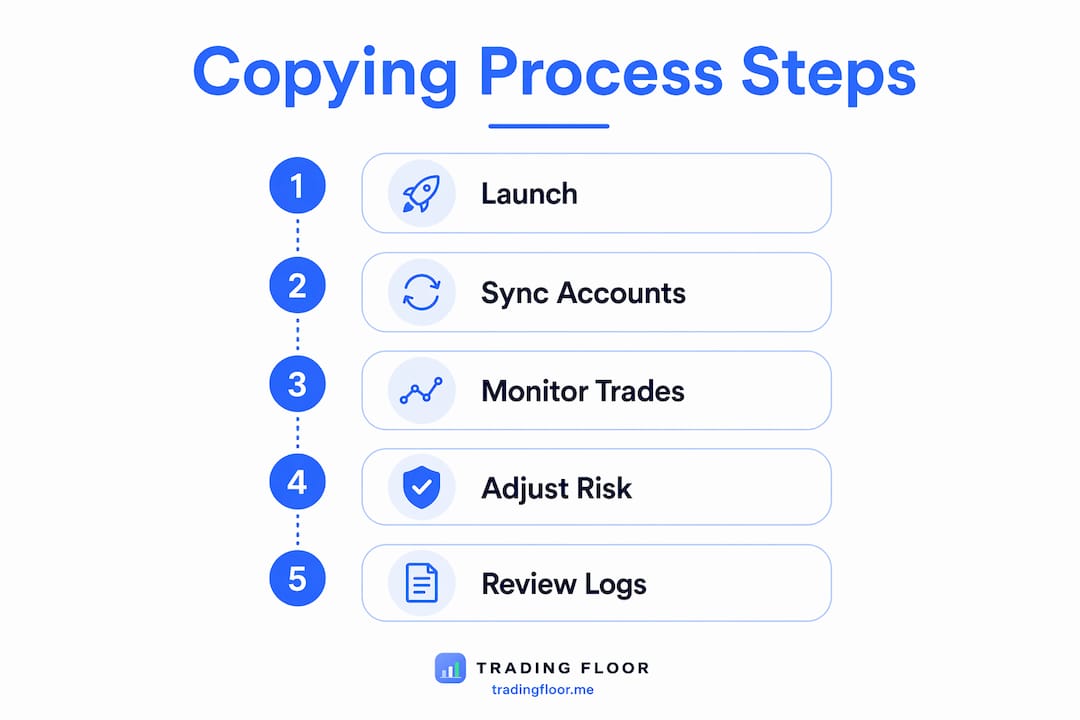
Launching and syncing accounts
Start the master account terminal first and confirm it is connected and authenticated. Then bring each follower account online and verify the copier shows an active link for each one. Check that position size multipliers display correctly for every follower before the market opens. A misconfigured multiplier discovered mid-trade is far more disruptive than one caught during pre-market checks.
Monitoring execution accuracy
Watch the first several trades of each session closely. Confirm that fills on follower accounts match the master’s direction, that protective orders appear immediately after entry, and that the scaled contract counts are correct. Copying trades across multiple prop firm accounts requires attention to platform-specific fill behavior, since Tradovate and Rithmic handle partial fills differently.
Handling evaluation account constraints
Evaluation accounts often carry stricter rules than funded accounts, including lower daily loss limits and trailing drawdown calculations. Configure separate multiplier profiles for evaluation accounts to reflect their tighter parameters. Never copy a full-size master position into an evaluation account without scaling it down to fit that account’s specific risk envelope.
- Confirm each account’s daily loss limit before the session starts.
- Set the copier to skip new entries on any account that has hit 80% of its daily limit.
- Use multi-platform trading best practices to handle broker-specific order types and margin rules.
- Keep a manual override ready for any account that behaves unexpectedly.
| Scenario | Recommended action |
|---|---|
| Follower account misses an entry | Check connection status and re-authenticate if needed |
| Protective order not copied | Manually place stop-loss immediately, then diagnose copier |
| Daily loss limit hit on one account | Halt copying to that account only, keep others running |
| Identical timestamps detected | Increase execution delay randomization range |
What are the most common mistakes when automating position copying?
The most damaging mistakes in copy trading automation fall into a few predictable categories. Knowing them in advance is cheaper than learning them from a failed account.
Confusing internal and external copying. Most prop firms permit internal trade copying across accounts the trader controls but strictly prohibit copying signals from third-party providers. Traders who misread this rule either avoid automation entirely out of unnecessary fear or unknowingly violate it by subscribing to external signal services. The distinction is clear: your own trades, your own accounts, internal copying is generally allowed.
Skipping protective order replication. A copier that sends entries without copying the associated stop-loss and take-profit creates naked positions on follower accounts. Replicating ATM bracket orders with correct position sizing per account is the standard that prevents this. Naked positions are both a compliance risk and a financial one.
Ignoring contract size differences. Not all prop firm accounts trade the same instruments at the same contract sizes. Copying a full ES contract position into a micro-futures evaluation account without adjusting the multiplier blows through risk limits in a single trade.
Using shared IP addresses. Cloud copiers using shared IPs are a known detection vector. Prop firm compliance systems monitor for synchronized order flow from the same IP range. Local copiers with dedicated connections are the safer choice for compliance-sensitive accounts.
Prop firm surveillance does not just look at what you trade. It looks at when you trade, from where, and whether the pattern matches across accounts. Identical entry times, identical stop levels, and a shared IP address are three data points that together build a strong case for a violation. Randomization and execution delays are not optional features. They are the difference between compliant automation and a flagged account.
Key Takeaways
Automating position copying in prop trading requires modular architecture, account-specific risk controls, and deliberate compliance measures to protect every funded account from detection and rule violations.
| Point | Details |
|---|---|
| Local copiers reduce detection risk | Unique IP profiles and realistic order timing lower the chance of prop firm flags. |
| Position size multipliers are required | Scale contracts per account size to maintain proportional risk across all followers. |
| Protective orders must copy with every trade | Naked positions on follower accounts violate most prop firm rules and create uncontrolled losses. |
| Demo testing before live deployment | Test all risk controls, multipliers, and the panic button for several days before using real capital. |
| Internal copying is generally permitted | Most prop firms allow copying your own trades across your own accounts; external signal copying is not. |
Why I think most traders automate too late
The traders I see struggle most with multi-account prop trading are not the ones who automate badly. They are the ones who wait too long to automate at all. They manage two funded accounts manually, then three, then four, and by the time errors start compounding, they have already paid for the lesson in failed evaluations and avoidable drawdowns.
The mindset shift that actually matters is moving from “I am a trader who executes trades” to “I am an engineer who builds and monitors a trading system.” That shift changes how you think about every component. You stop asking “did I enter that trade correctly?” and start asking “does my system replicate that entry correctly every time, with the right size, the right stops, and the right timing?” Those are very different questions, and the second one scales.
What I have found is that modular design makes the difference between a system you can fix and one you have to rebuild. When signal processing, position sizing, and execution are separate components, a problem in one does not corrupt the others. You can test each piece independently, which is how you build confidence before going live. Tradingfloor’s architecture reflects this thinking, with real-time position mirroring and individual account risk controls that operate independently of each other.
The other thing I will say plainly: demo testing is not a formality. I have seen traders skip it and then discover their panic button did not work during a fast market. That is not a recoverable situation. Spend the time on demo. It is the cheapest insurance available.
— KennyTrades
Tradingfloor: built for multi-account prop traders
Prop traders managing multiple funded accounts need a system that copies real positions, not just signals, and applies the right risk controls to each account independently.

Tradingfloor mirrors the leader’s net position across funded and evaluation accounts in real time, with trade limits, daily loss controls, and real-time notifications built in. It runs in the cloud, so there is no software to install, and it works across Tradovate and TopstepX accounts from any device. Traders who want to see current system reliability can check the live system status before committing. For pricing and account tiers, the full breakdown is available at Tradingfloor’s pricing page.
FAQ
What is automated position copying in prop trading?
Automated position copying in prop trading is the real-time replication of a master account’s trades across multiple funded or evaluation accounts, with account-specific risk controls applied to each follower automatically.
Is copy trading allowed by prop firms?
Most prop firms permit internal copying, meaning a trader copying their own trades across their own accounts. External signal copying from third-party providers is typically prohibited and monitored through pattern detection.
How do I avoid detection when copying trades across prop accounts?
Use a local copier with a unique IP address, apply small randomized delays between master and follower executions, and vary stop-loss and take-profit levels by one to two ticks across accounts to avoid identical order clusters.
What happens if a protective order does not copy to a follower account?
The follower account holds a naked position, which violates most prop firm rules and creates uncontrolled risk exposure. Manually place the stop-loss immediately and then diagnose the copier’s protective order replication settings.
How should I size positions when copying to accounts of different sizes?
Apply a position size multiplier based on the ratio of each follower account’s size to the master account. A $50K follower copying a $150K master uses a 0.33x multiplier to maintain proportional risk across both accounts.
Recommended
- How to Copy Trades Across Multiple Prop Firm Accounts Like TopstepX — Trading Floor
- Multi-Platform Trading Best Practices for Prop Traders — Trading Floor
- Best Trade Copier for Topstep and Tradovate Prop Accounts — Trading Floor
- <Trading Floor vs TradeCopia: Which Futures Trade Copier Is Right for Prop Traders?> — Trading Floor
Trading Floor mirrors every trade across your Tradovate, TopstepX & Rithmic accounts in real time, from $25/mo.
Start copying →