Time Filters in Copy Trading: When to Copy and When to Pause

Use time-based filters to copy only during your strategy’s high-probability session windows, and pause during known “toxic” hours when spreads widen and liquidity vanishes. That single change does more for risk reduction than almost any other setting on a copy trading dashboard, because it stops your account from inheriting a provider’s worst-timed trades along with the good ones.
Three things to do this week: turn on your platform’s scheduler instead of relying on manual pausing, backtest your provider’s performance hour by hour before you trust a filter, and set per-account risk limits so a bad window still can’t do serious damage. One catch trips up almost everyone the first time: confirm whether your scheduler reads UTC or the exchange’s local time, and convert your session windows accordingly. A filter set in the wrong timezone doesn’t fail loudly. It just quietly copies trades at 3 a.m. when you meant to block them.
- Enable the scheduler and set day/hour rules before manually intervening
- Backtest hourly performance to find your provider’s real toxic hours
- Set per-account risk caps (position limits, slippage caps) as a backstop
- Convert every window to your local timezone and verify the scheduler’s reference clock
Key Takeaways
Time filters work because they let a copy trader inherit a provider’s edge during high-probability hours while excluding the thin, volatile windows that turn a good strategy into a losing one.
| Point | Details |
|---|---|
| Time windows change trade quality | Liquidity and spread shift by session, so the same signal can be high or low probability depending on when it fires. |
| Backtest before filtering | Break provider performance down by hour before setting any exclusion window, not after. |
| Automate over manual pausing | Schedulers handle timezone and day-of-week rules consistently; manual pausing fails under fatigue. |
| Tune opening interval and lifetime | Set these deliberately, since defaults can cause missed copies or premature closures. |
| Combine filters with risk caps | Tradingfloor pairs real-time position mirroring with per-account risk controls so time filters and exposure limits work together. |
Table of Contents
- Why Time Windows Matter in Copy Trading
- Common Time-Filter Patterns That Actually Work
- Should You Filter Manually or Automate the Schedule?
- How to Set Up Time Filters Step by Step
- Measuring Whether a Time Filter Actually Works
- Pairing Time Filters With Account-Level Risk Controls
- Where Time Filters Go Wrong
- The Sniper Approach Beats “Copy Everything”
- Put Time Filters and Risk Controls to Work
- Sources
Why Time Windows Matter in Copy Trading
Markets don’t behave the same way at 3 a.m. as they do at 9:30 a.m. Eastern. The forex day runs through three overlapping sessions, Asian, London, and New York, and each one carries a different liquidity profile. London’s open floods the market with volume and tightens spreads on major pairs. The New York overlap with London, roughly 8 a.m. to noon Eastern, produces the heaviest volume of the day. The gap between the New York close and the Asian session’s early hours is thinner, and thin markets punish copied trades in specific ways.
That thin window is what traders call the toxic hour, and it shows up in a few predictable forms:
- Spreads widen on major pairs, sometimes increasing significantly above normal cost
- A single large order can move price disproportionately because there’s no depth to absorb it
- Post-news spikes create false breakouts that reverse within minutes, right as slippage is at its worst
Time-based filtering that excludes the Asian lull and the minutes immediately after major news releases can materially improve a strategy’s win rate, according to practical trading-education coverage on the topic. The reasoning holds up mechanically: a strategy that works because it exploits volatility during London’s open will look broken if you copy it at 4 a.m. when volatility barely exists.
There’s a deeper idea buried in this, too, one that traders often miss until they’ve lost money learning it. A setup that looks technically perfect on a chart, right price level, right pattern, can still be a low-probability trade if it fires outside its intended time window. ICT’s time and price framework argues that price alone never tells the full story. Time and price have to align for a signal to carry real weight, which is exactly why blindly copying a provider around the clock throws away half the edge.
Common Time-Filter Patterns That Actually Work
Most experienced copy traders converge on a short list of reusable time windows rather than inventing new ones for every strategy. Knowing which pattern fits which instrument saves you from copying blind.
- London open overlap (roughly 3 a.m. to 5 a.m. Eastern): favors EUR/USD, GBP/USD, and other majors where European desks drive early volume
- New York/London overlap (8 a.m. to noon Eastern): the busiest window of the trading day, well suited to indices and major forex pairs alike
- New York open (9:30 a.m. to 11 a.m. Eastern): useful for U.S. index futures and stocks reacting to the cash open
- Narrow one-hour windows tied to session opens: some traders build tight, single-hour filters around a session’s first sixty minutes, mirroring the kind of high-probability window ICT-style methodologies describe, without needing to adopt the full framework
Instrument choice changes which pattern matters most. Forex majors respond strongly to session overlaps because liquidity is genuinely session-driven. Stock indices care more about the cash market open and close than about forex sessions at all. Crypto is the outlier: it trades continuously, so instead of session windows, traders filtering crypto copies tend to block exchange maintenance windows and known low-volume stretches, since position sizing discipline matters as much as timing when volatility spikes without warning.
Beyond sessions, block copying around scheduled news events (NFP Fridays, central bank rate decisions), during your broker’s known spread-widening windows near rollover, and around holiday sessions where volume can drop without warning. A provider that trades well on a normal Tuesday can trade terribly on the Wednesday before Thanksgiving.
Should You Filter Manually or Automate the Schedule?
Manual pausing feels like control. It isn’t, not reliably. If you’re relying on remembering to disable copying before every NFP release or every Friday afternoon, you will eventually forget, usually on the one day it mattered most.
- Manual pause gives you flexibility to react to unexpected news in real time, but it’s error-prone under pressure and depends entirely on you being at your screen at the right moment.
- Automated scheduling applies day-of-week and hourly rules consistently, handles timezone conversion once instead of every day, and keeps working while you sleep, travel, or simply forget. Platforms supporting scheduled day and hour rules let traders pre-block recurring events like NFP Fridays without touching a setting each week.
- Hybrid workflows combine the two: run the automated schedule as your baseline, but keep a manual override switch for genuine surprises, unscheduled central bank statements, geopolitical shocks, exchange outages, that no calendar rule anticipated.
Most serious copy traders land on the hybrid model within a month of going live, because pure manual control eventually fails from fatigue and pure automation occasionally needs a human veto.
Pro Tip: Set a recurring calendar alert to review your time-filter schedule monthly. Sessions don’t move, but daylight saving transitions in your timezone versus the exchange’s timezone absolutely do, and that mismatch is the single most common cause of a filter quietly failing.
How to Set Up Time Filters Step by Step
This checklist works regardless of which copy trading platform you use, since the underlying logic (session windows, scheduler rules, opening intervals, position lifetimes) is close to universal across serious copying tools.
- Map your session windows in your own timezone first. Write down London open, the New York overlap, and your provider’s historically strong hours in your local clock, not UTC, so you’re not doing mental math under pressure later.
- Backtest hour by hour before setting anything live. Pull at least a few months of the provider’s trade history and break results down by hour of day. A strategy with a strong overall win rate can hide a terrible 2 a.m. slot dragging the average down.
- Build scheduler rules around days, hours, and timezone reference. Confirm explicitly whether the scheduler reads UTC, your broker’s server time, or the exchange’s local time. This one setting causes more filter failures than any other configuration mistake.
- Account for daylight saving transitions. If your platform doesn’t auto-adjust, mark the two shift dates each year and manually recheck your windows.
- Configure the opening interval and position lifetime. These two settings control how long the platform waits before copying a signal and how long a copied position is allowed to stay open. Documented time-settings parameters like
openingIntervalInMinutesandlifetimeInHoursexist precisely because a copy that fires too late or holds open too long defeats the purpose of the filter around it. - Enable alerts for filter activation and expiration, and build in a manual override path for days when a scheduled pause needs a human exception.
- Document every schedule version you deploy, with the date and reasoning, so you can trace performance changes back to a specific filter adjustment instead of guessing.
Some platforms implement the actual window selection through a visual interface where you draw a time rectangle directly on a chart to mark an include or exclude zone, which is faster to configure correctly than typing raw hour ranges into a form.
| Setting | Typical starting value | What it controls |
|---|---|---|
| Opening interval | 1 to 5 minutes | How long the system waits before mirroring a new signal |
| Position lifetime | 4 to 24 hours | How long a copied position stays open before automatic closure |
| Session window | Session-specific (e.g., London open) | Which hours copying is active at all |
| Day-of-week rule | Exclude Fridays after economic releases | Blocks recurring high-risk calendar days |
Treat these starting values as a baseline to adjust after your own backtest, not a fixed rule. A scalping strategy needs a tighter opening interval than a swing approach copied across evaluation accounts.
Measuring Whether a Time Filter Actually Works
A time filter is a hypothesis, not a fact, until you’ve tested it against real trade data. Skipping this step is how traders end up with filters that feel smart but quietly cost them money.
Run these metrics before and after applying any new window:
- Hourly win rate: break every trade down by the hour it opened, not just the day
- Expectancy per hour: average profit or loss per trade within each hourly bucket, since a high win rate with a small edge can still lose to a low win rate with a large one
- Spread and slippage by hour: even a technically winning setup can bleed profit if execution costs spike during a specific window
- Drawdown concentration: check whether your worst drawdowns cluster inside a specific time band rather than spreading evenly across the day
Trading-education guidance consistently recommends backing decisions with hour-by-hour tables rather than a single aggregate win rate, because aggregate numbers hide exactly the kind of hourly weak spot a filter is meant to fix. Small samples lie easily: a “bad hour” built on eight trades might just be noise, so give any new filter a rolling test window of at least a few dozen trades in that specific hour before trusting it.
Decision rule of thumb: if a window’s expectancy is meaningfully negative across a reasonable sample, exclude it. If it’s roughly flat, no strong case either way, don’t touch it yet. If removing a filter doesn’t measurably hurt performance over the next test cycle, that filter may have been unnecessary friction rather than genuine protection.
Pairing Time Filters With Account-Level Risk Controls
Time filters solve one problem: when copying happens. They don’t solve position sizing, exposure limits, or what happens when a provider itself has a bad day inside an approved window. Those need separate controls running alongside the schedule.
Layer these controls on top of your time filters:
- Per-trade and daily position limits, so no single copied signal can overload an account
- Slippage caps that reject a copy if the fill price has moved too far from the signal price
- Per-instrument exposure limits, especially if you’re copying into multiple accounts holding correlated positions
- Daily loss cutoffs that halt copying entirely once an account hits a defined threshold
The correlation risk is the part traders underestimate most. If you’re mirroring a provider that trades continuously across a 24/5 session, every account you’re copying into inherits the same directional bet at the same moment. A time filter narrows that exposure window; a per-account risk cap limits how much damage fits inside it even when the window is right.
A scheduler that respects session windows and a set of per-account limits aren’t competing tools. The filter decides when copying happens. The risk cap decides how much can go wrong once it does. Skip either one and the other is working with half the picture.
Tradingfloor’s real-time position mirroring is built around exactly this pairing: the platform mirrors a leader’s net position across funded and evaluation accounts on Tradovate, TopstepX, and Rithmic, while per-account risk controls run underneath it, so a session-based filter and an account-level cap operate together instead of as separate afterthoughts. For traders juggling several evaluation accounts, that combination of automated risk safeguards and scheduler-friendly controls is the difference between copying selectively and just copying everything and hoping.
Where Time Filters Go Wrong
The most common mistake isn’t forgetting to set a filter. It’s setting too many, and never checking whether they’re actually helping.
- Over-filtering: Stack enough exclusion windows and you can strangle a strategy’s opportunity set until the sample size left is too small to mean anything. Validate each filter individually against the metrics above before adding the next one.
- Timezone mismatches: The scheduler reads UTC, you set your windows in Eastern time, and now your “London open” filter is active during the New York lunch lull instead. Always verify the platform’s reference timezone explicitly rather than assuming.
- Opening interval set too tight: If the interval is shorter than your provider’s typical execution delay, copies get missed entirely, and you’ll see gaps in your trade log that look like outages but aren’t.
- Position lifetime set too short: Lifetime settings that are too aggressive will force-close legitimate positions before a trade has had time to play out, turning winners into losers on a technicality.
- No resync check after an outage: If your platform or broker connection drops, confirm positions reconcile correctly once service resumes rather than assuming everything caught up automatically.
Pro Tip: Keep a simple log of every rejected order and late fill with a timestamp. Within a few weeks, a pattern usually emerges, most often clustering right at the edge of a filter window, which tells you exactly which setting to adjust first.
The Sniper Approach Beats “Copy Everything”
Most copy trading advice still treats time filters as an optional add-on, something to configure once and forget. That’s backward. The filter isn’t a nice-to-have layered on top of a good provider; it’s often the difference between that provider’s real edge showing up in your account and getting diluted by hours where the strategy was never designed to trade.
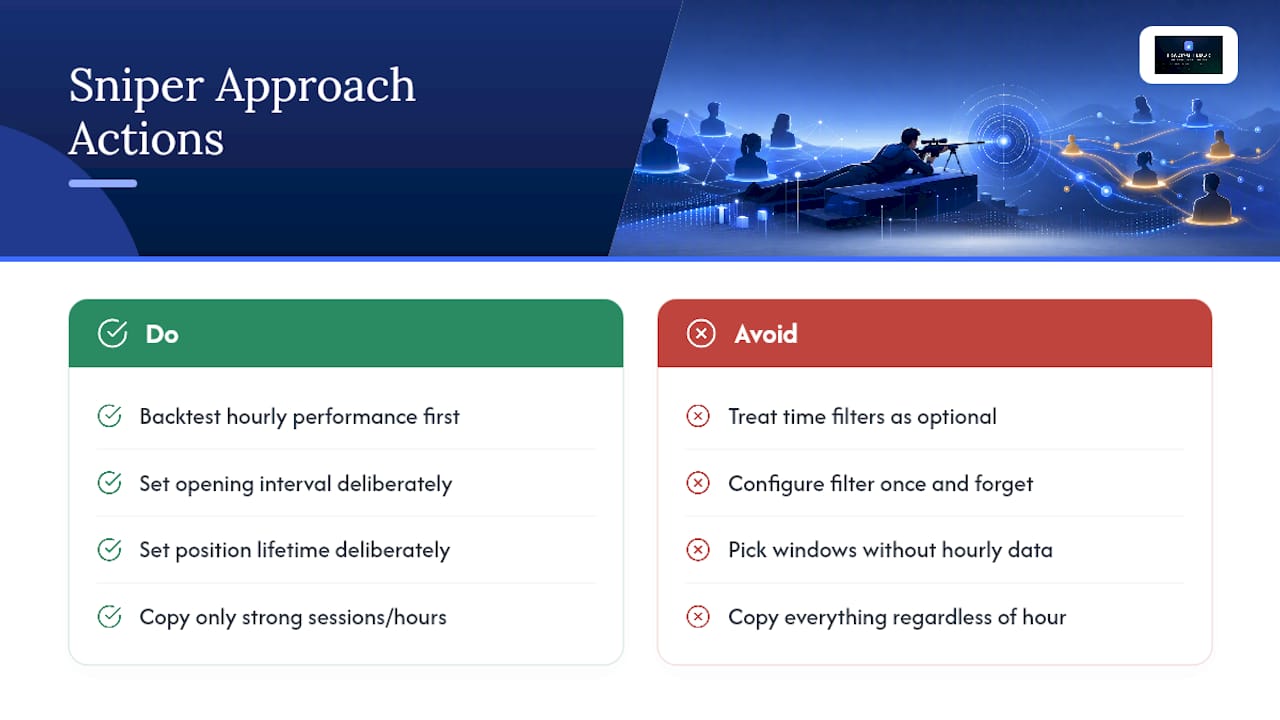
The conventional wisdom oversells picking the right provider and undersells picking the right hours to copy them. A strong provider trading through a toxic hour will still generate a toxic trade. Sessions matter more than most traders give them credit for, right up until they lose money proving it to themselves.
If you take one thing from this article, prioritize the backtest before the filter. Setting a plausible-sounding window without checking hourly performance data first is guessing dressed up as strategy. Set the opening interval and position lifetime deliberately too. Those two settings quietly determine whether your filter actually does what you think it does, or just creates gaps and premature closures that look like bad luck.
— KennyTrades
Put Time Filters and Risk Controls to Work
Everything covered here, session windows, opening intervals, position lifetime limits, per-account risk caps, only helps if your platform can actually run those controls at the same time, across every account you manage. That’s the specific gap Tradingfloor is built to close: real-time position mirroring across funded and evaluation accounts on Tradovate, TopstepX, and Rithmic, with scheduler-friendly controls, per-account trade limits, slippage caps, and the kind of opening-interval and position-lifetime settings this article walks through.

If you’re running a Take Profit Trader account, the Take Profit Trader trade copier mirrors one trade across every account you manage with those same per-account limits in place. TradeDay traders have a parallel option with the TradeDay trade copier. And if you’re still weighing which funded programs even permit copying in the first place, the breakdown of prop firms that allow copy trading is worth reading before you commit to a workflow. Start a trial and set your first session window today.
Sources
Recommended
- Trades Copied Right: Real-Time Mirroring for Prop Traders — Trading Floor
- Types of Trade Copying Strategies: 2026 Guide — Trading Floor
- Avoid Consistency Rule Violations When Copying Trades — Trading Floor
- How to Automate Position Copying in Prop Trading — Trading Floor
Trading Floor mirrors every trade across your Tradovate, TopstepX & Rithmic accounts in real time, from $25/mo.
Start copying →