Automated Risk Controls Every Futures Copier Must Have
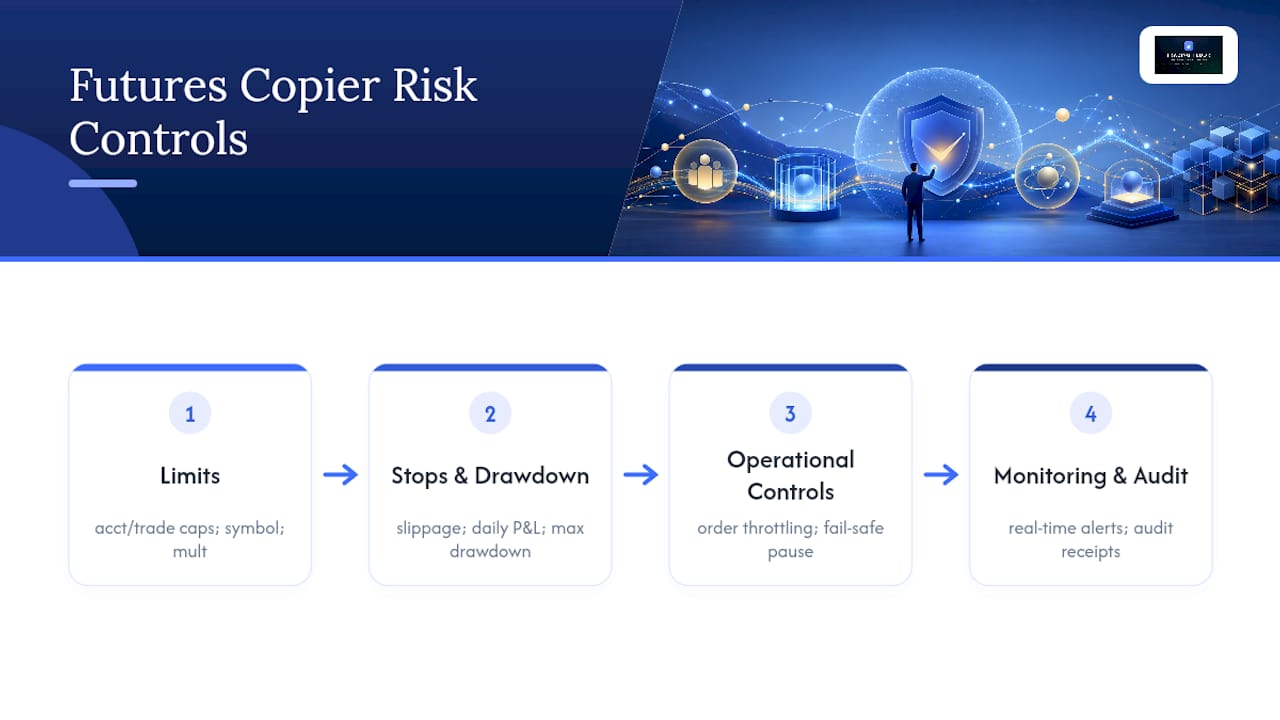
Every cloud trade-copier for futures needs this investment automation risk controls list active before the first live copy: per-account trade size limits (caps max contracts per account), per-trade max contracts (rejects oversized single orders), contract multipliers (scales leader size to follower equity), slippage caps (cancels fills beyond your tick tolerance), daily P&L stops (halts copying when the day’s loss threshold hits), max drawdown limits (shuts the account before a firm violation), per-symbol limits and whitelists/blacklists (blocks forbidden instruments), order throttling (prevents burst rejections), fail-safe/manual pause (global kill switch), real-time notifications (alerts on every trigger), and receipts with audit trail (timestamps every copy for reconciliation). Platforms like Tradovate, TopstepX, and Rithmic each enforce these constraints differently at the execution layer, so the copier must enforce them independently before the order reaches the broker.
Key Takeaways
A cloud trade-copier for futures must enforce per-account hard stops and a portfolio-level soft stop together to prevent cascading failures across funded and evaluation accounts.
| Point | Details |
|---|---|
| Enable hard stops first | Set per-account trade size limits and daily P&L stops before any live copying begins. |
| Use phase-based multipliers | Scale risk multipliers by account phase: 0.25x for evaluation, up to 1.0x for funded accounts with buffer. |
| Stage the roll-out | Start with 3–5 accounts, verify receipts and fills, then expand in batches. |
| Run nightly reconciliation | Compare leader and follower receipts every session to catch partial-fill mismatches before they compound. |
| Tradingfloor deployment | Tradingfloor maps every control on this list natively, with a 30-day free trial and setup under one hour. |
Table of Contents
- 1. The full automated risk controls list, explained
- 2. Hard vs. soft controls: how to decide what to enforce
- 3. Step-by-step setup for your cloud trade-copier
- 4. How to test and verify your controls actually work
- 5. Operational rules and common failure modes
- 6. Broker and platform compatibility notes
- 7. Quick-start templates by account size and phase
- What actually matters when you run this at scale
- Tradingfloor covers this checklist out of the box
- Sources
1. The full automated risk controls list, explained
Per-account trade size limit
Sets the maximum open contracts allowed on a single follower account at any moment. Without it, a large leader position copies at full size to every follower regardless of account equity, which can breach a prop firm’s position limit in one fill.
Example config: a max of a few contracts on a typical evaluation account.
Per-trade max contracts
A hard ceiling on any single copied order. This catches the edge case where the leader adds to a position in one large block that would exceed the follower’s per-account limit in a single event.
Example config: reject any single order above a small number of contracts.
Contract multipliers
Maps leader size to follower size by ratio, equity, or fixed contract count. Tradingfloor supports ratio-based and fixed-contract multipliers natively, so you can set different scaling per account without touching each broker’s interface.
Pro Tip: When mapping across exchanges with different tick values (e.g., MES vs. ES), use fixed-contract mode rather than ratio mode to avoid fractional-contract rounding errors that produce unexpected position sizes.
Slippage caps
Defines the maximum acceptable fill deviation in ticks. If the follower fill exceeds the cap, the copier cancels or flattens the position rather than accepting a bad fill. For tick-based futures on Rithmic or Tradovate, express this as a tick count (e.g., 2 ticks on ES, 4 ticks on NQ during news).
Daily P&L stop
Halts all copying on an account once the day’s realized plus unrealized loss hits a threshold. This is the control that keeps a bad morning from becoming a blown evaluation.
Max drawdown limit
Enforces the firm’s trailing or static drawdown rule at the copier level, independent of the broker’s own enforcement. A copier-side drawdown check catches the problem before the broker does and gives you time to flatten rather than receive a forced liquidation.
Per-symbol limits and whitelist/blacklist
Restricts copying to approved instruments and blocks any leader trade in a forbidden symbol. Prop firms frequently ban certain products (crypto futures, micro contracts during evaluation, specific commodity contracts). A whitelist is safer than a blacklist: only approved symbols copy, everything else is silently dropped.
Order throttling
Limits the number of orders sent to a broker within a rolling time window. Without throttling, a leader who enters and exits rapidly can trigger a burst of follower orders that hit exchange rate limits, producing rejections or partial fills that leave followers in unintended positions.
Fail-safe and manual pause
A global kill switch that stops all copying across every follower account instantly. This should be triggerable from a mobile device and should also fire automatically when a portfolio-level loss threshold is breached. Staged activation and copier receipts make it easier to verify the pause worked across every account.
Real-time notifications
Push alerts on every control trigger: a rejected copy, a slippage cap hit, a daily stop firing, a partial fill. Notifications are not optional logging. They are the only way to catch a silent failure mid-session when you are managing 10+ accounts.
Receipts and audit trail
Every copied order must log: timestamp, leader order ID, follower account ID, instrument, intended size, actual fill size, fill price, slippage in ticks, and trigger reason if rejected. This log is what you show a prop firm if a rule dispute arises, and it is what a nightly reconciliation job compares against leader fills.
2. Hard vs. soft controls: how to decide what to enforce
Not every control should reject an order outright. The right enforcement level depends on the account’s phase and the severity of the rule being enforced.
Hard enforcement (reject or cancel the order) is appropriate when:
- The control maps directly to a firm rule violation (position limit, daily loss, drawdown).
- Breaching it would trigger an account failure or forced liquidation.
- The rule is binary: either the order is within limits or it is not.
Soft enforcement (warn, log, or reduce the ratio) is appropriate when:
- The control is a trader-defined preference, not a firm rule.
- The breach is marginal and a ratio reduction keeps the trade within bounds.
- The account has enough buffer that a warning is sufficient.
Sample thresholds by account phase:
The portfolio stop slows the bleeding before individual accounts hit their hard limits, preventing a cascade where every account fires its hard stop simultaneously and leaves you with a pile of open positions to manage at once.*
3. Step-by-step setup for your cloud trade-copier
Before enabling a single live copy, run this sequence:
- Build your account map. Document every account: firm name, account ID, platform (Tradovate, TopstepX, Rithmic), phase, equity, daily loss limit, drawdown type (trailing vs. static), and copy-trading policy. Prop firms differ significantly on copy-trading rules, and some ban cloud copiers outright. Confirm each firm’s current policy before connecting anything.
- Configure symbol mapping. Match leader symbols to follower symbols for each platform. Tradovate uses different contract suffixes than Rithmic. A mismatch here copies to the wrong instrument silently.
- Set multipliers and per-account limits. Use the phase-based thresholds from the table above as your starting point. Apply hard limits first, then layer in soft controls.
- Enable notifications and logging. Configure push alerts for every control trigger. Enable receipts on every copy. Verify the log destination is accessible from outside the copier (a separate monitoring account or dashboard).
- Set up API keys with least privilege. The execution API key needs order-entry permissions only. A separate read-only key handles monitoring. Never use a single admin key for both.
- Run a sandbox test. Send a simulated leader trade and verify every follower receives the correct scaled size, the receipt logs correctly, and a slippage-cap breach cancels the order as expected.
- Stage the live roll-out. Start with 3–5 accounts. Verify fills, receipts, and latency before adding more. See the evaluation-phase trading checklist for phase-specific pre-live checks.
Pre-live checklist:
- Account map complete and firm copy-trading policies confirmed
- Symbol mapping verified in sandbox
- Per-account limits and multipliers set
- Notifications firing to correct channels
- Receipts logging with all required fields
- API keys scoped to least privilege
- Sandbox test passed with forced slippage-cap breach
Pro Tip: Keep Rithmic’s open monitoring window active during the first live session. The copier’s own logs will not catch a stuck order at the exchange level. Rithmic’s feed shows the order state independently.
4. How to test and verify your controls actually work
Testing is not optional. A control that is configured but untested is a false sense of security.
| Test scenario | Expected outcome | Pass criterion |
|---|---|---|
| Normal copy, within limits | Follower fills at scaled size | Fill within 2 ticks of leader fill |
| Slippage cap breach (simulated) | Order canceled, alert fired | Alert within 5 seconds, no fill |
| Daily P&L stop trigger | All copying halted on that account | No new orders after trigger |
| Partial fill on leader | Follower receives proportional partial | Receipt logs partial, no orphan position |
| Leader disconnect mid-trade | Fail-safe fires, followers flatten | Global pause confirmed across all accounts |
| Order burst (throttle test) | Orders queued, not rejected | No exchange rejections, queue clears in order |
Run a nightly reconciliation job that pulls leader receipts and follower receipts, compares fill sizes and timestamps, and alerts on any mismatch above a 1-tick or 1-contract threshold. Aggregated dashboards that unify P&L and fill data across accounts make this reconciliation practical at scale.
For latency, measure the time from leader fill timestamp to follower order submission. Anything above 500ms on a Rithmic path during normal market hours warrants investigation before a news event.
5. Operational rules and common failure modes
Key operational rules:
- Trade in groups of 4–5 accounts, not all accounts simultaneously. Copying the same trade to every account at once multiplies correlated risk, not diversification.
- Set a portfolio daily loss limit before the session starts. If the aggregate P&L across all accounts hits it, reduce all multipliers to 0.25x or pause entirely.
- Maintain an equity buffer above the firm’s drawdown limit on every account before scaling up multipliers.
- Never enable a new account group without completing the full pre-live checklist above.
Common failure modes and fixes:
- Correlated drawdown: all accounts lose simultaneously because they hold the same position. Fix: account groups with staggered entry timing or different instruments per group.
- Copy latency compounding: follower fills arrive late during fast markets, producing worse average prices than the leader. Fix: slippage caps and latency monitoring on the Rithmic feed.
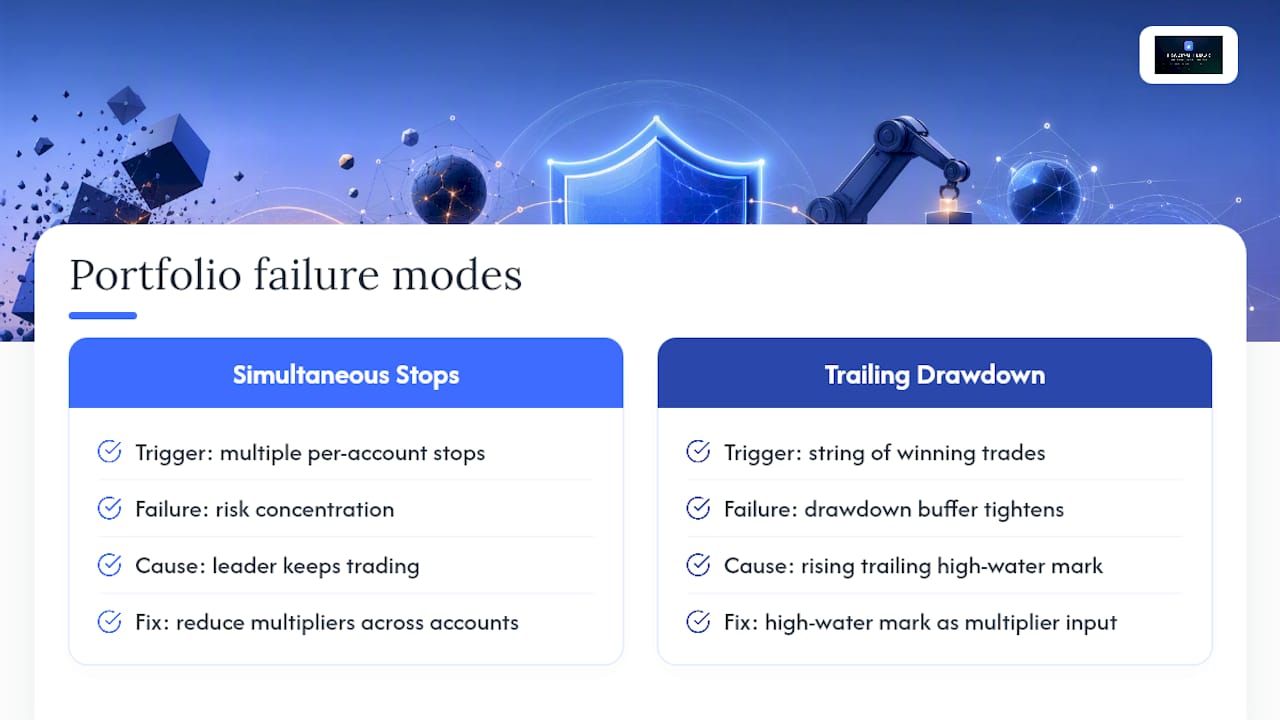
- Trailing drawdown trap: a winning streak raises the trailing high-water mark, then a normal pullback violates the drawdown. Fix: reduce multipliers as the account approaches the trailing high-water mark, not after.
- Partial fill orphan: leader gets a partial fill, follower receives a full fill (or vice versa), leaving a size mismatch. Fix: receipts reconciliation catches this within minutes; the nightly job catches it before the next session.
Pro Tip: If the copier fails mid-session, the fastest triage is: (1) trigger the global pause immediately, (2) check each follower’s open position against the leader’s current position manually, (3) flatten any account with a mismatch, (4) verify the copier’s connection to the data feed before resuming. Do not resume copying until receipts confirm the feed is live.
For a deeper framework on systematic risk management across multiple accounts, the principles of portfolio-level stop budgeting apply directly to multi-account copier operations.
6. Broker and platform compatibility notes
The three platforms most U.S. prop traders use with a copier each have distinct constraints:
Tradovate uses a WebSocket-based API with its own symbol naming convention. Order types supported include market, limit, and stop-limit. Tradovate enforces position limits at the account level and calculates daily loss on a cash basis. Symbol suffixes include month/year codes that must be mapped explicitly in the copier’s symbol table.
TopstepX operates on a proprietary execution layer. Confirm whether your copier vendor has a direct TopstepX integration or routes through a compatible data feed. TopstepX enforces trailing drawdown from the account’s highest intraday equity, which means a winning morning raises the bar for the afternoon.
Rithmic is a data and order-routing infrastructure layer used by many prop firms. It supports a broader range of order types and provides independent feed monitoring, which is why keeping a Rithmic monitoring window open during live sessions is a practical survival requirement. CQG is the other common routing path with similar latency characteristics.
For platform-specific symbol mapping and execution differences, the key is to test every symbol mapping in sandbox before live deployment and to re-verify mappings at each contract rollover.
Implementation checklist for broker connectivity:
- API keys created with order-entry-only scope
- Symbol mapping table complete and sandbox-verified
- Contract rollover dates documented and calendar alerts set
- Platform-specific throttle limits noted and order throttling set below those limits
- Drawdown calculation type (trailing vs. static, intraday vs. end-of-day) confirmed per firm
7. Quick-start templates by account size and phase
Use these as starting defaults. Then adjust for your firm’s specific rules and your strategy’s volatility profile.
For high-volatility sessions (FOMC, NFP, CPI), cut the slippage cap by half and reduce the risk multiplier by one tier. For scalping strategies with high order frequency, set order throttling to no more than 10 orders per 60-second window to stay below most exchange rate limits. The multi-account automation guide has additional template configurations for specific evaluation-phase scenarios.
What actually matters when you run this at scale
The conventional wisdom on multi-account automation focuses on the controls themselves. The part most traders underestimate is the interaction between controls when multiple accounts hit limits simultaneously.
Here is the scenario that catches operators off guard: a volatile session triggers the daily P&L stop on three accounts at the same moment. The copier pauses those accounts correctly. But the leader continues trading, and the remaining active accounts now carry disproportionate exposure because the paused accounts are no longer absorbing their share of the position. The portfolio risk has not decreased. It has concentrated.
The fix is not a better per-account stop. It is a portfolio-level soft stop that reduces multipliers across all active accounts when a threshold of accounts have hit their individual limits. That is the control most traders defer because it requires thinking about the portfolio as a whole, not account by account.
Trailing drawdown traps are the other underestimated failure mode. A string of winning trades raises the trailing high-water mark, which tightens the effective drawdown buffer. Most traders do not reduce their multipliers as the buffer shrinks. They keep the same settings that worked when the buffer was wide, then a normal retracement violates the drawdown because the math changed underneath them. The right response is to treat the trailing high-water mark as a dynamic input to your multiplier calculation, not a static background fact.
The controls list is the foundation. The portfolio logic on top of it is what keeps a bad session from becoming a catastrophic one.
Tradingfloor covers this checklist out of the box
Every control on this list maps directly to a feature in Tradingfloor’s cloud copier: per-account trade limits, contract multipliers, slippage caps, daily P&L stops, whitelist/blacklist, fail-safe pause, real-time push notifications, and a receipt on every copy with full audit trail. Auto-reconciliation runs continuously, not just nightly, so fill mismatches surface in minutes rather than the next morning.

Tradingfloor connects natively to Tradovate and TopstepX, with Rithmic compatibility for firms that route through that infrastructure. No installation. No desktop dependency. The copier runs in the cloud, accessible from any device, so a global pause is one tap from your phone. Deployment for a first group of 3–5 accounts typically takes under an hour when the account map and symbol mapping are prepared in advance. Pricing starts at $25/month, with a 30-day free trial to run the full sandbox test sequence before any live copying.
Start your staged roll-out with the 30-day free trial and verify every control on this checklist before your first live copy.
Sources
- Managing Multiple Funded Accounts: The Portfolio Approach to Prop Firm Trading - NexusFi Academy
- How to Manage Multiple Prop Firm Accounts | 2026 Guide
- Multiple Prop Firm Accounts: How to Manage Them | PropTally
Recommended
- Common Automated Investing Mistakes for Multi-Account Copiers — Trading Floor
- How to Automate Position Copying in Prop Trading — Trading Floor
- Trades Copied Right: Real-Time Mirroring for Prop Traders — Trading Floor
- Prop Firm Trade Copier — run every funded account as one floor
Trading Floor mirrors every trade across your Tradovate, TopstepX & Rithmic accounts in real time, from $25/mo.
Start copying →