Resync Under 5 Seconds: Order Mismatch Reconciliation for Prop Traders

Stop replicating new trades the moment you spot a discrepancy, then compare your master execution report against each follower’s broker fills to compute the net-delta. If that delta isn’t zero, resend the missing execution, flatten and reapply correctly sized orders, or resync using broker-confirmed fills as the source of truth. You’re done only when broker-confirmed net positions match across every account, not when your dashboard says they do.
TL;DR:
- Ensure broker-confirmed net positions match across all accounts before considering the reconciliation complete.
- Use broker trade IDs as the primary deduplication key to prevent double counting or missing partial fills.
- Conduct reconnection tests during live market hours to measure resync times under volatility, aiming for under 5 seconds.
- Address inverted or reversed trades immediately by pausing replication, reviewing the broker report, and flattening incorrect positions before reapplying correct ones.
- Standardize communication protocols and documentation, including timestamps, trade IDs, and consistent reporting, to prevent recurrent mismatches.
Table of Contents
- What Is Order Mismatch Reconciliation?
- What Causes Order Mismatches? A Root-Cause Checklist
- How Do You Run a Full Reconciliation Workflow?
- Executions Mode vs. Orders Mode: Which Causes More Mismatches?
- What Operational Controls and Tests Prevent Recurring Mismatches?
- Trading Floor and KennyTrades: What Live Prop Environments Get Wrong
- How Do You Handle Inverted or Reversed Trades?
- What Communication Protocols Keep Reconciliation Clean?
- How Do Latency and Network Delays Cause Order Mismatches?
- How Do You Prevent Future Order Mismatches?
- Why Most Reconciliation Advice Misses the Point
- How Trading Floor Supports Your Reconciliation Checklist
- Where to Go Deeper on Reconciliation and Controls
- Sources
What Is Order Mismatch Reconciliation?
Order mismatch reconciliation is the process of detecting, investigating, and fixing gaps between what your master account traded and what actually landed in your follower accounts. In multi-account trade-copying setups, a mismatch shows up as a net-position delta: the master shows three contracts long, a follower shows two, and nobody notices until the account is already exposed to risk it didn’t sign up for.
This isn’t the same discipline as invoice-to-payment reconciliation in accounting. For prop trading operations, the stakes are position risk and account rule compliance, not bookkeeping accuracy. Every step below assumes you’re managing live or simulated futures positions across funded and evaluation accounts, where a five-minute lag in catching a mismatch can mean a margin call on one account and an unhedged position on another.
What Causes Order Mismatches? A Root-Cause Checklist
Before you touch a single order, figure out which failure mode you’re dealing with. Guessing wastes time and often makes the mismatch worse.
- Partial fills: Your master fills 5 contracts but the follower only gets 3 filled before the order times out or the broker throttles size. Check execution logs for fill quantity versus order quantity, and use broker trade ID as your primary dedupe key, falling back to timestamp plus side plus size plus price when trade IDs aren’t yet available.
- Slippage from Executions Mode: If your copier runs in Executions Mode, it waits for the master’s fill, then sends a market order to each follower. That guarantees a fill but not a matching price, and latency between accounts widens the gap further.
- Order-type mismatches: A stop-limit on the master account can behave differently than a stop-market equivalent on a follower, especially across brokers with different OCO (one-cancels-other) and cancel semantics.
- Contract multiplier and sizing errors: Proportional sizing logic that doesn’t account for a different contract multiplier on a follower account will produce a net position that looks wrong even when every order executed correctly.
- Rejected orders: Margin limits, permission restrictions, or auto-risk kill switches on an evaluation account can silently reject an order the master filled without issue.
- Connectivity drops: A follower platform disconnects mid-trade, and the interface keeps showing a stale position long after the broker’s actual execution report has moved on.
Pro Tip: Never trust what’s on screen after a reconnection. Pull the broker’s execution report directly and treat it as the only accurate record until your dashboard has synced against it.
How Do You Run a Full Reconciliation Workflow?
A repeatable five-step sequence keeps you from introducing new risk while you’re fixing the old one.
- Detect. Set automated alerts on position delta between master and follower accounts. When an alert fires, log the timestamp, broker trade ID, price, size, and side for every leg involved.
- Triage. Match the symptom to a cause. A partial fill calls for a proportional size adjustment. A rejected order needs a margin or permission check before you resend anything. Guessing at this stage is how a small mismatch becomes a bigger one.
- Reconcile. Pause replication on the affected account before doing anything else. Document what you’re about to do, then decide between resending the missing execution or flattening the position and reapplying a correctly sized order. Broker-confirmed fills are always the reference point, never the copier’s internal log.
- Resync. Deduplicate using broker trade ID as the primary key; fall back to timestamp, side, size, and price only when a trade ID isn’t available yet. This is the same dedupe hierarchy that keeps a consolidated trading journal from double counting across brokers, and it applies just as directly to resyncing live positions. Resend or flatten one account at a time so you can verify each fix before moving to the next.
- Verify. Confirm the fix against the broker’s own execution report, not the copier interface. Your target is a reconciliation delta of zero. Document the incident regardless of outcome, and if the broker’s fill record itself looks wrong, open a dispute with the preserved logs attached.
Regulatory guidance for futures commission merchants requires exactly this kind of prompt investigation and documented reconciliation of individual positions against aggregate totals. Building your process around that standard isn’t overkill. It’s the baseline auditors and account administrators already expect.
A few habits make this workflow faster every time you run it:
- Keep a single reconciliation log, not one per account, so patterns across the whole book are visible.
- Never resend an order until you’ve confirmed the original didn’t fill somewhere downstream.
- Time-stamp every manual intervention, including the ones that didn’t fix anything.
Executions Mode vs. Orders Mode: Which Causes More Mismatches?
The copier mode you run changes your entire mismatch profile.
Executions Mode waits for the master to fill, then fires a market order to each follower. Followers almost always get filled, which makes this the safer default when your follower fleet is mixed in size or when a fast market makes precision less important than certainty. The tradeoff is slippage: your follower’s entry price can drift meaningfully from the master’s, especially in fast-moving contracts.
Orders Mode mirrors the master’s actual order type in real time, including limit orders, which keeps entry prices tighter across accounts. The cost is complexity. Partial fills, rejections, and cancel/replace timing all become live variables you have to manage, and a follower that can’t match the master’s order type exactly will throw a mismatch you wouldn’t see under Executions Mode.
A few operational habits reduce mismatch risk regardless of mode:
- Align ATM (Advanced Trade Management) settings per account so stop and target logic behaves consistently.
- Set slippage caps on follower accounts so a bad fill doesn’t silently balloon your risk.
- Run periodic latency tests between master and follower connections, particularly after any broker or platform update.
- Use proportional sizing tied to each account’s actual contract multiplier, not a flat ratio.
Firms running account groups instead of individual manual replication tend to see fewer of these errors simply because the sizing and routing logic is centralized rather than repeated by hand across every account.
What Operational Controls and Tests Prevent Recurring Mismatches?
Reconciliation only stays solved if the controls around it are boring and consistent. That means accurate timestamps on every order, stable trade IDs you can dedupe against, sequential numbering on manual tickets, and a clear separation between whoever executes trades and whoever reviews the reconciliation log.
Two KPIs matter more than the rest: reconciliation delta and time-to-resync. Best practice for reconnection handling targets under 5 seconds to resync state after a disconnect, with anything past 30 seconds flagged as a real problem worth investigating, not a fluke to shrug off.
Run these tests on a schedule, not just after something breaks:
- Cancel/replace timing tests: Verify how long it takes a cancel-and-replace order to actually update across every follower account.
- Reconnection simulation: Force a disconnect under live-market conditions and measure how long it takes positions to resync against broker-confirmed fills.
- Cancel-ack latency measurement: Track how long acknowledgment takes on cancels specifically, since this is where phantom orders tend to hide.
- Daily aggregate-to-broker reconciliation: Run a full position reconcile against the broker’s own reporting once a day, not just when an alert fires.
Pro Tip: Schedule your reconnection tests during actual market hours, not overnight simulation windows. A test run in a quiet market tells you almost nothing about how your platform behaves when volatility and volume spike at the same time.
Keep exception reports and incident summaries in one place. A trade audit trail that captures every timestamp, trade ID, and confirmation is what turns a one-off fix into a documented process you can defend to a firm’s risk desk or an evaluation account administrator.
Trading Floor and KennyTrades: What Live Prop Environments Get Wrong
The most avoidable mistakes we see in live prop environments all trace back to the same root cause: no consistent dedupe key. Teams that rely on timestamp matching alone, without a broker trade ID as the primary key, end up double counting fills or missing partial ones entirely. Skipping partial-fill checks after a busy market session is a close second, and insufficient reconnection testing rounds out the list. Most firms only discover their resync time is too slow after a real disconnect, not during a planned test.
Trading Floor’s architecture of real-time net-position mirroring, per-account risk controls, and push notifications maps directly onto the workflow above: it’s built to surface a delta fast rather than let it sit quietly until the next manual check.
A practical starting checklist for evaluating any copier setup: run 10 live-mirroring trades across small-size follower accounts, measure position-delta after each one, and time how long full reconciliation takes from alert to broker-confirmed match.
How Do You Handle Inverted or Reversed Trades?
An inverted trade happens when a follower account ends up net short while the master is net long, or vice versa. This is one of the more dangerous mismatch types because it doesn’t just under-hedge a position, it actively works against the master’s strategy.
The most common cause is a sizing or side-mapping error in the copier configuration, often introduced when an account is set up to mirror inversely for hedging purposes and then accidentally left in that state during normal replication. The second most common cause is a stale reconnection: the follower platform reprocesses an old cancel or reversal signal after coming back online, flipping a position that had already resolved correctly on the broker side.
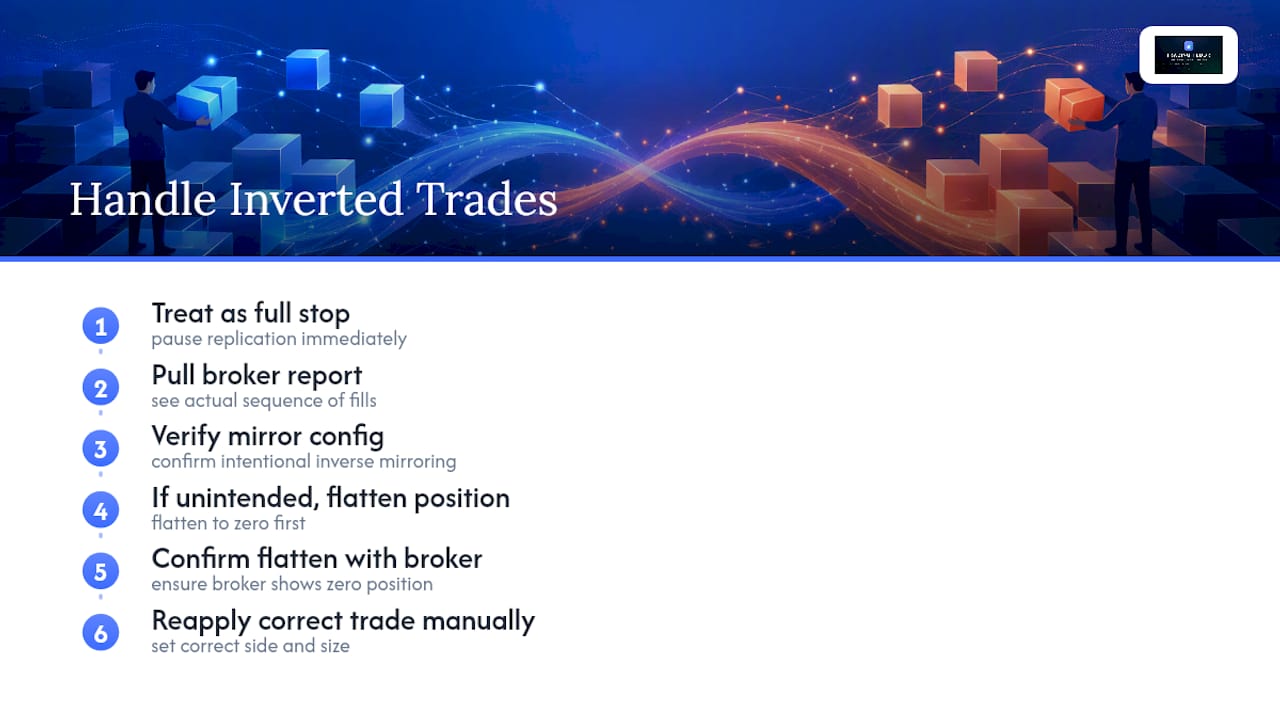
Treat any inverted position as a full stop event, not a routine mismatch. Pause replication on that account immediately, pull the broker’s execution report to see the actual sequence of fills, and don’t assume the copier’s own trade log reflects reality. If the account was intentionally configured for inverse mirroring, verify that configuration explicitly before touching anything else. If it wasn’t, flatten the position to zero first, confirm the flatten against the broker, and only then reapply the correct side and size manually. Never try to “net out” an inverted position by sending an offsetting trade through the same copier logic that caused the reversal. That’s how one mismatch becomes two.
What Communication Protocols Keep Reconciliation Clean?
Reconciliation breaks down fastest when the people and systems involved aren’t talking to each other in a consistent format. Set a standard: every mismatch alert includes account ID, symbol, expected position, actual position, and timestamp, sent to the same channel every time. A reconciliation note that says “follower is off” without numbers attached is worse than no note at all.
Between platforms, the master account’s execution report should be treated as the outbound signal of record, and every follower’s broker confirmation should be logged as the inbound response. When a discrepancy shows up between the two, whoever is handling the reconciliation should document the resolution in the same log both records fall into, not a side channel like a chat message that disappears from context in a week.
If your operation spans multiple brokers or platforms, agree in advance on how disputes get escalated. That means knowing which broker’s dispute desk to contact, what documentation they require (trade ID, timestamp, expected versus actual fill), and who on your team owns following up until it’s closed. Waiting until a real dispute happens to figure this out costs hours you don’t have during a live trading session.
How Do Latency and Network Delays Cause Order Mismatches?
Every mismatch tied to slippage or a stale display traces back to some form of latency, whether it’s the delay between the master’s fill and the follower’s order being sent, or a follower platform’s connection lagging behind the broker’s actual state.
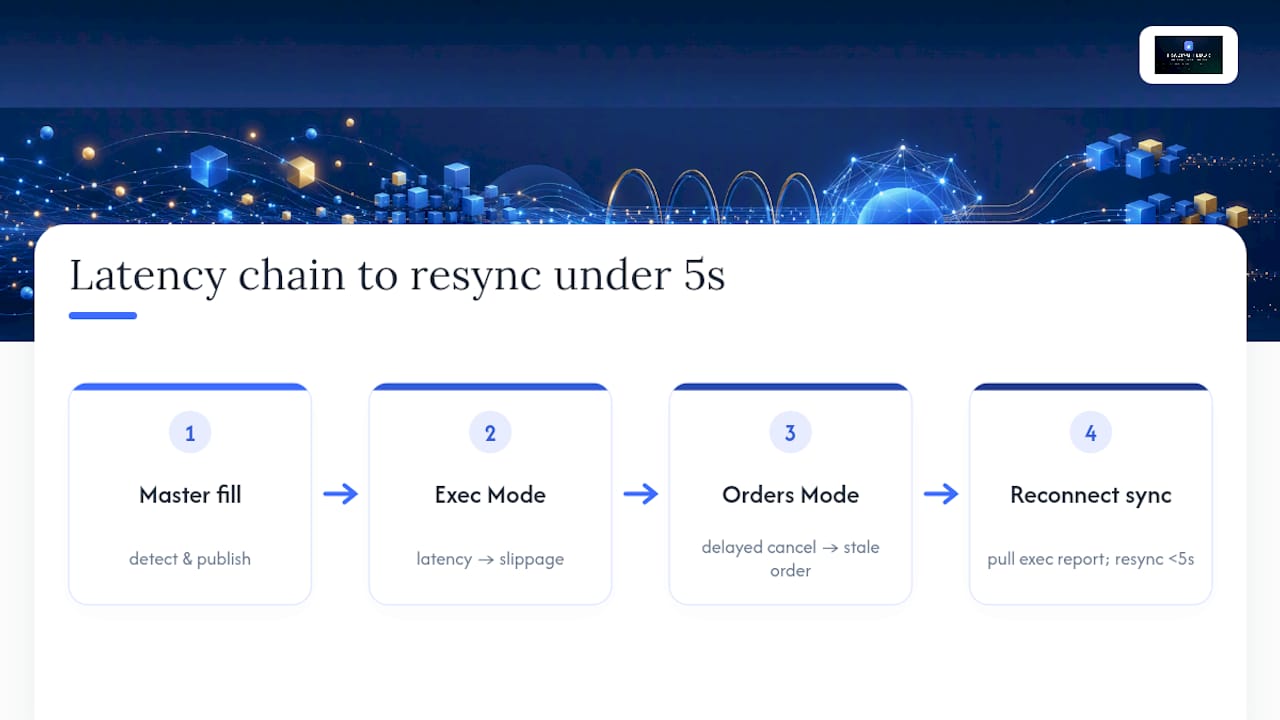
In Executions Mode, latency between the master’s fill detection and the follower’s market order directly widens your slippage. Latency between the master’s fill detection and the follower’s market order can cause entry price differences across accounts, even when every order executes exactly as designed. In Orders Mode, latency shows up differently: a delayed cancel or replace can leave a follower holding a stale order that the master already adjusted or canceled minutes earlier.
Network delays during reconnection are the most dangerous version of this problem because they’re invisible until you go looking. A follower platform can show a position that hasn’t updated in several minutes while quietly presenting it as current. That’s why reconnection-to-sync targets under 5 seconds matter as an operational benchmark, not just a nice-to-have metric.
Mitigation comes down to a short list of habits: run periodic latency tests between your master and follower connections, set slippage caps so a delayed fill doesn’t silently expand your risk, and never treat a follower’s on-screen position as accurate immediately after a reconnect. Pull the broker’s execution report first every time.
How Do You Prevent Future Order Mismatches?
Prevention beats reconciliation every time, mostly because a mismatch caught before it grows never touches your P&L. The firms with the fewest recurring problems all share the same habit: they monitor position delta continuously instead of checking it manually at the end of the day.
Set automated alerts on any nonzero delta between master and follower net positions, with a threshold tight enough to catch a single-contract discrepancy. Pair that with a daily reconciliation against the broker’s own aggregate report, since a copier’s internal dashboard can drift out of sync with reality without ever throwing an error on its own.
Standardize your dedupe key across every account from day one. Using broker trade ID as the primary key, with timestamp, side, size, and price as fallback, is what keeps a busy trading day from turning into a manual reconstruction project later. A single consolidated reconciliation log across every account, rather than a separate log per broker, makes patterns visible that you’d otherwise miss entirely.
Finally, treat every past mismatch as a test case. If a partial fill caused a delta last month, add a specific check for partial fills to your reconciliation routine going forward. Prevention isn’t a policy document. It’s a growing list of specific failure modes you’ve already seen and built a check against.
Why Most Reconciliation Advice Misses the Point
Most guidance on this topic reads like a process map: detect, investigate, resolve, move on. That framing is fine on paper and mostly useless the first time a follower account shows a stale position ten minutes after a real disconnect. The advice that actually holds up under live conditions is the boring stuff: broker execution reports as the only source of truth, a single dedupe key applied consistently, and a reconnection test run under real market volatility instead of a quiet overnight window.
Where conventional advice falls short is treating every mismatch as equally investigable on a clean timeline. In practice, you’re often triaging while the market is still moving and a second trade is already queued. The firms that handle this well aren’t the ones with the most detailed documentation. They’re the ones who tested their reconnection and resync process before they needed it under pressure.
Prioritize testing over process. Run the reconnection simulation, measure your actual resync time, and fix what’s slow before a real disconnect forces the question.
— KennyTrades
How Trading Floor Supports Your Reconciliation Checklist
Our trade copier mirrors net positions in real time across funded and evaluation accounts, with per-account risk controls and push notifications that flag a position delta as soon as it appears, not after you happen to check.

If you’re managing accounts across Tradovate, TopstepX, or Rithmic-based brokers, the reconciliation workflow above is easiest to validate on a live setup rather than in theory. Run the 10-trade checklist from this guide during your trial: mirror small-size trades across a couple of follower accounts, measure the delta after each one, and time how long it takes to resync after a deliberate disconnect. If you’re running accounts with Take Profit Trader, TradeDay, or Lucid Trading, those integrations are ready to test directly. Check current platform status anytime at Trading Floor’s system status page if you’re diagnosing a connectivity issue rather than a copier setting. Start a free trial and run the checklist against your own account setup before you commit to anything.
Where to Go Deeper on Reconciliation and Controls
For the regulatory backbone behind audit trails and prompt reconciliation, the Comptroller’s Handbook on futures commission merchant activities is the primary reference. For copier mode mechanics, see the breakdown of Executions Mode versus Orders Mode. Trading Floor’s own guides on trading error logs and evaluation phase checklists cover technical setup and audit documentation in more depth. If you’re setting up a compliance-friendly execution desk, this execution setup guide is worth a read too.
Sources
- Executions Mode vs Orders Mode | NinjaTrader Trade Copier
- Futures Commission Merchant Activities (Comptroller’s Handbook)
- Reconciling trades across multiple brokers (2026 guide)
Recommended
- Why Synchronizing Evaluation Accounts Helps Prop Traders
- Trades Copied Right: Real-Time Mirroring for Prop Traders
- Multi-Platform Trading Best Practices for Prop Traders
- Why Prop Traders Need Error Reduction to Pass Challenges
Trading Floor mirrors every trade across your Tradovate, TopstepX & Rithmic accounts in real time, from $25/mo.
Start copying →