42 ms Benchmark: Symbol Filters for Multi Account Copy Trading

Symbol filters let you control exactly which instruments get mirrored between accounts by including, excluding, or remapping tickers before a trade copier executes them. The reliable pattern for multi-account, multi-broker mirroring is a tight whitelist paired with symbol mapping for broker-specific suffixes, plus per-account risk caps that limit how much damage a bad signal can do. Trading Floor applies exactly this combination across Tradovate, TopstepX, and Rithmic accounts, and its own latency benchmark (roughly 42 ms from a TradingView alert into Tradovate) shows why fast, filtered mirroring matters for slippage-sensitive setups.
TL;DR:
- Using narrow whitelists with symbol mapping and risk caps prevents unintended trades and limits potential losses from bad signals.
- Exact symbol and account-specific naming are critical, with mismatches causing silent trade rejections, especially if mapping rules are missing or incorrect.
- Latency around 42 milliseconds impacts slippage on fast-moving contracts, making speed an important factor for effective filtering and copying.
- Regularly testing in demo accounts and monitoring rejection logs helps identify and fix mapping errors, time zone issues, or unexpected symbol universe shifts.
- Trading Floor’s real-time position mirroring with integrated filtering reduces errors and provides tighter control over multi-account, multi-broker setups.
Table of Contents
- How symbol filters work in copy trading
- How do you set up symbol filters step by step?
- What do good symbol filter configurations look like?
- What operational factors affect filter reliability?
- What are the most common symbol filter mistakes?
- Trading Floor’s approach to symbol filtering
- Lessons from running symbol filters across multiple funded accounts
- Get symbol filtering and multi-account mirroring running today
- Where to verify copier settings and broker registration
- Sources
How symbol filters work in copy trading
A symbol filter sits between the signal a leader generates and the order your copier sends to a follower account. Every filter type answers the same question in a different way: should this specific trade get copied, and under what name?
Include and exclude logic is the simplest layer. An include (whitelist) rule tells the copier “only mirror trades on these tickers,” full stop. An exclude (blacklist) rule flips that: “mirror everything except these.” The distinction matters at execution time. A whitelist rejects unknown signals by default, which is safer when a leader occasionally trades something outside their usual playbook. A blacklist assumes you trust everything until proven otherwise, which is riskier but less maintenance if the leader’s universe is wide and stable.
Magic number, or strategy ID, filtering works one level deeper than the symbol itself. Many leaders run more than one strategy on the same account, each tagged with a unique identifier attached to its orders. Filtering by magic number lets you copy only the swing strategy and ignore the scalping bot running in parallel, even though both might trade the same instrument. This is the layer traders miss most often, then wonder why their copied performance doesn’t match the leader’s published results.
Symbol mapping, sometimes called suffix normalization, solves a problem that has nothing to do with strategy and everything to do with broker plumbing. A leader on one broker might trade “ES1!” while your follower account on another platform lists the same contract as “ESZ26” or carries a broker-specific suffix. Without a mapping rule, the copier sees two different symbols and simply won’t execute the trade. Copy APIs increasingly build this in natively. MetaAPI’s CopyFactory model, for example, ships with dedicated symbolFilter and symbolMapping fields so the platform can remap a ticker before it ever reaches the follower account.
Time filters and content filters round out the toolkit. Time filters restrict copying to specific trading-hours windows, useful if a leader occasionally trades illiquid overnight sessions you want no part of. Content or text filters scan the signal payload itself and block or allow trades based on keywords, useful for leaders whose alerts include tags like “test” or “manual override.” Documentation from copier platforms confirms these four layers, symbol, magic number, time, and content, form the core configuration stack that most serious copy setups rely on.
Here’s the practical breakdown of what each filter type controls:
- Symbol filter: which instruments get copied at all
- Magic number filter: which strategy on a shared account gets copied
- Symbol mapping: how a ticker translates between brokers with different naming conventions
- Time filter: which hours of the trading day are eligible for copying
- Content filter: which signal text patterns get allowed or blocked
How do you set up symbol filters step by step?
Before touching any settings, spend fifteen minutes auditing what the leader account actually trades. Pull a week or two of trade history and list every symbol that appears. This single step prevents the most common early mistake: building a whitelist that’s too narrow and silently drops legitimate trades.
- Decide whitelist vs. blacklist based on the leader’s range. If the leader consistently trades three to six instruments, whitelist them by exact name. If they trade a wide, shifting universe and you only want to exclude one or two problem symbols, use a blacklist instead.
- Enable the symbol filter and enter exact broker symbol names. Case sensitivity and formatting matter here. “MES” and “mes” might read as identical to you, but a copier reading raw strings won’t always agree. Copier documentation stresses using exact-name formatting, comma-separated where required, to avoid silent mismatches.
- Add mapping rules for every follower account with a different naming convention. If your leader trades on one broker and your evaluation account sits on another, write out the mapping pair (source symbol to destination symbol) for each instrument before you go live.
- Set risk caps alongside the filter, not after. Configure a per-trade position size cap and a daily loss limit on each follower account. Filters control what gets copied; risk caps control how much damage gets done if a filtered trade still goes wrong. Copier guides consistently recommend pairing filter rules with per-trade and daily loss limits rather than treating them as separate settings.
- Test everything in a demo or evaluation account first. Run the leader’s signals through your filtered configuration without live capital attached and watch for rejected trades, unmapped symbols, or filters that block more than expected.
- Monitor logs for blocked signals during the test window. Most copiers keep a rejection log. Read it. A trade blocked because of a naming mismatch looks identical, at a glance, to one blocked intentionally.
- Run a small-lot live test before scaling up. Once the demo run looks clean, copy at minimum size for a day or two on live accounts before trusting the configuration with full position sizing.
Pro Tip: Pre-declare every symbol the leader trades in a “symbols traded” list if your copier supports it. CopyFactory’s model does this specifically because a copier that already knows the instrument names doesn’t waste the first live trade learning them on the fly, which is exactly when execution delays and rejects tend to happen.
What do good symbol filter configurations look like?
Most working configurations fall into a handful of repeatable patterns. Knowing which one fits your setup saves a lot of trial and error.
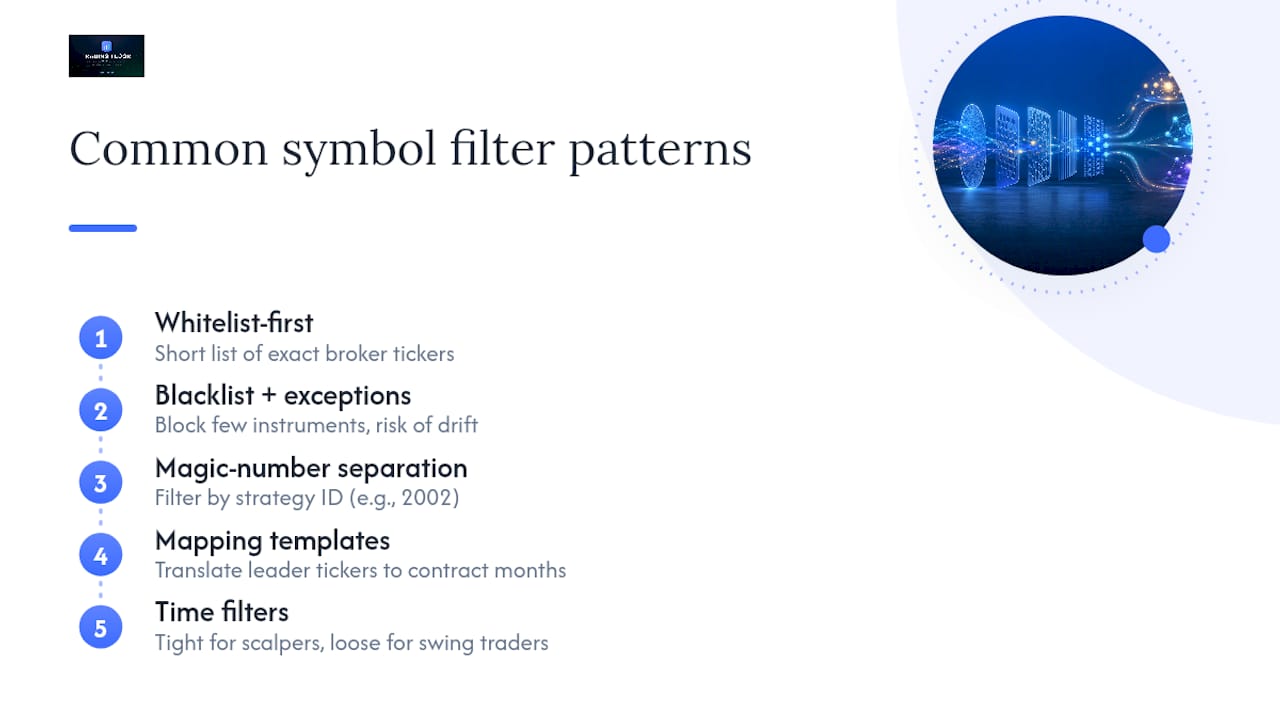
Whitelist-first, small and specific. If a leader trades five index futures and nothing else, your whitelist is those five tickers, written exactly as your broker lists them: ES, NQ, YM, RTY, MES. Keep this list as short as the leader’s actual behavior allows. TradeEcho’s copy trading settings guide is direct about this: a ticker filter should stay short and purposeful, because padding it with “just in case” symbols defeats the point of filtering in the first place.
Blacklist with named exceptions. Works when a leader trades broadly but you want one or two instruments removed, say, an illiquid micro contract that adds slippage without adding return. The risk here is drift: a leader who adds a new symbol to their normal rotation gets copied automatically, since a blacklist admits everything not explicitly named.
Magic-number separation for multi-strategy leaders. If a leader labels a scalping bot with magic number 1001 and a swing strategy with 2002, and you only want the swing side, filter to 2002 and skip the symbol filter question entirely for that leader, since the strategy ID already narrows execution.
Mapping templates for common suffix patterns. A typical mapping entry looks like ES1! → ESZ26 or NQ.CME → NQZ26, translating a leader’s generic ticker into the exact contract month your follower account needs. Build this list once per broker pair and reuse it.
Time filters split naturally by trading style. Scalpers copying a leader’s five-minute setups usually want tight time windows, matching only the leader’s active session, since a delayed fill on a scalp trade defeats the strategy. Swing traders holding positions for days can run looser time filters, since a few hours of delay on entry rarely changes the outcome.
What operational factors affect filter reliability?
Filters only work as well as the plumbing underneath them. Three things determine whether a well-designed filter configuration actually performs in live conditions: symbol normalization, latency, and account-type support.
Poor symbol normalization is the single biggest cause of silent trade rejects in multi-broker copying. When a leader’s ticker doesn’t match a follower account’s naming convention and no mapping rule exists, the trade simply fails, often without an obvious error message. Platforms that build symbol mapping into the core API rather than treating it as an afterthought see meaningfully fewer first-trade rejections, since the translation happens automatically instead of depending on a trader remembering to configure it.
Latency compounds slippage risk, especially for filtered trades on fast-moving contracts. Trading Floor’s own integration benchmark shows roughly 42 milliseconds from a TradingView alert into a Tradovate execution, a figure worth using as a rough baseline when evaluating any copier’s speed claims. The faster the pipe, the less a symbol filter’s processing time erodes the fill price your follower account gets.
Account and broker support varies more than most traders expect. Suffix mismatches show up most often between:
- Futures accounts using contract-month suffixes (Z26, H26) versus generic continuous symbols
- Prop firm evaluation accounts with broker-specific naming layered on top of standard tickers
- Multi-broker setups where one leg runs on Rithmic and another on a direct broker feed
Watch for auto-reconciliation features, too. A copier that flags a mismatched position between leader and follower accounts, rather than letting it drift silently, catches mapping errors before they compound into a real loss.
What are the most common symbol filter mistakes?
Over-filtering is the mistake that does the most invisible damage. Strip too many symbols from a leader’s universe, somewhere north of 20 to 30 percent of their normal trading, and you’re no longer copying their strategy. You’re copying a different, unbacktested version of it. The leader’s published track record stops meaning anything for your filtered subset, since heavy filtering changes the underlying strategy more than most traders account for.
Naming mismatches cause the second most common failure, usually from case sensitivity or a missing suffix. “MES” versus “MESZ26” looks trivial to a human eye and invisible to a copier expecting an exact string match.
Run this debugging sequence when trades stop copying as expected:
- Check the blocked-signal log first. Most rejects show up here with a reason code before you need to guess.
- Search for “symbol not found” errors specifically. This almost always means a mapping rule is missing or misspelled.
- Re-simulate the exact failed trade in demo. Reproduce the conditions rather than guessing at a fix.
- Check time filter boundaries against both accounts’ timezones. A filter set in the wrong timezone silently blocks trades that should have passed.
Pro Tip: If more than a handful of the leader’s trades get rejected in a single week for reasons unrelated to your intended filter, stop and re-evaluate. That’s usually a sign the leader’s symbol universe has shifted, not that your configuration is broken.
Trading Floor’s approach to symbol filtering
Trading Floor is built around real-time position mirroring rather than signal copying, which changes how filtering works in practice. Instead of relaying a trade alert, it mirrors the leader’s net position directly across every connected funded or evaluation account, with per-account risk controls, contract multipliers, and symbol mapping applied automatically to prevent size or naming mismatches between brokers.
Recommended settings for multi-broker mirroring: map every symbol pair before going live, set a per-trade position cap on each follower account independently, and enable push notifications so a blocked or mismatched trade doesn’t sit unnoticed. Combined with the platform’s 42 ms TradingView-to-Tradovate latency, that gives multi-account traders a monitoring benchmark worth checking their own setup against.
Lessons from running symbol filters across multiple funded accounts
Running filters across several funded accounts teaches you fast that the configuration you set on day one rarely survives contact with a live market. A few rules hold up consistently:
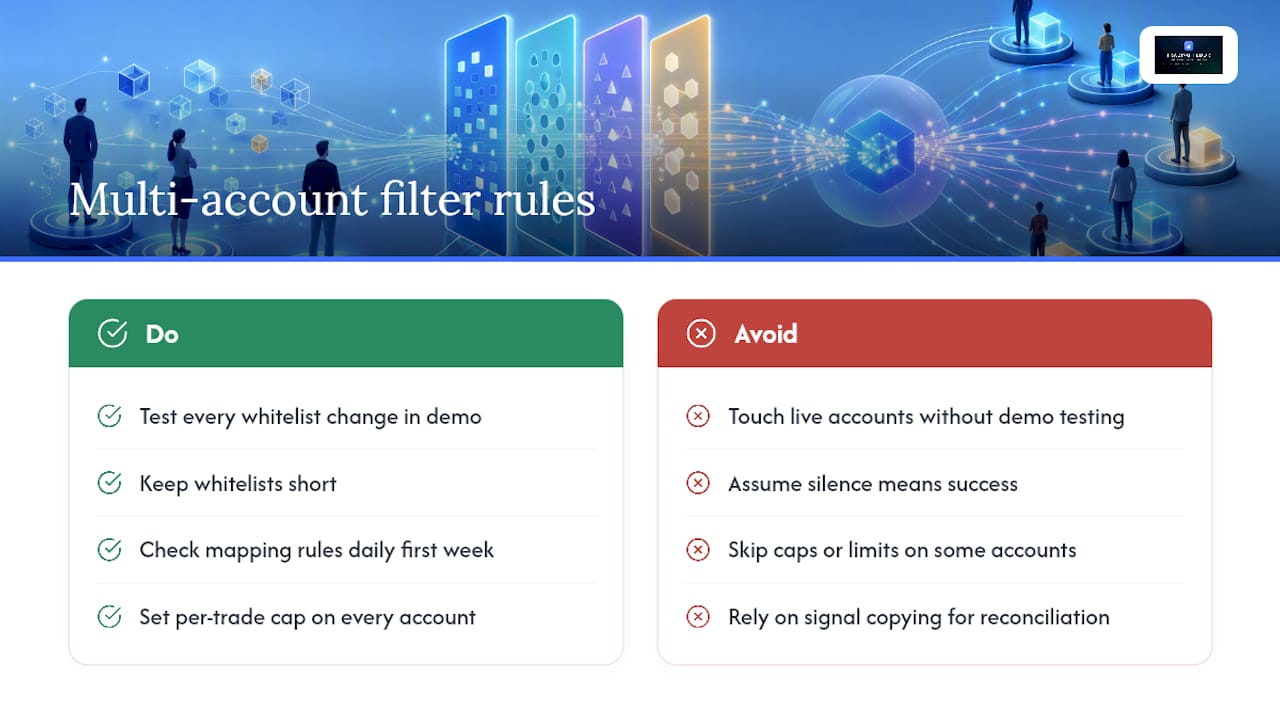
Test every whitelist change in demo before touching a live account, no exceptions, even for a change that feels obvious. Keep whitelists short. Check your mapping rules daily during the first week of a new leader relationship, since a missed contract rollover breaks mapping silently. Set a per-trade cap and a daily loss limit on every account, not just the ones that feel riskier. Read the blocked-signal log at least once a day rather than assuming silence means success.
Reconciliation errors dropped noticeably after switching from signal-based copying to real-time position mirroring, mostly because there’s no gap between what the leader holds and what the follower account reflects. That single change removed most of the manual cross-checking that used to eat an hour every evening.
— KennyTrades
Get symbol filtering and multi-account mirroring running today
Trading Floor gives you what a generic signal copier can’t: real-time position mirroring with symbol mapping, contract multipliers, and per-account risk caps built in from the start, not bolted on. That means fewer rejected trades from suffix mismatches, tighter control over exposure on each funded account, and push notifications the moment something needs your attention.

The platform runs in the cloud with no installation, works across Tradovate, TopstepX, and Rithmic, and supports group account management if you’re coordinating more than one trader’s accounts. If you manage evaluation or funded accounts across multiple firms, start with the TradeSyncer alternative trial to get mapping and risk caps configured on your accounts, or check the Tradovate-specific copier setup if that’s where most of your accounts sit. Either path gets you filtering, mapping, and monitoring live within a day.
Where to verify copier settings and broker registration
- Trading filters configuration guide, for symbol, time, and content filter syntax across common copier platforms
- CopyFactory strategy model documentation, for symbolFilter and symbolMapping field structure
- Copy trading risk settings guide, for pairing filters with position caps and daily loss limits
- NFA basic profile lookup, for verifying a U.S. futures broker or firm’s registration status before connecting any account
- Types of trade copying strategies guide, for matching filter patterns to scalping versus swing strategies
Sources
- copier docs - trading filters guide
- Strategy - CopyFactory 2 - fast cloud copy trading API
- Copy Trading Preferences: Every Setting Explained | Trade Echo
Recommended
- Take Profit Trader Trade Copier — mirror one trade across every Take Profit Trader account
- Common Automated Investing Mistakes for Multi-Account Copiers
- Tradeify Trade Copier — mirror one trade across every Tradeify account
- Trading Account Delegation Best Practices for Prop Traders
Trading Floor mirrors every trade across your Tradovate, TopstepX & Rithmic accounts in real time, from $25/mo.
Start copying →