Sync Evaluation and Funded Accounts: 2026 Guide

Syncing evaluation and funded accounts is defined as the process of replicating trades from a single master account to multiple evaluation and funded accounts simultaneously, with proportional risk controls applied to each. Traders managing two, five, or ten accounts at once face a real problem: manual execution across accounts multiplies errors and creates inconsistent risk exposure. The solution is account synchronization, the industry term for this process, using trade copier software paired with centralized journaling tools. Tradingfloor mirrors a leader’s net position across any combination of funded and evaluation accounts in real time, making it one of the most direct applications of this approach available today.
What tools enable effective sync of evaluation and funded accounts?
Trade copiers, prop firm journals, and centralized dashboards form the three pillars of any working synchronization setup. Each serves a distinct function, and skipping one creates gaps that cause account failures.
Trade copiers replicate orders from a master account to follower accounts automatically. The best ones include a “Disable on Error” safety feature that halts copying when an account breaches limits or disconnects, preventing cascading errors across your entire portfolio. Advanced copiers also display real-time synchronization status so you can spot a dropped connection before it costs you a trade.
Prop firm journals handle the compliance layer. Centralized journals import trade data from all connected accounts automatically and show drawdown and profit targets in real time. They flag impending rule violations before they occur, which turns a reactive problem into a proactive one.
The cloud vs. local copier decision matters more than most traders realize. Cloud-based copiers run 24 hours a day without requiring your personal machine to stay on. Local copiers depend on your hardware and internet connection, which introduces single points of failure. For traders running accounts across platforms like Tradovate and TopstepX, a cloud solution removes the uptime risk entirely.
| Tool category | Core function | Key feature to require |
|---|---|---|
| Trade copier | Replicates orders across accounts | “Disable on Error” and real-time sync status |
| Prop firm journal | Tracks drawdown and rule compliance | Automatic trade import and violation alerts |
| Centralized dashboard | Unified portfolio view | Total equity display and per-account metrics |
| VPS hosting | Reduces latency for local copiers | Sub-10ms execution and 99.9% uptime |
Pro Tip: If you use a local trade copier, run it on a Virtual Private Server (VPS) rather than your home machine. VPS setups reduce latency and keep your copier running through power outages and internet drops, which are the two most common causes of sync failures.

How do you set up proportional position sizing step by step?
Proportional position sizing is the method that keeps risk consistent across accounts of different sizes. Without it, a 5-lot trade on a $100,000 master account becomes a 5-lot trade on a $25,000 follower account, which is four times the relative risk.
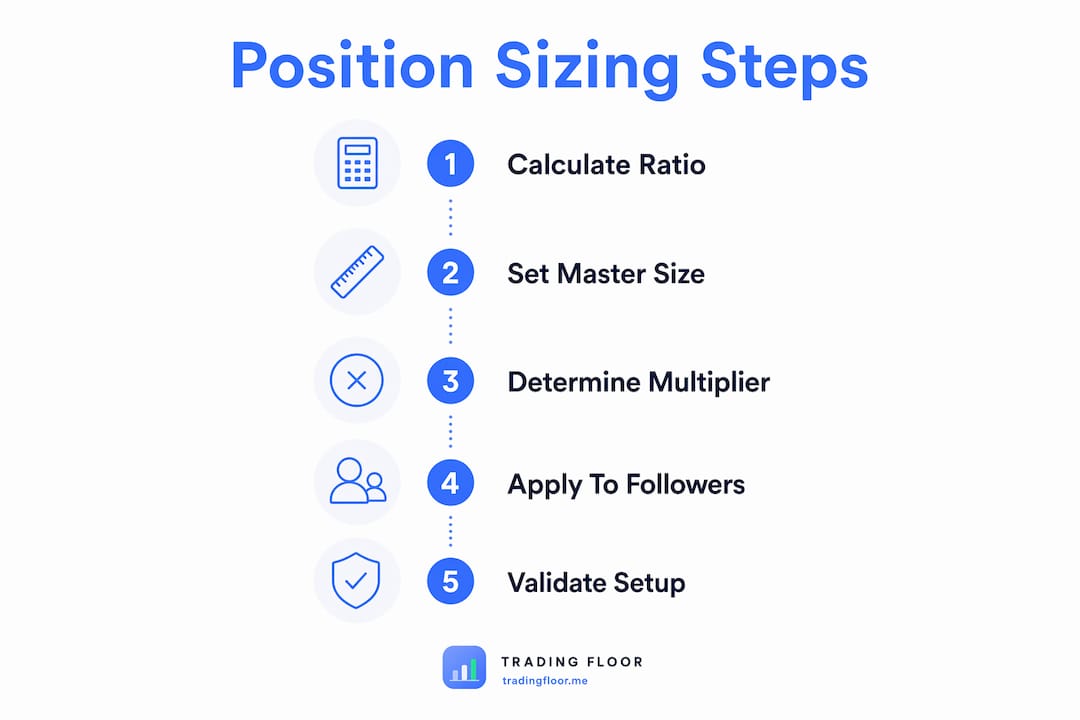
The industry-standard formula is straightforward: Follower Multiplier = Follower Account Size divided by Master Account Size. A $25,000 follower account linked to a $100,000 master account uses a 0.25 multiplier. Every trade the master places gets scaled to 25% of the original size on the follower.
Follow these steps to configure your setup correctly:
- Identify your master account. Choose the account with the most permissive rules or the one you trade most naturally. This becomes the source of all signals.
- Calculate each follower multiplier. Divide each follower account size by the master account size. Write these down before entering them into your copier software.
- Enter multipliers into the copier. Input each calculated multiplier into the corresponding follower account slot in your trade copier settings. Double-check every entry.
- Map instruments carefully. Confirm that the instrument names match across brokers. ES on one platform may appear as ES1! or MES on another. A mismatch causes the copier to skip or misfill orders.
- Run test trades with minimum lots. Test trades with minimal lots across all accounts before going live. Verify that each follower account receives the correct scaled position.
- Calibrate and adjust. Compare the filled prices and sizes across accounts after each test trade. Adjust multipliers if any account shows a consistent sizing error.
- Scale up gradually. Once your test trades confirm accurate replication, increase to your normal position sizes. Do not skip the test phase, even if you are in a hurry to start trading.
Pro Tip: Start with just one or two follower accounts when you first configure a sync setup. Validate that the copier behaves correctly at small scale before adding more accounts. Adding accounts before the system is verified creates compounding errors that are hard to trace.
For traders using multi-broker synchronization strategies, the instrument mapping step is where most early failures happen. Spend extra time here.
What are the common challenges when syncing evaluation and funded accounts?
Desync errors, rejected orders, and multiplier mismatches are the three most frequent technical failures in multi-account synchronization. Each has a specific cause and a specific fix.
- Desync due to latency. When your copier connection drops briefly, the master account executes a trade that follower accounts never receive. The fix is monitoring your copier’s real-time sync status and setting up automatic reconnection alerts.
- Rejected orders. Follower accounts sometimes reject orders because the calculated lot size falls below the broker’s minimum or exceeds the account’s position limit. Adjust your multiplier or your master account’s base size to keep follower orders within acceptable ranges.
- Multiplier mismatches. Entering 0.25 instead of 0.025 is a common data entry error that causes a follower account to take ten times the intended risk. Always verify multipliers against your written calculations before saving settings.
- Approaching drawdown limits. Each prop firm sets its own daily loss limit and maximum drawdown rules. Monitoring drawdown data holistically across all accounts prevents a situation where one account quietly approaches its limit while you focus on another.
- Compliance and identity issues. Prop firms sometimes audit IP addresses and trading behaviors during payout periods. All linked accounts must be under the same legal owner to avoid violations. No software workaround substitutes for legal ownership compliance.
The psychological challenge is equally real. Watching one account lose while another gains triggers the urge to intervene manually. Treating the portfolio as a managed fund rather than a collection of individual accounts removes that emotional trigger. Your metric is total portfolio equity, not any single account’s daily result.
Pro Tip: Use your prop firm journal to set early-warning thresholds at 70% of each account’s daily loss limit. Getting an alert at 70% gives you time to reduce position size or stop trading for the day before you breach the actual limit.
For a deeper look at drawdown management across funded accounts, the rules vary significantly between firms, and knowing them in advance prevents avoidable failures.
How do you optimize strategy across evaluation and funded accounts?
Funded accounts reward consistency. Evaluation accounts reward speed. These two requirements pull in opposite directions, and failing to recognize the shift is the most common reason traders lose funded accounts shortly after passing evaluations.
Funded accounts require a consistent, moderate trading style, unlike evaluation accounts, which incentivize aggressive position-taking to hit profit targets quickly. Ignoring this shift causes funded phase failure even for traders who passed evaluations with strong results.
The practical solution is to use tagging and journaling tools to separate performance data by account type. Journaling tools tag trades by account phase, allowing you to run distinct performance reviews for evaluation trades and funded trades side by side. This separation shows you exactly where your strategy needs to change.
Key performance metrics to monitor for each account type:
- Win rate by phase. A high win rate during evaluation that drops sharply in funded trading signals over-aggression during the evaluation phase.
- Average risk per trade. Funded accounts should show lower average risk per trade than evaluation accounts. If they do not, your sizing has not adjusted.
- Drawdown velocity. How fast you approach your drawdown limit matters as much as whether you breach it. Slow drawdown velocity signals controlled trading.
- Profit factor by phase. Profit factor (gross profit divided by gross loss) should remain stable or improve in funded trading. A declining profit factor signals strategy drift.
| Metric | Evaluation target | Funded target |
|---|---|---|
| Risk per trade | Higher, to meet profit targets | Lower, to protect the account |
| Drawdown velocity | Faster acceptable | Slower preferred |
| Profit factor | Above 1.5 | Above 1.5, ideally improving |
| Trading frequency | Higher acceptable | Consistent, not forced |
Understanding evaluation account rules before you start syncing helps you design a strategy that works in both phases without requiring a complete overhaul at the transition point.
Key Takeaways
Syncing evaluation and funded accounts requires proportional position sizing, centralized compliance monitoring, and a clear strategy shift from aggressive evaluation trading to consistent funded account management.
| Point | Details |
|---|---|
| Use the multiplier formula | Divide follower account size by master account size to set correct position scaling. |
| Test before going live | Run minimum-lot test trades across all accounts to verify instrument mapping and sizing. |
| Monitor drawdown holistically | Track total portfolio drawdown, not individual account results, to prevent compliance breaches. |
| Shift strategy at funding | Reduce risk per trade when moving from evaluation to funded status to protect the account. |
| Use early-warning alerts | Set journal thresholds at 70% of daily loss limits to catch problems before they become violations. |
What I’ve learned from managing multiple synced accounts
The part nobody talks about is how disorienting it feels the first time you watch five accounts move simultaneously. Your instinct is to treat each one as a separate decision. That instinct will cost you money.
The traders I’ve seen succeed with multi-account synchronization all share one habit: they stop looking at individual account P&L during the trading day. They set their rules, configure their copier, and then watch total portfolio equity as a single number. That mental shift is harder than any technical setup, but it is the actual skill that separates traders who scale from those who stay stuck at one account.
On the tool side, I have a strong opinion: cloud-based copiers are not optional if you are serious about this. I ran a local copier for three months and lost two trades to internet outages. Switching to a cloud setup eliminated that problem entirely. The VPS route works too, but it adds a maintenance layer that most traders underestimate.
The other thing I would tell anyone starting this process: journal obsessively before you scale. The performance data from your early synced trades tells you whether your multipliers are correct, whether your strategy holds up across accounts, and whether you are emotionally ready to manage the portfolio size you are targeting. Skipping that data collection phase is the fastest way to fail at scale.
Start with two accounts. Get them running cleanly for 30 days. Then add more.
— KennyTrades
Tradingfloor makes multi-account sync practical
Managing the technical side of account synchronization takes time away from actual trading. Tradingfloor is built specifically for prop traders who need to mirror positions across multiple funded and evaluation accounts without building a custom setup from scratch.
Tradingfloor mirrors the leader’s net position across any connected account in real time, with individual risk controls applied per account. The platform runs in the cloud, so there is no software to install and no local machine to keep running. Real-time notifications and trade limit controls mean you stay within each firm’s rules without manually checking every account. Traders using platforms like Tradovate and TopstepX can connect accounts directly and start syncing without complex configuration. For traders ready to scale, Tradingfloor’s pricing is structured to grow with your account count.
FAQ
What is account synchronization in prop trading?
Account synchronization is the process of replicating trades from a master account to multiple follower accounts automatically, with proportional sizing applied to each. It eliminates manual execution errors and keeps risk consistent across all accounts.
How do I calculate the right multiplier for each follower account?
Divide the follower account size by the master account size. A $50,000 follower linked to a $100,000 master uses a 0.5 multiplier, so every trade is replicated at half the master’s position size.
Why do funded accounts require a different strategy than evaluation accounts?
Funded accounts penalize drawdown more severely than evaluation accounts reward profit speed. Traders who carry aggressive evaluation habits into funded trading frequently breach drawdown limits within the first few weeks.
What happens if my trade copier disconnects mid-session?
Advanced trade copiers include a “Disable on Error” feature that halts copying when a connection drops, preventing partial fills and mismatched positions. Always confirm your copier has this feature before using it on live funded accounts.
Do prop firms allow traders to sync multiple accounts?
Most prop firms permit multi-account trading as long as all accounts are under the same legal owner. Firms audit IP addresses and trading patterns during payout periods, so legal ownership compliance is non-negotiable regardless of which synchronization tools you use.
Recommended
- Funded Account Risk Rules Explained for Prop Traders — Trading Floor
- Top 3 technests.ai Alternatives 2026 — Trading Floor
- Top 4 nbs360.com Alternatives for 2026 — Trading Floor
- Types of Trading Evaluation Account Rules Explained — Trading Floor
Trading Floor mirrors every trade across your Tradovate, TopstepX & Rithmic accounts in real time, from $25/mo.
Start copying →