Stop Accidental Copies: 5 Steps to Exclude Accounts for Prop Traders

You exclude an account from copying by turning off its individual “Copy” toggle, removing it as a follower, revoking its investor or read-only credentials, or flattening its open positions through a kill switch. All four stop new orders from reaching that account immediately. Before you do any of this, check your prop firm’s copying rules, since some programs treat inbound copying between accounts as a violation.
TL;DR:
- Excluding an account requires pausing copying, flattening open positions, revoking credentials, and confirming it no longer appears as an active follower.
- Always identify the account by its official ID and verify its funding status before making any exclusion or credential changes.
- Prop firms have different rules about copying, with some banning intra-account copying or third-party management, so confirm policies beforehand.
- Testing exclusions with small trades and rechecking the follower list after updates prevents silent failures or unexpected trades.
- Permanent exclusion involves credential revocation and group removal, while temporary pauses keep the connection and credentials active for quick reactivation.
Table of Contents
- The Immediate Checklist to Exclude an Account Right Now
- Step-by-Step: How to Disable, Remove, or Isolate a Follower Account
- What Prop-Firm Rules to Check Before Excluding or Reconnecting Accounts
- How to Test an Exclusion and Confirm It Actually Worked
- Troubleshooting: Why an Excluded Account Still Receives Copies
- Privacy and Security Considerations When Excluding Accounts
- How Excluding Accounts Changes Your Overall Portfolio Numbers
- Temporary Pause vs. Permanent Exclusion: What’s the Real Difference?
- What I’ve Learned Running Multiple Funded Accounts Through One Copier
- Where Trading Floor Fits Into Your Exclusion Workflow
- Sources
The Immediate Checklist to Exclude an Account Right Now
If a funded or evaluation account is receiving trades it shouldn’t, work through this sequence before you troubleshoot anything else:
- Pause copying globally or disable that account’s individual copy toggle so no new orders route to it.
- Flatten open positions on the excluded account only, leaving other followers untouched.
- Revoke or rotate the investor/read-only credentials tied to that account if the exclusion needs to be permanent.
- Log the change with a timestamp and note it in your team channel or trade journal.
- Confirm the account no longer shows as an active follower in your dashboard’s account list.
Pro Tip: Do the toggle and the flatten in that order, not the reverse. Flattening first while copy is still active can trigger a fresh signal that re-opens the position you just closed.
Most trade-copier dashboards structure this as a follower table with a per-account column for the copy state, a ratio or multiplier field, and a “Flat” button next to each row, according to FutuCopy’s configuration documentation. That layout is close to universal across the category, which is why the checklist above works regardless of which software you run.
Step-by-Step: How to Disable, Remove, or Isolate a Follower Account
Excluding an account correctly means confirming three things before you touch a single setting: which account, what type, and what state it’s in.
- Identify the account by its official account ID, not by a nickname or label you assigned. Confirm whether it’s a funded account or still in evaluation, since some firms treat the two differently for copying purposes.
- Find the per-account “Copy” toggle in the follower list and switch it off, or remove the account from the follower group entirely if you want it gone rather than just paused.
- Flatten existing positions on that account specifically. A flatten action scoped to one account should close its open trades without touching the leader or any other follower.
- Adjust the multiplier or ratio to zero, or move the account into a separate “excluded” group, if you need a softer pause rather than a full removal. This matters when you want to keep the connection alive for later but stop live mirroring today.
- Revoke or rotate the investor/read-only credentials attached to that account. This closes the door on inbound copying at the connection level, not just at the software toggle level.
- Apply per-account trade limits where the platform supports them, such as a daily loss cap or a maximum contract count, so the account self-locks if something slips through.
Standard copier interfaces give you per-account copy toggles, ratio settings, flatten actions, and group-level controls as separate layers, per FutuCopy’s own documentation. That layering is deliberate. A toggle stops new orders. A flatten clears existing exposure. A credential revoke stops the connection itself. Skipping one of the three is the most common reason an “excluded” account keeps trading.
Prop trading guides consistently recommend testing any copier configuration with a single follower before scaling to a full account group, and building in a kill switch you’ve actually rehearsed, according to Plutus Trade Base’s guidance on copying funded accounts. That advice applies just as much to removing an account as adding one. Test the exclusion the same way you’d test the connection.
- Confirm the account ID before every credential change.
- Never rely on the toggle alone if the account holds live positions.
- Re-check the follower list after any platform update.
What Prop-Firm Rules to Check Before Excluding or Reconnecting Accounts
Not every firm treats account copying the same way, and the differences matter more than most traders assume. FundedNext, for example, allows copying between a trader’s own Challenge accounts but caps the combined capital involved and forbids copying between different individuals entirely, with external cloud-based copy tools often restricted outright. Other programs go further. Some prop firms explicitly ban copy trading between different users and classify inbound copying or third-party account management as grounds for immediate termination, per FundingPips’ trading conduct standards.
Before you reconnect an account you previously excluded, or exclude one for the first time, work through this:
- Confirm whether your firm allows copying between accounts you personally own, and check for capital caps or account-count limits.
- Verify which copying methods are permitted. VPS-based setups are frequently allowed where cloud-based services are not.
- Avoid inbound copying entirely if your firm prohibits it, and use investor or read-only access exactly the way the firm prescribes.
- Get written confirmation from firm support for anything ambiguous, and keep that correspondence on file.
Pro Tip: Screenshot the support ticket, not just the reply. Firms update policy pages, and a saved screenshot with a date on it holds up better than a link that might change later.
Detailed rule breakdowns for firms that permit copy trading change often enough that a quick check before making any structural change is worth the five minutes it costs.
How to Test an Exclusion and Confirm It Actually Worked
An exclusion that looks correct in the dashboard can still fail silently. Verify it with a real, if small, test.
- Place a small, reversible test trade on the leader account and watch every follower account, including the one you excluded. It should receive nothing.
- Check the event log and order history filtered by the excluded account’s ID, not just the dashboard summary view.
- Monitor across a full trading session, ideally one that includes a scheduled news event, since volatility exposes timing issues a quiet market won’t.
- Verify behavior in both Orders Mode and Executions Mode if your platform distinguishes between the two, since an exclusion that holds in one mode can leak in the other.
- Build a short post-change checklist you re-run after any platform update or broker migration, since both are common triggers for settings resetting.
Staged testing with a single follower before scaling to a full account group is standard advice across the copy trading literature, and it applies directly here. Test the exclusion the same deliberate way you tested the original connection, rather than assuming a toggle flip is the end of the job.
Troubleshooting: Why an Excluded Account Still Receives Copies
Four issues account for nearly every case of an exclusion that doesn’t hold.
- Open positions weren’t actually flattened. A failed flatten leaves exposure sitting on the account even though the toggle reads “off.” Force-close manually and confirm the fill in the order history before you move on.
- Group-level rules are overriding the per-account toggle. Per-account settings can be inherited from a group configuration, so an account you excluded individually can still trade if it belongs to a group that’s copying. Inspect the group hierarchy directly rather than trusting the individual toggle.
- Symbol or contract mapping is generating unexpected orders. Cross-contract mapping and multiplier settings occasionally produce trades on instruments you didn’t expect, especially across different brokers. Check the mapping table, not just the copy toggle.
- Credential or connection issues are causing order resubmissions. A flaky connection can resend orders that look like new copies. Revoke and recreate the API keys or investor credentials, then retest from scratch.
Disconnected follower accounts typically show as grayed out with copying disabled until reconnected, which is worth checking first since it’s the simplest explanation, according to FutuCopy’s documentation. If the account looks “on” but nothing is copying, or looks “off” but something is, the connection state is usually where the real answer sits.
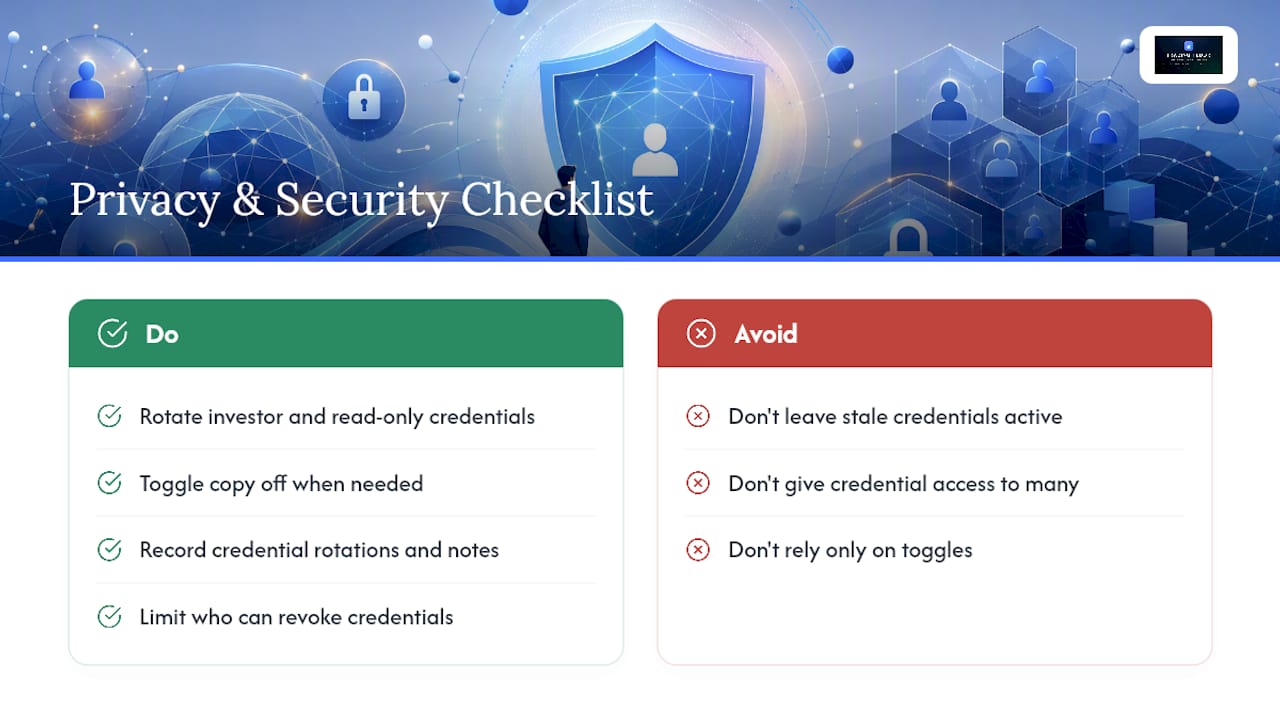
Privacy and Security Considerations When Excluding Accounts
Excluding an account isn’t purely a mechanical setting. It’s also a security boundary. The moment you revoke read-only or investor credentials, you’re cutting off a data pathway, not just a trade pathway, and that distinction matters more than most traders treat it.
Read-only or investor-level access is designed to expose position and balance data without granting order placement rights. When you exclude an account by rotating those credentials rather than just toggling copy off, you eliminate any lingering exposure of that account’s trading data to the copier connection. That’s worth doing even for accounts you plan to reconnect later, since stale credentials sitting active but unused are a quiet risk with no upside.
Keep a record of every credential rotation, and treat that record as part of your security posture, not just your operational log. Documenting setup changes, screenshots, and support correspondence gives you a defense if a dispute arises later over what was connected to what and when, a practice Plutus Trade Base recommends as standard operating procedure for anyone running multiple funded accounts.
There’s also a practical delegation angle. If more than one person on your team can make these changes, restrict who holds credential-level access separately from who holds toggle-level access. A junior trader might reasonably flip a copy toggle off before a volatile session. Fewer people should be able to revoke or reissue investor credentials, since that’s the layer that actually controls account connectivity. Account delegation practices built around that separation prevent a lot of avoidable confusion.
How Excluding Accounts Changes Your Overall Portfolio Numbers
Pulling an account out of a copy group doesn’t just remove that account’s trades. It changes the shape of your combined exposure, sometimes in ways that aren’t obvious until you look at the aggregate.
If you were running five funded accounts through one leader and you exclude one, your total position size across the group shrinks proportionally, but your per-trade risk on the remaining four doesn’t automatically adjust unless you’ve set ratios to compensate. Treating total exposure as a single unit, rather than five separate numbers, is the framework that analysis of multi-account copy trading points to as the way to avoid overexposure when accounts drop in and out of a group. Risk-scaling by account equity, rather than fixed lot sizes, keeps the math consistent whether you’re running three accounts or eight.
There’s a performance-tracking wrinkle too. An excluded account’s trade history stops updating the moment you pull it, which means your blended win rate and drawdown figures across the account group will shift, sometimes making the remaining accounts look better or worse than they actually are relative to your full operation. If you’re reporting performance to a firm or reviewing your own numbers weekly, note the exclusion date in your trade journal so you’re not comparing pre-exclusion and post-exclusion periods as if they were the same dataset.
The upside is real: isolating a problem account, whether it’s hitting daily loss limits or behaving oddly on fills, protects the rest of your portfolio from a single bad connection dragging down accounts that were performing fine on their own.
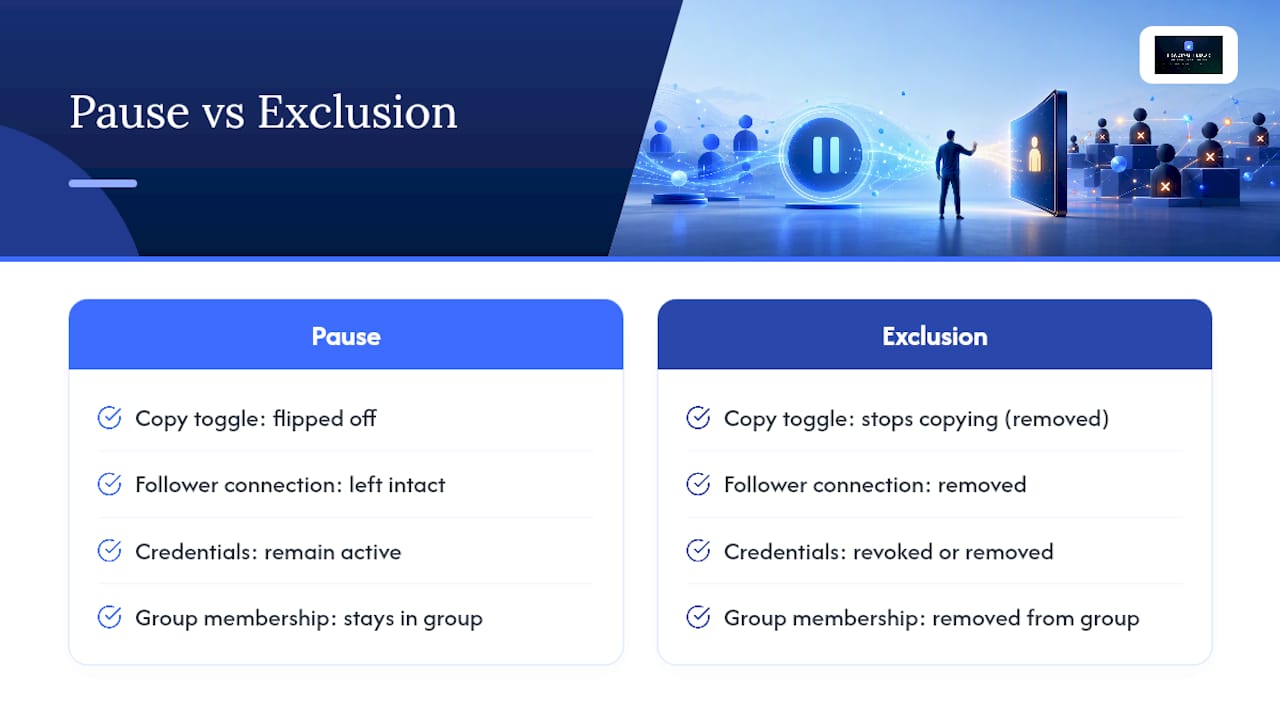
Temporary Pause vs. Permanent Exclusion: What’s the Real Difference?
A pause and an exclusion look similar on the surface. Both stop an account from receiving trades. The difference is in what stays connected underneath.
A temporary pause typically means flipping the copy toggle off while leaving the follower connection, credentials, and group membership intact. You can reverse it in seconds. This is the right move during a volatile news release, a scheduled maintenance window, or any situation where you expect to turn copying back on within hours or days.
An exclusion, in the way most operators mean it, goes further. It usually involves removing the account from the follower group, revoking its investor or read-only credentials, or both. That’s a structural change, not a switch flip, and reversing it means reconnecting from scratch: re-adding credentials, rejoining the group, and retesting the connection.
The practical rule: if you expect to reconnect the account soon, pause it. If you’re excluding it because of a compliance concern, a firm rule violation risk, or a permanent decision to run that account independently, do the full exclusion with credential revocation. Mixing the two up is a common mistake. Traders often leave credentials active “just in case” on an account they meant to exclude permanently, which quietly reopens the security question covered earlier.
What I’ve Learned Running Multiple Funded Accounts Through One Copier
Conservative defaults save you more grief than clever configurations ever will. Every time I’ve added a new follower account, I test it alone first, with a small position size, before letting it run alongside the rest of the group. Staged rollouts catch mapping errors and multiplier mistakes while the stakes are still low, which lines up with the standard industry recommendation to add one follower at a time rather than connecting a full account group at once.
Kill-switch drills matter more than most traders admit. Practicing the flatten sequence on a quiet Tuesday means you’re not fumbling through an unfamiliar menu during a Fed announcement when three accounts are bleeding at once. And keep the audit trail. Every credential rotation, every support ticket, every toggle change goes in a log with a date. It’s tedious. It’s also the only thing that protects you when a firm asks what happened to an account six weeks after the fact.
— KennyTrades
Where Trading Floor Fits Into Your Exclusion Workflow
Manually chasing down toggles, credentials, and flatten buttons across a growing account list gets slower every time you add another funded account. Trading Floor was built around per-account controls from the start, so excluding one account never means touching the settings on the others.

Every follower account in this trade copier software has its own “Copy” toggle, its own flatten action, and its own trade limits, including daily loss caps and max contract counts, so an account can lock itself out automatically before a small problem becomes a big one. Real-time notifications flag the moment an account is excluded or reconnected, and every change lands in an audit log for later review if needed. The practical workflow matches what’s outlined above: toggle off, flatten, revoke the investor key, and record the timestamp automatically instead of doing it by hand.
If you’re running accounts on Tradovate, the Tradovate trade copier applies these per-account exclusion controls directly, with a 30-day free trial to test the workflow on your own account setup before committing to a subscription.
Sources
- What is the copy trading rule at FundedNext
- Trading conduct and security standards — FundingPips
- How to Copy Trade Funded Accounts Safely | Plutus Trade Base
Recommended
- Trading Account Delegation Best Practices for Prop Traders
- How to Copy Trades Across Multiple Prop Firm Accounts Like TopstepX
- Avoid Consistency Rule Violations When Copying Trades
- How to Automate Position Copying in Prop Trading
Trading Floor mirrors every trade across your Tradovate, TopstepX & Rithmic accounts in real time, from $25/mo.
Start copying →