Drawdown Protection for Follower Accounts: A Prop Trader's Guide
Drawdown protection for follower accounts is a set of mechanical, per-account limits that stop a copied account from spiraling into a recovery project. The verdict: layer three controls—a per-provider allocation cap, a per-trade size limit, and an account-level equity stop—and treat none of them as optional. Set these three first:
- Provider allocation cap: no single leader controls more than 10 to 20% of any one follower account’s equity.
- Account equity stop: a hard flatten trigger at 15 to 20% drawdown from peak equity.
- Per-trade max size: a fixed contract or dollar ceiling independent of what the leader is trading.
The math explains the urgency: a 20% drawdown needs a 25% gain just to break even, and a 40% drawdown needs a 66.7% gain to recover. Stops that trigger early are cheap. Stops that trigger late are not.
Key Takeaways
Drawdown protection for follower accounts works only when allocation caps, per-trade limits, and an account-level equity stop operate together as one layered system.
| Point | Details |
|---|---|
| Cap provider allocation | Limit any single leader to 10 to 20% of a follower account’s equity, with 10% as the safer default. |
| Set a hard equity stop | Trigger a full or partial flatten near 15 to 20% drawdown before recovery math turns brutal. |
| Prefer copier-level enforcement | Copier-level automation reacts faster and scales across accounts better than manual monitoring. |
| Test before scaling | Run new configs on micro contract size for one to two weeks before deploying full position size. |
| Use Trading Floor for enforcement | Trading Floor applies per-account equity stops, receipts, and audit logs across Tradovate and TopstepX integrations. |
Table of Contents
- How Drawdown Protection Works on a Follower Account
- The Control Stack: Per-Account Settings You Actually Need
- Copier-Level, Broker-Level, or Manual: Which Enforcement Method Wins?
- Setting Up Drawdown Protection for Apex, Topstep, and MFF Accounts
- Why Drawdown Protection Fails: Latency, Mismatches, and Rejections
- Choosing a Trade Copier That Actually Enforces Drawdown Limits
- Compliance Considerations for Drawdown-Protected Follower Accounts
- What Trade Copier Software with Drawdown Protection Costs
- Connecting Drawdown Controls to Your Existing Trading Setup
- Monitoring Follower Drawdown in Real Time: What the Interface Should Show
- Which Brokers and Platforms Support Follower Drawdown Protection
- Why We Build Per-Account Controls the Way We Do
- Enforce Drawdown Limits Automatically with Trading Floor
- Frequently Asked Questions
- Sources
How Drawdown Protection Works on a Follower Account
The core mechanism is simple: a monitoring layer watches equity in real time and executes a predefined action the instant a threshold is crossed. That’s it. No discretion, no waiting for the trader to notice a red number.
Systems can measure three different things, and the choice matters more than most traders realize. Balance only updates when a trade closes, so it lags during a live losing streak. Sub-account equity within a single copied strategy is narrower but can miss aggregate exposure across multiple providers. Full account equity, marked to market including open positions, is what most copy trading risk management frameworks recommend, because it reflects what you’d actually lose if everything closed right now.
Once a trigger fires, a copier can take one of several actions:
- Pause new copies while existing positions stay open and are managed manually.
- Close copied positions immediately, flattening only what the copier opened.
- Full-account flatten, closing everything regardless of origin.
- Manual review with a cooldown, which blocks new trades until a human clears the account.
Pro Tip: Never let a paused account auto-resume copying the instant equity recovers a few points above the trigger. Build in a manual review step. Automatic re-entry after a drawdown event is how traders turn one bad week into three.
The Control Stack: Per-Account Settings You Actually Need
Think of this as layers, not a single switch. The primary layer is the provider allocation cap. The secondary layer is the account-level equity stop. The tertiary layer is a bundle of trade-level filters that catch what the first two miss.
Cap any single signal provider at 10 to 20% of portfolio equity, with 10% as the conservative default if you’re copying more than one leader into the same account. This alone prevents one bad trader from wiping out a funded evaluation. Layer an account-level hard equity stop near 15 to 20% drawdown on top of that, acting as the portfolio-wide brake regardless of how many providers you’re following.
Below those two, add:
- Per-trade max size, capped independent of the leader’s position size.
- Contract multiplier controls, so a micro contract on the leader’s account doesn’t accidentally map to a full-size contract on yours.
- Symbol filters, blocking instruments your funded account isn’t approved to trade.
- Daily loss caps, which matter more than most traders admit for firms with daily limits.
- Slippage limits, rejecting fills that move too far from the intended entry.
When evaluating any copier for this stack, look for real-time position mirroring rather than signal-only alerts, per-account audit logs, timestamped receipts on every copy, and a trailing-drawdown calculator built for the specific prop firm you’re funded with. Those four features are the difference between a system you can trust and one you’re guessing about.
Copier-Level, Broker-Level, or Manual: Which Enforcement Method Wins?
Copier-level automation is the most flexible and reliable option for multi-account setups, broker-level protections work well as a supplement where available, and manual rules should be your fallback, not your primary plan.
Copier-level enforcement runs the check inside the trade-copier software itself. It’s per-account, it reacts in near real time, and it can apply different rules to different accounts even when they’re all copying the same leader. This is the only approach that scales past two or three accounts without turning into a full-time monitoring job.
Broker or exchange-native rules, like margin-based liquidation triggers, work as a backstop but rarely give you the granularity a prop account needs. They’re built to protect the broker’s capital, not your evaluation pass rate.
Manual procedures, watching a dashboard and closing positions by hand, are the weakest link. Latency alone makes this unreliable once you’re running more than a couple of accounts at once.
Choose copier-level controls as your default whenever you’re mirroring across more than one funded or evaluation account. Reserve broker-level rules as a secondary safety net, and treat manual monitoring as something you do for oversight, never as your primary drawdown defense.
Setting Up Drawdown Protection for Apex, Topstep, and MFF Accounts
That baseline adjusts depending on the leader’s trading style and the specific prop firm’s trailing-drawdown rules, which you can review in detail through resources like evaluation account rule breakdowns.
Three example configs, mapped to common leader profiles:
- Low-frequency futures leader: 15% provider cap, 18% account stop, 2% per-trade risk. Wider tolerance fits fewer, larger trades.
- Aggressive scalper: 8% provider cap, 12% account stop, 0.5 to 1% per-trade risk. Tighter limits offset the higher trade frequency and faster equity swings.
- Multi-asset leader trading across futures and options: 10% provider cap per asset class, 15% account stop, contract multiplier locked per symbol to prevent cross-asset sizing errors.
Before going live, run through this checklist:
- Set the provider allocation cap first, before connecting any leader.
- Enable per-trade caps independent of the leader’s position size.
- Configure the equity stop action, deciding upfront between pause and full close.
- Set a cooldown period requiring manual review before re-copying resumes.
- Test with micro contract size for one to two weeks before scaling to full size.
Run the numbers through Trading Floor’s trailing-drawdown calculator for Apex, Topstep, or MFF before finalizing your equity stop threshold. Trailing-drawdown math differs from static drawdown math, and guessing here is expensive.
Why Drawdown Protection Fails: Latency, Mismatches, and Rejections
The controls above fail most often because of four operational gaps: execution latency, contract-size mismatches, order rejections, and weekend or gap events that jump straight past a stop level.
- Latency: a slow copy engine can execute your stop seconds after the leader already moved further against you. Choose infrastructure built for low-latency mirroring.
- Scaling mismatch: converting a leader’s micro contract into your standard contract at the wrong ratio multiplies your risk without warning. Precise mirroring and auto-reconciliation catch this before it compounds.
- Rejected orders: a broker rejection during high volatility can leave a follower account holding a position the leader already closed.
- Margin calls and gap events: weekend gaps can blow through a static stop entirely, which is why conservative contract multipliers and slippage caps matter as much as the stop level itself.
Check all four during onboarding, and revisit them weekly. Execution logs catch drift before it becomes a blown account.
Choosing a Trade Copier That Actually Enforces Drawdown Limits
The single most important procurement question: does the copier enforce per-account equity stops and per-account limits in real time, or does it just send alerts and hope you’re watching?
Run any candidate through this checklist:
- Confirms real-time position mirroring, not delayed signal replication.
- Enforces per-account equity stops and per-trade caps independently across accounts.
- Supports a cooldown or manual-review step before re-copying resumes.
- Handles contract multiplier conversion automatically between account sizes.
- Produces audit logs and timestamped receipts for every copied trade.
- Supports the brokers you actually use, such as Tradovate or TopstepX.
On a demo call, ask directly about latency SLAs, what a notification looks like when a stop triggers, how re-entry rules work after a cooldown, the full supported broker list, and how pricing scales once you’re running more than two or three accounts.
Compliance Considerations for Drawdown-Protected Follower Accounts
Prop firms and futures brokers set their own rules on account sharing, position mirroring, and third-party software, and those rules vary by firm. Some evaluation programs restrict how positions can be opened across linked accounts, and violating those terms, even unintentionally through automated copying, can void a funded account regardless of whether the trade itself was profitable.
Before connecting any account to a copier, check the specific firm’s stance on automated trading and multi-account management. Firms differ on whether they permit copy trading at all, and the rules can change between evaluation and funded stages. A reference like Trading Floor’s breakdown of which prop firms allow copy trading is a useful starting point, but always confirm current terms directly with your firm before deploying live capital.
Regulatory obligations sit separately from firm-specific rules. Futures trading is regulated, and copy-trading arrangements don’t shift responsibility for trade decisions away from the account holder. As the TradingView Hub’s copy trading documentation notes, followers retain control over sizing and risk caps and shouldn’t rely solely on a provider’s stop-loss, because the outcomes land on the follower’s account regardless of who generated the signal.
Keep your own records. Audit logs and trade receipts aren’t just an operational nicety, they’re your documentation if a firm ever questions how a position was opened or closed. Retain them for as long as your funded account stays active.
What Trade Copier Software with Drawdown Protection Costs
Pricing for copier software with real per-account drawdown controls generally falls into a few structures: flat monthly subscriptions, per-account or per-connection add-on fees, and tiered plans based on the number of accounts you’re running simultaneously.
Flat subscriptions work well if you’re managing a small, stable number of accounts. Per-account pricing scales more predictably as you add funded accounts, though it means your monthly cost grows in step with your account count. Tiered plans usually bundle a set number of accounts into a base price, with additional accounts billed incrementally, which tends to work best for traders actively growing a multi-account book.
The features that matter most for drawdown protection, real-time mirroring, per-account equity stops, contract multiplier conversion, and audit logging, aren’t always included at the base tier. Some providers gate cooldown and manual-review features, or trailing-drawdown calculators, behind higher plans. Before committing, confirm whether per-account risk controls are a core feature of every tier or an upsell reserved for premium plans. A copier that’s cheap but lacks per-account equity stops isn’t actually cheaper once a single bad drawdown event costs you a funded account.
Factor in the cost of a blown evaluation against the price difference between tiers. A $30 monthly gap between plans is trivial next to the cost of re-purchasing a funded evaluation because a copier didn’t enforce the equity stop you thought was active.
Connecting Drawdown Controls to Your Existing Trading Setup
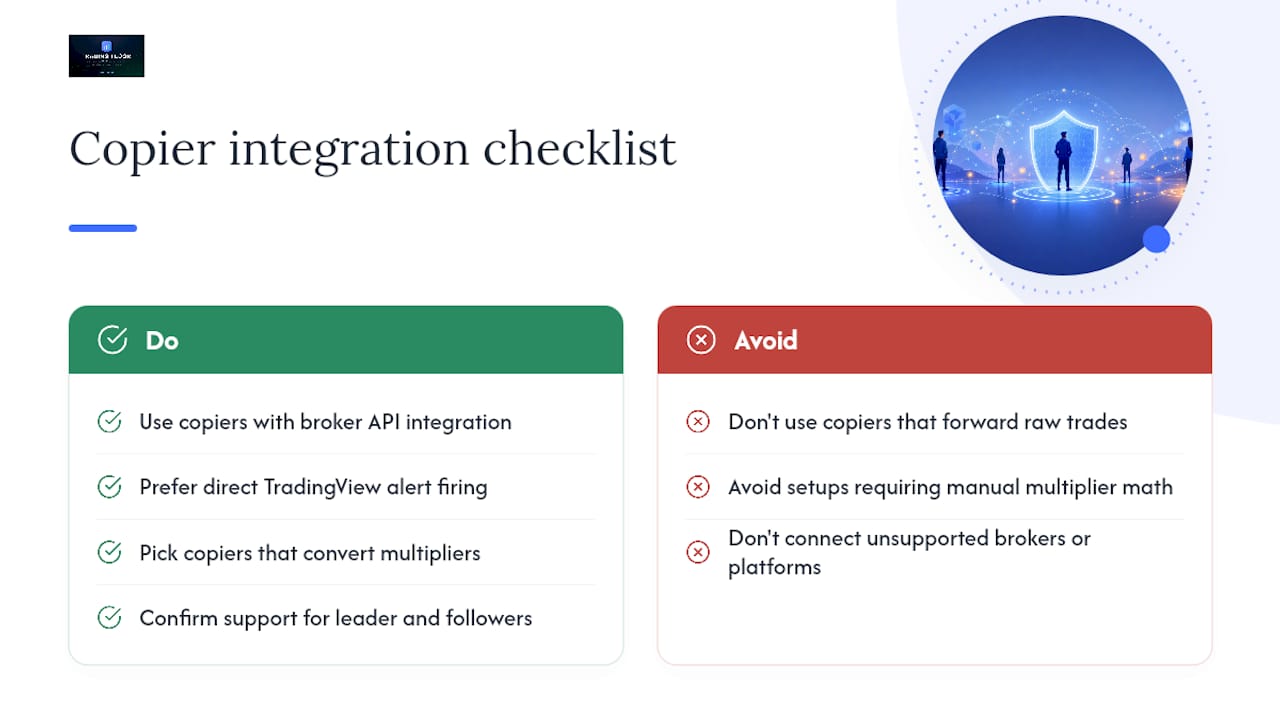
Most trade-copier software connects through broker APIs or platform-specific integrations rather than requiring a full platform switch. For futures traders, that typically means direct integration with platforms like Tradovate and TopstepX, letting the copier read account equity and execute stop actions without you manually bridging systems.
Signal sources matter too. If your leader account runs on TradingView, look for a copier that can fire alerts directly into every connected account with minimal delay, since the gap between signal generation and execution is exactly where scaling mismatches and slippage creep in. The tighter that integration, the less room there is for a drawdown control to fire too late.
Integration depth also determines whether contract multiplier conversion happens automatically. A copier that only forwards raw trade instructions without adjusting for different account sizes forces you to manually calculate conversion ratios every time you connect a new account, which is exactly the kind of manual step that introduces the scaling errors covered earlier. Look for copiers that handle this conversion natively as part of the connection setup, not as a separate manual configuration step.
Before committing to any integration, confirm it supports both your leader’s platform and every broker your follower accounts run on. A mismatch here, where the leader trades on one platform and your follower accounts sit on brokers the copier doesn’t support, is the single most common reason traders end up patching together spreadsheets and manual trade entry instead of running true automated mirroring.
Monitoring Follower Drawdown in Real Time: What the Interface Should Show
A usable drawdown monitoring interface answers one question at a glance: how close is each follower account to its equity stop right now? If you have to click into five different account views to answer that, the interface is working against you.

The strongest dashboards show every connected account’s current equity, distance to the drawdown threshold, and provider allocation on a single screen, updated live rather than on a delay.
Notifications matter as much as the dashboard itself. A push notification the moment a stop triggers, paired with a receipt showing exactly which positions closed and at what price, turns a black-box event into something you can audit later. Without that receipt trail, you’re left guessing whether the copier actually did what it claimed.
Cloud-based access matters more than it sounds. Being able to check follower account status from a phone between trading sessions, without installing anything device-specific, is the difference between catching a drawdown event early and finding out about it hours later.
Which Brokers and Platforms Support Follower Drawdown Protection
Broker and platform compatibility determines whether a drawdown protection setup is even possible in the first place. Futures traders running multi-account copying most commonly work across Tradovate and TopstepX, both of which support the kind of real-time account data that per-account equity stops depend on.
Prop firm compatibility runs alongside broker compatibility. Apex, Topstep, and MFF each set their own evaluation and funded-account rules, and a copier needs to work within whatever trailing-drawdown structure a given firm enforces, which is exactly why firm-specific calculators matter more than a generic drawdown percentage. A copier that works flawlessly on one firm’s rule set can still put you in violation of another firm’s trailing-drawdown mechanics if the thresholds aren’t configured per firm.
Not every trade-copier product supports every broker or every prop firm equally. Some are built primarily for one platform and add others later, which shows up as gaps in feature parity, a stop that fires reliably on one integration but lags on another. Before connecting a live account, confirm the copier explicitly lists support for your specific broker and your specific funded firm, not just a general claim of “broker compatibility.”
Why We Build Per-Account Controls the Way We Do
Trading Floor treats per-account equity stops and audit logs as non-negotiable, not optional add-ons, because the failure modes covered above (latency, scaling mismatches, rejected orders) don’t announce themselves until an account is already in trouble. Prop firms don’t forgive a blown trailing-drawdown rule because a copier lagged by a few seconds. Building the controls at the account level, independent of the leader, is the only design that actually matches how funded accounts get evaluated.
Enforce Drawdown Limits Automatically with Trading Floor
Trading Floor gives you the layered control stack this guide describes, built directly into a cloud-based copier that mirrors real positions, not just signals, across accounts on Tradovate and TopstepX.

Every follower account gets its own equity stop, per-trade caps, and automatic contract multiplier conversion, so a micro-to-standard mismatch never slips through unnoticed. Every copied trade generates a timestamped receipt, and every account keeps its own audit log, so you can see exactly what happened and when, not guess after the fact. Before you set your thresholds, run your numbers through the free trailing-drawdown calculator built for Apex, Topstep, MFF, and other funded programs.
If you’re running multiple Take Profit Trader accounts and copying one leader across all of them, the Take Profit Trader trade copier applies these same per-account protections out of the box. Start a trial and connect your first account today to see the equity stop and receipt system in action before you scale to a full multi-account book.
Frequently Asked Questions
What does drawdown protection for follower accounts actually mean? It means applying per-account limits, an allocation cap, per-trade size limit, and equity stop, so a copied account can’t be dragged into a deep loss just because the leader account is having a bad week.
How big should my provider allocation cap be? Most copiers recommend 10 to 20% of account equity per provider, with 10% as the conservative starting point if you’re following more than one signal source.
Should I trust the leader’s own stop-loss instead of setting my own? No. Follower accounts should set their own stop-loss, position size, and daily max loss rather than relying entirely on the provider’s risk settings.
Does drawdown protection work the same way for Apex, Topstep, and MFF accounts? The core mechanics are similar, but exact trailing-drawdown thresholds differ by firm, which is why running your numbers through a firm-specific trailing-drawdown calculator matters before setting your equity stop.
What’s the biggest reason drawdown protection fails in practice? Latency and contract-size mismatches cause more real-world failures than the protection logic itself. A stop that fires a few seconds late, or a micro-to-standard conversion error, can undo an otherwise sound configuration.
Sources
- Trading Risk Management: 3 Essential Rules for Copiers
- Copy Trading Risk Management | TradingView Hub Docs
- Copy Trading Risk Management Stops Costly Account Blowups
Recommended
- Prop Account Trade Limit Setup: Your 2026 Guide — Trading Floor
- Recover From a Drawdown Hit Without Losing Funded Accounts — Trading Floor
- Prop Trading Leader Accounts: What Funded Traders Need to Know — Trading Floor
- Funded Account Risk Rules Explained for Prop Traders — Trading Floor
Trading Floor mirrors every trade across your Tradovate, TopstepX & Rithmic accounts in real time, from $25/mo.
Start copying →