Tradecopia.com Alternatives for Prop Traders in 2026

For prop traders managing multiple funded accounts, the best Tradecopia.com alternatives are cloud-native copiers with built-in risk controls. If you need replication latency averaging around 1.6ms for scalping ES or NQ, a desktop/local setup still wins on raw speed. For everyone else, cloud-native beats desktop on cost, convenience, and multi-account scaling.
Top alternatives to evaluate:
- Tradingfloor — cloud-native, real-time position mirroring, built-in risk controls; Tradovate and TopstepX compatible
- nbs360.com — cloud-based with multi-account monitoring and risk dashboards
- Tradease.io — desktop-leaning copier with direct broker integrations
- technests.ai — automation and AI-driven strategy execution with journaling
Recommended pick: Tradingfloor for day traders and swing traders running multiple prop accounts. Desktop tools like Tradease.io for scalpers who need every millisecond.
Table of Contents
- What are the best Tradecopia.com alternatives for prop traders?
- Detailed profiles: Tradingfloor, nbs360.com, Tradease.io, and technests.ai
- How do you pick the right alternative for your trading style?
- Migration checklist: switching from Tradecopia.com safely
- How we evaluated these alternatives
- Key Takeaways
- The case for going cloud-native sooner than you think
- Tradingfloor: a cloud-native alternative worth trying
- Useful sources and further reading
What are the best Tradecopia.com alternatives for prop traders?
| Feature | Tradingfloor | nbs360.com | Tradease.io | technests.ai |
|---|---|---|---|---|
| Best for | Multi-account prop traders | Risk monitoring + multi-account | Scalpers, low-latency futures | Automation + AI strategy |
| Copy type | Real-time position mirroring | Signal + position | Position copy | Signal + automation |
| Architecture | Cloud-native | Cloud | Desktop/VPS | Cloud + local hybrid |
| Latency notes | Sub-10ms via WebSocket | Sub-10ms typical | ~1.6ms average (desktop) | Varies by automation layer |
| Supported brokers | Tradovate, TopstepX | Tradovate, Rithmic, others | Tradovate, NinjaTrader, Rithmic | Tradovate, NinjaTrader |
| Multi-account / risk controls | Unlimited accounts, hard lockouts, trade limits | Multi-account dashboards, alerts | Account caps vary by tier | Strategy-level limits |
| Ease of setup | No install, browser-based | Dashboard setup, moderate | VPS or local install required | API config, moderate |
| Pricing / trial | Subscription, trial available | Subscription tiers | Tiered or one-time license | Subscription, trial available |
| Notifications | Real-time alerts, any device | Email + dashboard alerts | Local alerts | Automated alerts + journal |
The sharpest split in this comparison is architecture. Desktop tools like Tradease.io can hit ~1.6ms replication latency but require a VPS, which typically runs $20–$50/month on top of your subscription. Cloud-native options remove that overhead entirely. The trade-off is real: if you scalp volatile futures and need fills within approximately 1.6ms average latency, desktop wins. If you run day trades or swing positions across several funded accounts, cloud-native is cheaper and easier to scale.
Pro Tip: Before switching platforms, run end-to-end sim tests from your broker feed through the copier and back. Compare p50 and p99 latency, not just the single-number average a vendor advertises. A tool that claims 5ms average might hit 40ms at p99 during volatile opens.
Detailed profiles: Tradingfloor, nbs360.com, Tradease.io, and technests.ai
Tradingfloor
Tradingfloor mirrors the leader account’s net position in real time across any number of funded and evaluation accounts. No installation, no VPS, no desktop dependency. You get hard trade limits, real-time notifications on any device, and individual risk controls per account. Tradovate and TopstepX compatibility is built in, which covers the two most popular prop platforms in the U.S. right now.
Pros:
- No VPS cost or local install
- Real-time position mirroring (not just signals)
- Per-account risk controls and hard lockouts
- Works from any device
Cons:
- Cloud latency won’t beat a local desktop setup for sub-5ms scalping
- Dependent on internet connection quality
Supported brokers: Tradovate, TopstepX. Check the Tradovate-specific setup guide for configuration details.
Pricing: Subscription model with a trial available. No one-time license.
nbs360.com
nbs360.com targets traders who want centralized visibility across multiple accounts alongside copying. The dashboard approach works well for traders managing several prop accounts simultaneously and wanting a single pane of glass for risk exposure. Broker compatibility spans Tradovate and Rithmic, though Rithmic adapter setups can impose session limits that matter when scaling beyond a handful of accounts.
Pros:
- Multi-account risk dashboards
- Cloud-based, no VPS needed
- Real-time alerts
Cons:
- Less emphasis on position mirroring vs. signal copying
- Rithmic session limits can constrain scaling
Supported brokers: Tradovate, Rithmic, select others.
Pricing: Subscription tiers; pricing not publicly listed in full detail.
Tradease.io
Tradease.io is the desktop-first option here. It connects directly to broker APIs at the local level, which is where the latency advantage comes from. If you scalp ES or NQ and need fills replicated in under 5ms, this architecture delivers. The trade-off is setup complexity: you need a VPS or a dedicated machine running continuously, plus the monthly VPS cost.
Pros:
- Lowest replication latency of the group
- Direct broker API integration
- Established desktop copier workflow
Cons:
- VPS or dedicated machine required
- Higher total cost of ownership at scale
- Less convenient for multi-device access
Supported brokers: Tradovate, NinjaTrader, Rithmic.
Pricing: Tiered monthly or one-time license options. Account caps vary by tier, which affects TCO when scaling.
technests.ai
technests.ai leans into automation and AI-assisted strategy execution. It suits traders who want more than copying: built-in journaling, strategy automation, and performance analytics in one place. Some cloud tools bundle journaling and automation, which can reduce effective monthly costs compared to buying separate subscriptions for each function. That bundling is technests.ai’s clearest advantage over pure copiers.
Pros:
- AI-driven strategy automation
- Integrated journaling reduces third-party subscription costs
- Good for traders focused on systematic strategies
Cons:
- More complex setup than a pure copier
- Latency depends on automation layer configuration
- Less focused on prop-specific risk controls
Supported brokers: Tradovate, NinjaTrader.
Pricing: Subscription with trial available.
How do you pick the right alternative for your trading style?
Start with one question: are you a scalper or not?
Scalpers running ES, NQ, or MES who require replication latency around 1.6ms should use a desktop/local copier. The latency difference between a local setup and a cloud route is real, and it shows up in fast markets. For everyone else, cloud-native is the better default. You skip the VPS bill, you can access your accounts from any device, and scaling to additional funded accounts doesn’t require reconfiguring a local machine.
Beyond latency, check these before committing:
- Hard risk enforcement: Does the platform auto-flatten positions or trigger a kill-switch when a drawdown limit is hit? Soft alerts are not enough for prop compliance.
- Broker compatibility: Confirm your specific broker and account type are supported. Tradovate API connections scale more easily than older Rithmic adapter setups.
- Multi-account limits: Some tiers cap the number of simultaneous accounts. Know the ceiling before you scale.
- Trial and refund policy: Any vendor without a documented trial or refund policy is a red flag. You need to validate fills in a sim before going live.
- Pricing transparency: Watch for account caps that make a cheap base tier expensive at scale. A $39–$129/month range with unlimited accounts is a different TCO than a tiered model that charges per account.
For a deeper look at broker-specific fit, the Topstep and Tradovate prop account guide covers compatibility in detail.
Migration checklist: switching from Tradecopia.com safely
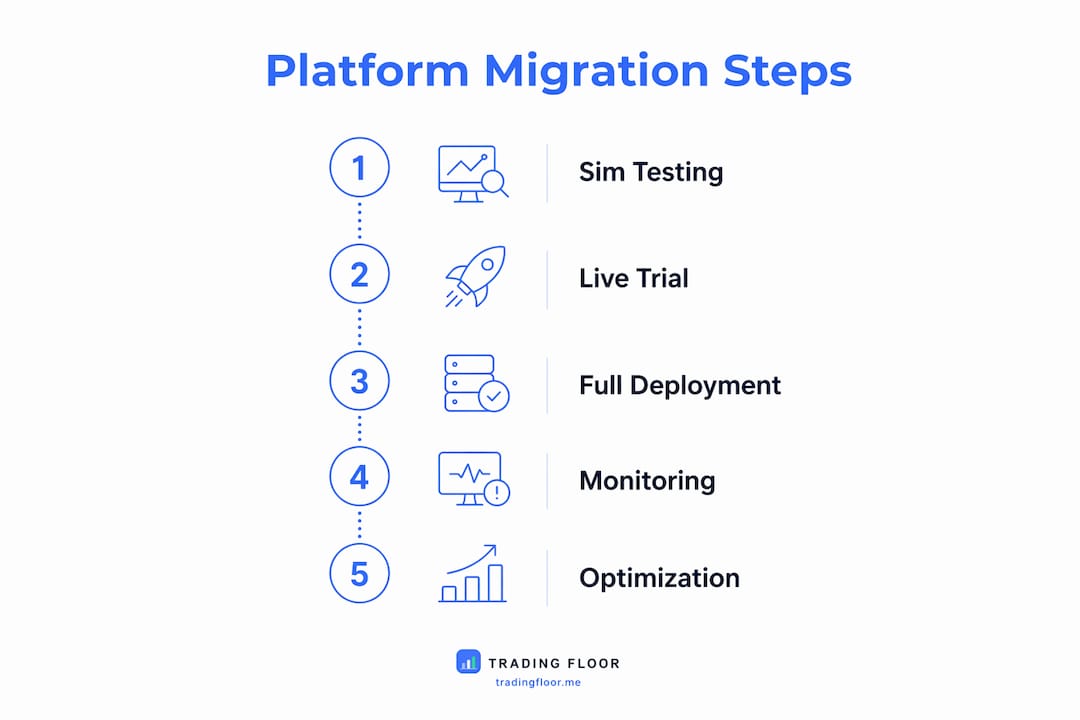
Follow a staged approach: sim first, small live second, full scale third. Never move funded accounts to a new copier without validating fills and risk controls in a sim environment.
- Inventory your accounts and instruments. List every account, broker, and contract you trade (ES, MES, NQ, etc.). Note any symbol mismatches between platforms.
- Confirm broker API and session limits. Check whether your broker supports the new platform’s connection model. Rithmic adapters can impose session limits that cap simultaneous accounts.
- Set identical risk templates. Replicate your current drawdown caps, position limits, and kill-switch thresholds in the new platform before any live trading.
- Run sim latency tests. Test end-to-end: broker feed → copier → broker. Measure p50 and p99, not just the average.
- Validate journal and trade attribution. Confirm fills are logged correctly and P&L attribution matches your broker statements.
- Run small-value live trades with caps. Start with one or two accounts at reduced size. Watch for contract sizing differences (ES vs. MES) and fill discrepancies.
- Monitor fills and reconcile P&L for 5–10 sessions. Only scale to full account count after fills are consistent and risk controls have triggered correctly at least once in testing.
Timeline: Sim phase takes 2–5 days. Small live phase, 1–2 weeks. Full scale after that.
How we evaluated these alternatives
Evaluation criteria focused on what actually matters for prop traders: latency claims (verified against published architecture), broker compatibility lists, multi-account limits, built-in risk enforcement, pricing transparency, and trial/refund policies.
Criteria used:
- Latency and architecture: Desktop vs. cloud, published figures, and plausibility given connection model
- Broker compatibility: Confirmed against vendor documentation for Tradovate, Rithmic, NinjaTrader, Topstep, and TopstepX
- Risk enforcement: Hard lockouts, auto-flatten, trailing drawdown caps vs. soft alerts only
- Multi-account limits: Tier caps and session constraints
- Pricing and TCO: Base subscription plus VPS costs where applicable
- Trial and refund policy: Documented policies only; undocumented claims were flagged
Vendor claims that could not be independently verified are noted as such. Tradingfloor’s features are drawn from published brand documentation.
Key Takeaways
Cloud-native copiers with hard risk controls are the best Tradecopia.com alternatives for most prop traders running multiple funded accounts.
| Point | Details |
|---|---|
| Cloud vs. desktop | Desktop wins on latency for scalpers; cloud wins on cost and convenience for day/swing traders. |
| VPS cost matters | Desktop copiers add $20–$50/month in VPS costs that cloud-native tools eliminate. |
| Hard risk controls are non-negotiable | Verify auto-flatten and kill-switch features before committing to any platform. |
| Stage your migration | Always validate fills and risk hooks in sim before moving funded accounts to a new copier. |
| Tradingfloor for most prop traders | Cloud-native, no VPS, real-time position mirroring, and Tradovate/TopstepX support make it the practical default. |
The case for going cloud-native sooner than you think
Most traders I see debating this comparison are still anchored to the idea that desktop equals serious and cloud equals convenience. That framing is outdated. The latency gap between a well-configured cloud copier and a desktop setup has narrowed to the point where it only matters for a specific slice of strategies: true scalpers trading tick-by-tick on ES or NQ, where a few milliseconds changes fill quality.
For everyone else, the desktop argument is mostly habit. You’re paying $20–$50/month for a VPS, managing a machine that needs uptime monitoring, and tying your workflow to a single local environment. Cloud-native removes all of that. The real risk controls, the ones that actually protect your funded accounts, are available on both architectures. The difference is whether you want to maintain infrastructure or trade.
My recommendation: if you’re not actively scalping sub-5ms strategies, try a cloud-native option first. Run the sim tests, validate the risk hooks, and see if the latency is a real problem for your actual strategy. Most traders find it isn’t.
Tradingfloor: a cloud-native alternative worth trying
Prop traders who want multi-account position mirroring without the VPS overhead have a direct option in Tradingfloor. It mirrors the leader account’s net position in real time across funded and evaluation accounts, with per-account risk controls, hard trade limits, and real-time notifications on any device. Tradovate and TopstepX compatibility is built in.


During your trial, run through this checklist: confirm broker connection, set your drawdown caps, run a sim session with at least two accounts, and check the system status page before going live. That’s the minimum to validate before scaling. Start your trial at tradingfloor.me.
Useful sources and further reading
- Tradecopia Review 2026: Best Futures Prop Trade Copier — detailed review of Tradecopia’s latency claims, risk features, and pricing tiers; useful for benchmarking alternatives.
- Tradecopia 2026 Review: Best Trade Copier for Prop Traders? — covers cloud vs. desktop trade-offs, VPS cost estimates, and WebSocket latency data.
- Tradecopia vs Replikanto: Which Trade Copier Is Better for Prop Firm Traders in 2026? — broker compatibility notes including Rithmic session limits and Tradovate API scaling.
- Trading Floor vs TradeCopia: Which Futures Trade Copier Is Right for Prop Traders? — direct comparison of Tradingfloor and Tradecopia on architecture, risk controls, and broker support.
- Types of Trade Copying Strategies: 2026 Guide — explains position mirroring vs. signal copying and how to match strategy type to copier architecture.
- Trader Gibkey: Trading Courses, Mentorship & Community — trading education resource for traders who want strategy development alongside tooling decisions.
Recommended
- Best Trade Copier for Topstep and Tradovate Prop Accounts — Trading Floor
- Top 4 nbs360.com Alternatives for 2026 — Trading Floor
- Top 3 technests.ai Alternatives 2026 — Trading Floor
- Best Tradease.io Alternatives for Multi-Account Traders — Trading Floor
Trading Floor mirrors every trade across your Tradovate, TopstepX & Rithmic accounts in real time, from $25/mo.
Start copying →