Contract Multipliers Setup: Formulas and Verification Steps

A contract multiplier is the numeric factor that converts a contract’s quoted price into the actual notional units it represents. Get it wrong and every downstream number, position size, margin estimate, and P&L breaks with it.
Three formulas cover almost every situation you’ll face:
- Total notional = price × multiplier × number of contracts
- Tick value = multiplier × tick size
- Total option premium = premium × multiplier × number of contracts
Most traders run into the same handful of multipliers repeatedly:
- U.S. listed equity options use a multiplier of 100
- E-mini S&P 500 futures (ES) use a multiplier of 50
- Crude oil futures (/CL) use a multiplier of 1,000 barrels
These are the common cases, not universal rules. Every instrument has its own published contract specification, and that’s the number you verify before you trade, not the one you remember from a different contract.
Key Takeaways
Getting contract multipliers right requires pulling the exact figure from the exchange spec, applying it consistently across every formula and account, and verifying it with a test trade before risking real capital.
| Point | Details |
|---|---|
| Verify, don’t assume | Always confirm the multiplier against the exchange spec, not memory or a cached broker value. |
| Apply the core formulas | Notional = price × multiplier × contracts; tick value = multiplier × tick size. |
| Watch for double-counting | Check whether both your order ticket and risk system apply the multiplier separately. |
| Sync across accounts | Multi-account and trade-copier setups need identical multiplier mapping on every destination account. |
| Automate the sync | Tradingfloor keeps multiplier mapping consistent across Tradovate, TopstepX, and Rithmic accounts automatically. |
Table of Contents
- Why the contract multiplier setup affects your P&L and margin
- Where to find your contract’s official multiplier
- Copy-ready formulas and worked examples
- Setting up multipliers correctly in your trading systems
- Common contract multiplier mistakes and how to fix them
- A pre-trade checklist for contract multiplier verification
- How Tradingfloor keeps your multiplier setup consistent across accounts
- Frequently asked questions about contract multiplier setup
- Sources
Why the contract multiplier setup affects your P&L and margin
The multiplier isn’t a cosmetic detail on a trade ticket. It scales everything: notional exposure, margin requirements, and the size of your Greeks. A larger contract size multiplier increases the notional value the contract controls, and margin is calculated as a percentage of that notional. Miss the multiplier and you misjudge how much capital a position actually ties up.
The effect compounds fast on the P&L side. A one-point move on an ES contract (multiplier 50) is worth $50. The same one-point move on a smaller-multiplier instrument might be worth a fraction of that. A bigger multiplier amplifies every tick in your favor or against you; a smaller one lets you size positions with more precision when you’re managing tight risk limits.
Greeks scale the same way. Total Vega on an options position equals per-contract Vega multiplied by the contract multiplier and the number of contracts, so a mispriced multiplier throws off your delta and vega exposure estimates right along with your dollar P&L.
Pro Tip: The most common error isn’t forgetting the multiplier, it’s applying it twice. This happens when a spreadsheet already multiplies by contract size and a connected risk system does it again on top. Check both layers before you trust the output.
Where to find your contract’s official multiplier
Never guess. Pull the multiplier from an authoritative source every time you set up a new instrument, in this order:
- Exchange contract specifications. CME Group, for example, publishes the multiplier, tick size, and contract size for every futures product it lists, and that page is the final word on the number.
- Broker instrument details. Your platform’s contract spec or instrument info panel should mirror the exchange figure exactly. If it doesn’t match, trust the exchange.
- Options Clearing Corporation (OCC) standards. For U.S. listed equity options, the OCC standardizes the multiplier at 100 shares per contract except for adjusted contracts following a corporate action.
- FIX protocol metadata. In system-to-system feeds, the multiplier travels as FIX Tag 231, ContractMultiplier, the field that standardizes how derivatives and fixed-income instruments express their unit conversion factor.
Once you have the number, run a quick sanity check: multiply it by the tick size and compare that result against the tick value your platform already lists. If they don’t match, something upstream is wrong.
Copy-ready formulas and worked examples
Keep these three formulas in your spreadsheet, they’re the backbone of every calculation you’ll do:
Notional value: = Price * Multiplier * Contracts
Tick value: = Multiplier * TickSize
Total premium: = Premium * Multiplier * Contracts
Example A, U.S. equity option. You buy 3 contracts of a call trading at $2.50. Multiplier is 100. Total premium = $2.50 × 100 × 3 = $750. That’s the actual cash you pay, not $7.50.
Example B, E-mini S&P 500 (ES) futures. ES has a multiplier of 50 and a minimum tick of 0.25 index points. Tick value = 50 × 0.25 = $12.50 per tick, per contract. If the index moves 10 points against a 2-contract position, that’s 40 ticks × $12.50 × 2 contracts = $1,000 in P&L. Margin scales the same way: a bigger move against an under-margined position eats through buffer fast.
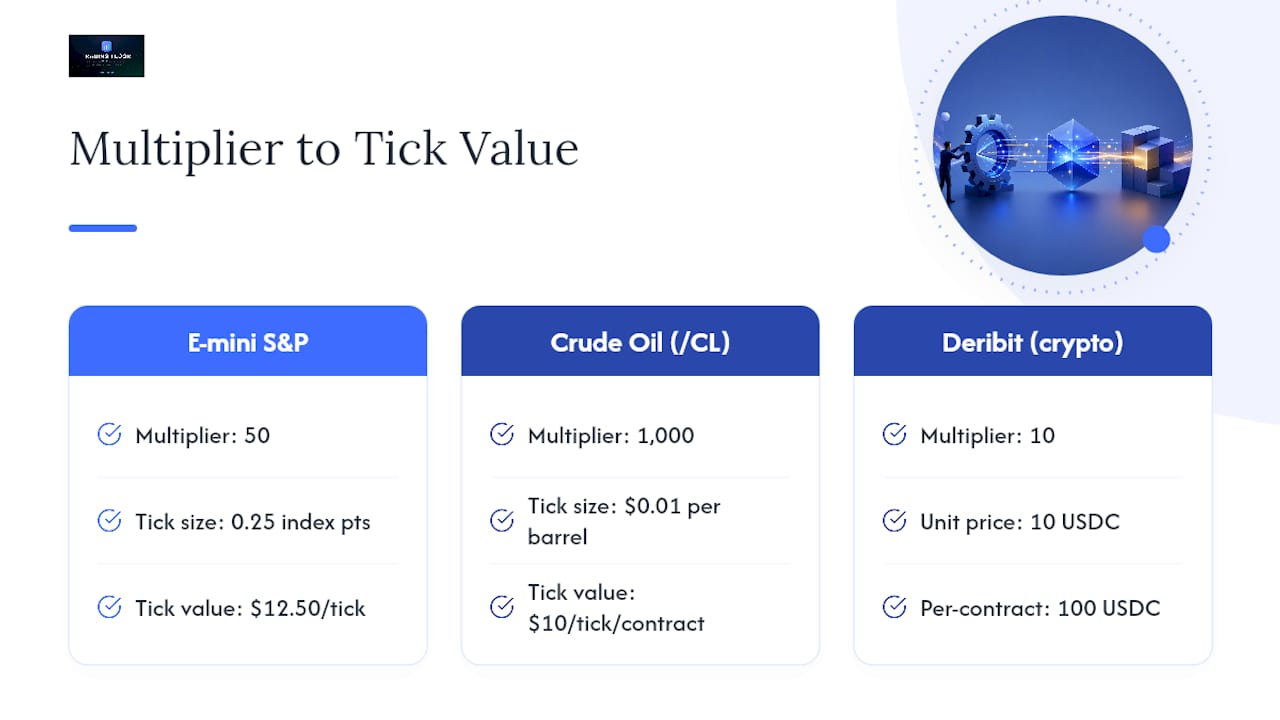
Example C, crude oil (/CL). The contract multiplier for /CL is 1,000 barrels, with a tick size of $0.01. Tick value = 1,000 × 0.01 = $10 per tick. A $1.00 move in crude on one contract equals $1,000 in P&L, a swing that catches undersized accounts off guard.
Example D, crypto option. Deribit’s linear USDC options apply the same logic outside traditional markets: a SOL call priced at 10 USDC with a multiplier of 10 settles at 10 × 10 = 100 USDC per contract, premium and settlement both scaled by that factor.
Greeks follow the identical pattern, multiply the per-contract Greek by the multiplier and then by contract count to get your total portfolio exposure.
Setting up multipliers correctly in your trading systems
Configuration happens in three places, and each one needs to agree with the others.
- Broker or platform instrument settings. Open the instrument details panel for each contract you trade and confirm the multiplier field matches the exchange spec exactly, not a cached or default value.
- FIX or API feeds. Map the incoming ContractMultiplier field (Tag 231) directly to your internal “multiplier” variable. Don’t let a system default to 1.0 when a feed omits the tag, Tag 231 can be left out entirely if the multiplier equals the instrument’s default, so your system needs its own fallback lookup, not a silent assumption.
- Trade-copier or order-routing software. Confirm the multiplier is synced identically on the source account and every destination account. A mismatch here means your mirrored position isn’t actually the same size.
After entering the value, run a test: place a tiny trade or run a synthetic calculation, then check whether the resulting notional and P&L match your spreadsheet’s expected output. If you’re running multi-account trade execution, repeat that check on every destination account, not just the first one. Watch for currency mismatches too: a multiplier that’s correct in USD terms can quietly break if a destination account quotes in a different currency.
Common contract multiplier mistakes and how to fix them
The most frequent error is simple omission, forgetting the multiplier entirely and treating a $2.50 option premium as $2.50 instead of $250. The second most common is the opposite problem: double-counting, when both the order ticket and a connected risk engine apply the multiplier independently, inflating notional and margin figures by a factor of the multiplier itself.
Unit confusion causes the third category of errors. Shares, contracts, and par value aren’t interchangeable, and a spreadsheet built around one definition breaks silently when fed data using another. Recompute notional from scratch, reconcile your trade blotter against your account ledger, and if the data comes through a system feed, inspect the raw FIX message for the ContractMultiplier tag rather than trusting a downstream display value.
Pro Tip: Add a “multiplier” column right next to every derived notional figure in your spreadsheets and platform templates. When the multiplier sits in plain view next to its result, a wrong number jumps out immediately instead of hiding inside a formula.
A pre-trade checklist for contract multiplier verification
Run this before opening or copying any new contract type:
- Confirm the official multiplier against the exchange spec, not memory or a broker default.
- Check that your platform’s displayed tick value equals multiplier × tick size.
- Verify currency and unit consistency across every account involved.
- Recalculate margin using the confirmed notional, not an assumed one.
- If you’re copying trades across accounts, confirm the multiplier mapping matches on every destination account.
The trader executing the position should confirm step one and two; a risk manager should sign off on margin recalculation; and whoever built the automation should own the mapping check for good.
A note on why this matters in multi-account setups
I’ve seen the same mistake surface repeatedly in multi-account trading: a trader configures a strategy correctly on their primary account, then copies it to a funded account running a slightly different instrument mapping, and the multiplier silently doesn’t match. One verification pass, comparing expected notional against actual notional on the destination account, would have caught it before the position ever opened. Build a multiplier check into every trade-copy automation deployment checklist, not as an afterthought, but as step one.
How Tradingfloor keeps your multiplier setup consistent across accounts
Manual multiplier checks work fine for one account. They fall apart once you’re running the same strategy across five funded accounts on different platforms, because every extra account is another place the mapping can quietly drift. Tradingfloor’s trade copier mirrors your net position across every funded and evaluation account you run, on Tradovate, TopstepX, and Rithmic, while keeping each account’s contract multiplier mapping synced automatically instead of trusting a manual re-entry every time you add a destination account.

That sync feeds directly into the checklist above: per-account risk controls catch a mismatched notional before it becomes a margin problem, auto-reconciliation flags a position that doesn’t match expected sizing, and push notifications tell you the moment something looks off across your accounts. It’s a cloud-based setup, so there’s nothing to install and nothing to reconfigure when you add a new evaluation account. If you’re managing multiple funded accounts and want your multiplier mapping handled instead of double-checked by hand every session, start a trial through the TradeSyncer alternative and see your first mirrored trade reconcile in real time.
Frequently asked questions about contract multiplier setup
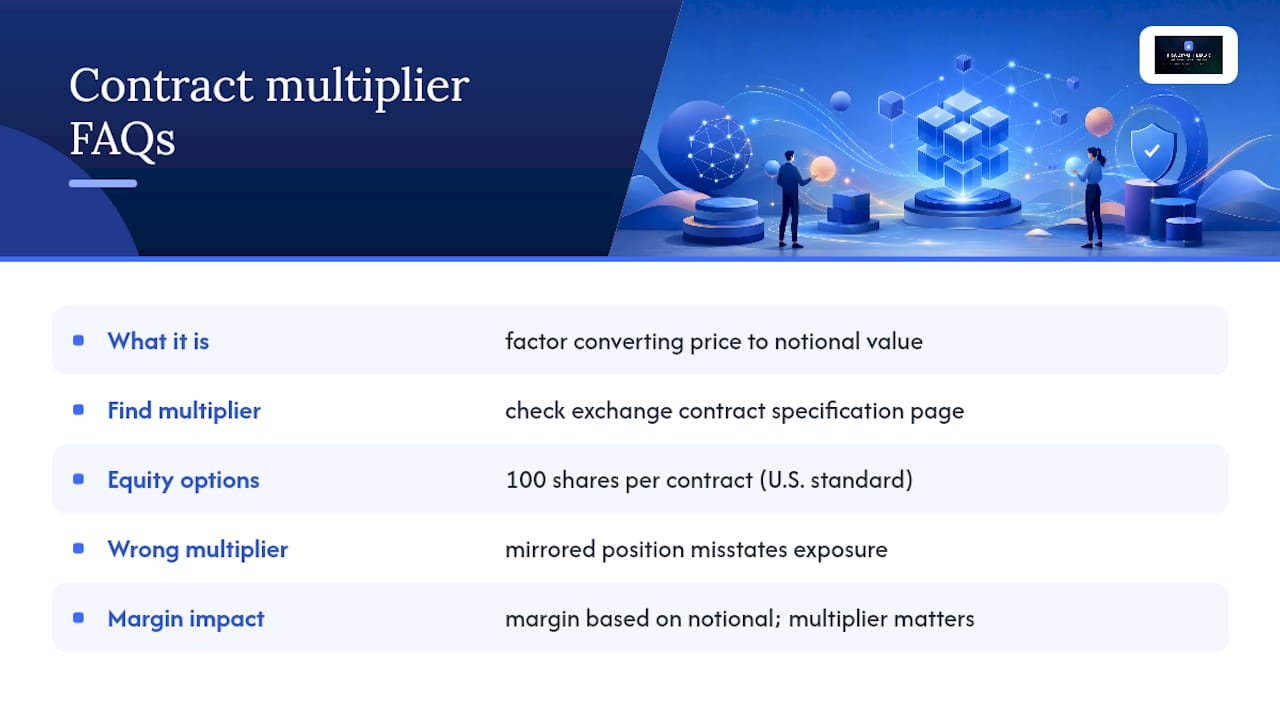
What is a contract multiplier in trading? It’s the numeric factor that converts a contract’s quoted price into the total dollar value it represents. Multiply price by multiplier by number of contracts and you get notional exposure.
How do I find the multiplier for a specific futures contract? Check the exchange’s published contract specification page first. CME Group lists the multiplier, tick size, and contract size for every futures product it offers, and that’s the authoritative source over any broker display.
Why do equity options use a multiplier of 100? The Options Clearing Corporation standardizes U.S. listed equity option contracts at 100 shares per contract, so a $3.00 premium actually costs $300 before commissions.
What happens if I use the wrong multiplier in a trade-copier setup? Your mirrored position size on the destination account won’t match your intended exposure, which throws off both your risk calculations and your margin usage. Syncing the multiplier automatically across accounts is the safest fix.
Does the contract multiplier affect margin requirements? Yes. Margin is calculated as a percentage of notional value, and notional equals contract size multiplied by price, so a wrong multiplier produces a wrong margin estimate every time.
This article is general information, not a substitute for advice from a qualified financial advisor. Consult a qualified financial professional about your own circumstances before acting on anything here.
Sources
- Docs for schema item ContractMultiplier_t in Financial Information eXchange (FIX)
- What are futures contract specifications or specs?
- Contract size multiplier (Greeks.live)
Recommended
- Pass Multiple Prop Firm Evals at Once With One Strategy — Trading Floor
- MyFundedFutures Trade Copier — mirror across MFF accounts (incl. Volumetrica)
- MyFundedFutures Trailing Drawdown Calculator (free, current numbers)
- Multi-Account Trade Execution Explained for Prop Traders — Trading Floor
Trading Floor mirrors every trade across your Tradovate, TopstepX & Rithmic accounts in real time, from $25/mo.
Start copying →